# Welcome!

What is this thing?

This is the one place that you should be able to go to find out anything you need to know about how things work here at SixPivot.

This handbook has a few different audiences:

* New starters
* Existing team members
* People interested in joining SixPivot&#x20;
* People interested in how we work and getting ideas for their workplace. Feel free to take what works for you, if you should have success in implementing something similar, that's awesome 🎉

By making it public facing and transparent it hopefully gives you confidence to keep us accountable internally (plus makes it real and reinforces our culture).

While we have done our best to capture everything you might need to know, we've almost certainly missed some things so if you find something missing - reach out on the #handbook channel on Slack and let us know.

Thanks to our friends at [Octopus](https://handbook.octopus.com/) for the inspiration for this handbook, as well as [Valve](https://archive.org/details/ValveEmployeeHandbook/page/n5/mode/2up) the original handbook of handbooks.&#x20;


# Who we are

## SixPivot

We help people create great software.&#x20;

Software is easy to build but making it elegant and maintainable is hard. Doing so fast is extremely difficult.&#x20;

We're experts in all things full stack software development, specialising in .NET, AWS and Azure. We work with all kinds of people, from teaching someone with an idea everything they need to know to make it a product, through to helping enterprises with multiple teams improve how they work.

We have a strong sense of purpose and a defined set of [values](/about-sixpivot/our-values). Being selective about the clients we partner with, want to build impactful relationships and software.&#x20;

### Backstory

Founding SixPivot in 2015, Faith Rees brought together people she'd worked with who shared the same purpose and values. Her intent was to build a company where we can enjoy what we do, continually learn, work with other talented people, and make a positive impact.

### Vision

Seeing SixPivot as her legacy, Faith is growing a company that everyone can be owners of. SixPivot is purposefully without VC's and external shareholders making decisions. Her vision is for the team to become shareholders of SixPivot and be wholly run by its people, sharing in profits. \
\
Faith envisioned her personal future wealth to come from product businesses she would go on to found. Hence, the SixPivot group:

<figure><img src="https://1433628967-files.gitbook.io/~/files/v0/b/gitbook-x-prod.appspot.com/o/spaces%2FazHLjJzFRgpNtF3p9lmK%2Fuploads%2FCv2TAaI3ONUrj4UWSC5o%2FSixPivot%20Group.png?alt=media&amp;token=1881df9d-9801-4c6d-89ce-b4125922fbfb" alt=""><figcaption></figcaption></figure>

Our ideal future state is to have an ecosystem where developers cycle between consulting and product to explore all types of technical and business challenges, continually growing and engaging with a variety of interesting values aligned projects.&#x20;

### Cloud Ctrl

Our product that gives transparency to cloud costs.

People often ask why their cloud spend is so much, or what changed to make it cost more. Big cloud vendors don't want you to understand your spend. The endpoints to pull from are poorly maintained, poorly documented, brittle, inconsistent, and subject to frequent change.&#x20;

Cloud Ctrl provides complete visibility of your cloud spend, anomalies, projections and spend trends. The product is saving customers hundreds of thousands of dollars in cloud spend every month and is evolving into an Environmental and Social Governance Tool that can provide cost management and governance across any consumption data.

### JumpSpiders

Our innovation incubator that develops and commercialises software products. &#x20;

Often there's a proven demand for product that has not yet been commercialised. Regularly these "market pull ideas" don't have a team to propel them forward.

In JumpSpiders we evaluate these ideas (whether they be internal team ideas or external client ideas) and look to the broader market applicability. If it's the right fit, we build the product for global scale in partnership.

### Purpose

We look at purpose through a few different lenses:

**Team** - our main purpose. Creating a company that we all want to work in, have a shared vision of what we want to achieve, and how we want to do things and make a difference.&#x20;

**Community** - what can we give back to our technical community. Whether it's supporting local community groups like DDD, or the work we do with startups, sharing at conferences, and giving back what we learn. It may be technical, procedural, or how we work; it's one of the drivers we have in supporting the community we work in.&#x20;

**Customers** - we don't want to be just doing work for money or be a body shop, we want to ensure we are adding value and being deliberately purposeful. We want to follow through on what we say to the customer, understand their business goals, and get fully invested with them and see them to succeed. We want to do everything we can to make them successful.

**World** - we all know technology and software is changing the world. Everything you are developing in some way will continue to be used in the future. We don't want to be responsible for code that will harm the fabric of society in some way, e.g., nuclear bombs. We don't want to be responsible for something that will be embedded into people's lives and have a negative impact on them.&#x20;

### Still have questions?&#x20;

Check out Faith's speaking about our purpose [here](https://web.microsoftstream.com/video/e4787e3f-f9bc-480a-a468-3caa52e56f22?referrer=https:%2F%2Fsixpivot.sharepoint.com%2F) (authentication required).&#x20;


# Our values

Being deliberate about who we work with, we love partnering with clients that align to our values. It's important to us that we can create change for better. To see our values alignment across projects click [here](https://sixpivot.sharepoint.com/:x:/s/HR/EQfqiQSBjjNBs1-HA5xIauoBkcr1NtCleW_uMC3m6krajg?e=KZerAo) (authentication required).&#x20;

<details>

<summary>Do No Harm</summary>

*Are they harming society?*

We will not work with anyone, or on anything, that harms society, e.g., gambling.

* Supports the UN Global Compact / SDG Goals

</details>

<details>

<summary>Drive</summary>

*Are we helping better the tech community?*

We want to build an internal and external community driven by best practice and creating workplaces of the future.

* Community - sharing our expertise
* Wellbeing
* Mentoring
* Diversity & Inclusion

</details>

<details>

<summary>Impact</summary>

*Are we making life better for others?*

We want what we build for others to impact the world for the better, and/or change the practices of others to seek to be better.

* Social responsibility
* Makes difference in the world
* Changes day-to-day operations for the better

</details>

<details>

<summary>Contribution</summary>

*Are we able to execute on our goals by having a sustainable business?*

We are a for-profit company, and we aim to make profit by doing the right things. Sometimes we may need to ensure our profitability first to ensure we can deliver on our higher purpose.

* Revenue
* Profitability
* No bench space

</details>

<details>

<summary>Goals</summary>

*Are we doing the kind of work that we want to be doing?*&#x20;

We value remaining ahead of our competition and being professional thought leaders.

We want to provide an ecosystem to support the type of work and roles of our team, both as individuals & collectively as a team.

* Professional Development
* Good / Right Tech
* Type of work
* ISV’s

</details>

<details>

<summary>Ethics</summary>

*Are we good people doing good things?*

To ensure we operate under an ethical framework in all that we do, we will subscribe to the world’s best practices in business.

* UN Global Compact / SDG Goals
* BCorp
* 6P Values & Purpose
* Best Places to Work

</details>

<details>

<summary>Partnerships</summary>

*Are we growing our partnerships?*

We are better together, building partnerships that help us grow our own business with companies we respect.

* Microsoft and our vendors
* JumpSpider companies
* Customers and good humans

</details>


# Who does what

We're made up of many different kinds of people. What do they all do? Here's a rough idea.

{% hint style="info" %}
There's a bit more information about what everyone does on projects in [Project structure ](/how-we-work/project-structure)too.
{% endhint %}

## Developers and Consultants

Our developers and consultants make up the majority of the company. You're out in the field (virtually), helping our clients to deliver quality software by writing code, driving process improvement, and asking difficult questions. You work remotely, flexibly, and are all here because we see something special in you.&#x20;

{% hint style="info" %}
Read more: [Developer](/careers-and-development/position-descriptions/developer) [Senior Developer](/careers-and-development/position-descriptions/senior-developer) [Senior Consultant](/careers-and-development/position-descriptions/senior-consultant)
{% endhint %}

## Sales & Marketing

<figure><img src="https://1433628967-files.gitbook.io/~/files/v0/b/gitbook-x-prod.appspot.com/o/spaces%2FazHLjJzFRgpNtF3p9lmK%2Fuploads%2FL3ucPADZh8uDVh8OpltO%2FSales%20%26%20Marketing.png?alt=media&amp;token=f118e986-85ba-4238-a1f4-35c3a4e8ca51" alt=""><figcaption><p>Faith, Briony and Lauren - our Sales &#x26; Marketing Team</p></figcaption></figure>

They keep you busy. They find interesting work for you to do by maintaining relationships with our existing clients and finding new ones with interesting problems to solve.

## Management

<figure><img src="https://1433628967-files.gitbook.io/~/files/v0/b/gitbook-x-prod.appspot.com/o/spaces%2FazHLjJzFRgpNtF3p9lmK%2Fuploads%2FtuMtR0lls1mvKyRLpoNV%2FManagement.png?alt=media&amp;token=52bf5fb7-99f3-487c-9cb6-558be343bd38" alt="" width="563"><figcaption><p>Shirley &#x26; Faith - our Management Team</p></figcaption></figure>

Our managers keep SixPivot running smoothly by ensuring that everyone in the company has what we need to do our jobs efficiently.

## Principal Leadership Team

<figure><img src="https://1433628967-files.gitbook.io/~/files/v0/b/gitbook-x-prod.appspot.com/o/spaces%2FazHLjJzFRgpNtF3p9lmK%2Fuploads%2FmQPX5yoBonjiY1ZFQ9Sz%2FPLT%203x3.png?alt=media&amp;token=515ee13b-a1bc-4a9f-b5d4-2376e3ef62bc" alt="" width="563"><figcaption><p>Newt, Bill, Shirley, Luke, Isaac, Chris, Faith, Steve &#x26; Quinten - our Principal Leadership Team</p></figcaption></figure>

The Principal Leadership Team, or PLT, plan and drive strategic initiatives across the company. It's made up of Management, Principals, and Directors.

{% hint style="info" %}
Read more: [Principal Consultant](/careers-and-development/position-descriptions/principal-consultant) [Consulting Director](/careers-and-development/position-descriptions/consulting-director) [Innovation Director](/careers-and-development/position-descriptions/innovation-director)&#x20;
{% endhint %}

## The Board

<figure><img src="https://1433628967-files.gitbook.io/~/files/v0/b/gitbook-x-prod.appspot.com/o/spaces%2FazHLjJzFRgpNtF3p9lmK%2Fuploads%2FulaUHt1ACDMsayDvTaCY%2Fboard.png?alt=media&amp;token=da2169a3-f77c-407d-9a8c-d1d2ff000074" alt="" width="563"><figcaption><p>Simon and Faith - our Board</p></figcaption></figure>

The board oversees the whole company, making sure it's moving in the right direction and operating efficiently.

## Founder

<figure><img src="https://1433628967-files.gitbook.io/~/files/v0/b/gitbook-x-prod.appspot.com/o/spaces%2FazHLjJzFRgpNtF3p9lmK%2Fuploads%2F0IDYoRzMRfObUks9fqcy%2FFaith.png?alt=media&amp;token=c723fab2-1e3d-40bd-ae98-c2c5a23d5af9" alt="" width="316"><figcaption><p>Faith - our Founder</p></figcaption></figure>

Faith founded SixPivot and keeps an eye on things to ensure we stay true to her vision.

## Sammy

<figure><img src="https://1433628967-files.gitbook.io/~/files/v0/b/gitbook-x-prod.appspot.com/o/spaces%2FazHLjJzFRgpNtF3p9lmK%2Fuploads%2F3dVnliGIoiN5s1Gt6Ocp%2Fsammy.png?alt=media&amp;token=418d3251-81a0-41ae-b833-6009f2611891" alt="" width="316"><figcaption><p>Sammy - our Head of Developer Experience</p></figcaption></figure>

Sammy is our Head of Developer Experience. She understands our people and culture, and continually improves both.

## Jayne

<figure><img src="https://1433628967-files.gitbook.io/~/files/v0/b/gitbook-x-prod.appspot.com/o/spaces%2FazHLjJzFRgpNtF3p9lmK%2Fuploads%2FjDRV3cEVXcdow5dfPklx%2Fjayne.png?alt=media&amp;token=70e9fc98-0440-4b0a-ad27-b03a9314e3f7" alt="" width="315"><figcaption><p>Jayne - our Everything Else</p></figcaption></figure>

Jayne does everything that needs doing to keep SixPivot running. She bills our clients, pays us, organises our events, and does a hundred more things that you'll never even notice.

## Cloud Ctrl

<figure><img src="https://1433628967-files.gitbook.io/~/files/v0/b/gitbook-x-prod.appspot.com/o/spaces%2FazHLjJzFRgpNtF3p9lmK%2Fuploads%2F28dbv5zAiGM7jKzdPN0Z%2FClout%20ctrl.png?alt=media&amp;token=51b487c8-8188-477d-9996-5fcda3177cf3" alt=""><figcaption><p>Steve, Tony &#x26; Mike - our Coud Ctrl team</p></figcaption></figure>

Do you want more developers? We've got more developers! The Cloud Ctrl team build, maintain, sell, and manage our cloud cost management product. Most of us have spent some time working with the team as part of our onboarding.

## What do you get when you put us all together? This lot 👇

<figure><img src="https://1433628967-files.gitbook.io/~/files/v0/b/gitbook-x-prod.appspot.com/o/spaces%2FazHLjJzFRgpNtF3p9lmK%2Fuploads%2F4hCRgfvhUInRE1ApegjQ%2FPivots%207x5.png?alt=media&amp;token=c01a44bf-d048-453d-9da0-bc0365226cba" alt=""><figcaption><p>Our SixPivot Group People</p></figcaption></figure>


# Wellbeing and mental health

We know everyone's experience is highly personal and people will have different preferences for support. Almost half ([44%](https://www.aihw.gov.au/reports/mental-health-services/mental-health)) of all Australians experience mental illness at some point in their life. The most common conditions are anxiety, affective disorders (especially depression), and substance use disorders (especially alcohol use). These conditions can be serious, but help is available and supported at SixPivot.

### Employee Assistance Program

Read more about this on the [Employee Assistance Program](/perks-and-benefits/employee-assistance-program)page

## Our wellbeing support team

Our team have paid coaching sessions available with an organisational consultant, mental skills coach, and psychologist. These are part of our everyday culture, not only from a wellbeing lens, but also a professional development lens. \
\
Understanding and accepting you, as you and helping you grow into the best version of yourself, as person not as your job title - this is central to SixPivot. \
\
Sessions with our coaches are encouraged and celebrated in learning more and going further. Please get in touch with your manager to arrange a session.&#x20;

### **Mark Bramwell, Organisational Consultant**&#x20;

Organisational psychology for high-performing teams. Coaches around what is happening in the workplace.​

### **Dr Jess Tonissen, Organisational Psychologist**

Leveraging the science of people and performance to unlock new possibilities for how we work, lead, and deliver together.​

### **Tony Priddle, Mental Skills Coach**

Helps people understand who they are, that perception is not reality and equips you with the tools to support your growth. &#x20;


# Flexibility

{% hint style="info" %}
TL;DR: We are work-from-anywhere; just be a team player, get the work done that you said you would, and communicate with your team ahead of time.&#x20;
{% endhint %}

Working from where you do your best work and offering true flexibility is part of our DNA. We look to subscribe to the [world's best practice in flexible working.](https://www.bbc.com/worklife/article/20190807-why-finland-leads-the-world-in-flexible-work)

This gives our team the ability to adjust typical daily hours of work in regard to start and finish times to work around family and work commitments. Team can discuss with their managers and clients in advance and come to an agreement.

### Be a team player

We're thoughtful of our team and clients, noting that most of our clients still work standard business hours. We expect you to fulfil your responsibility on your project, and are available to your team (client and SixPivot) when it is convenient for you and them.

Take leave and maximise flexibility (we encourage it), but our expectation is that you're a team player and you're not blocking others. We expect you to be dependable when your team needs you. It's important you participate and work your flexibility around things like:

* :calendar\_spiral: Important client meetings such as a project kick off, or a sprint ceremony like sprint retrospective
* :handshake: Pairing up on a Slack Huddle to have a code review, or lending a second pair of eyes on a problem
* :seedling: [Sixers](/our-culture/connecting#sixers): closed door session to talk transparently and deliver updates on the business
* :microphone2: The occasional [external speaker](/our-culture/connecting#external-speakers)

Use your calendar (SixPivot as well as the client's) to block out personal arrangements. Keep them private, we don't need to know the details, but this will help your team when they need to book some of your time.

### Flexibility works best when we can count on each other to:

* do what we said we'd do, or flag early when we can't.
* offer help before we're asked, and ask before we're stuck.
* keep each other posted on where we're at and when that changes.
* flex back when the team needs it, knowing our flexibility can cost someone else theirs.
* trust each other to get on with it.

### Working overseas

We openly encourage the team if they want to be digital nomads in countries that allow them to stay beyond the standard tourist visa. Articles that we like to share with the team:

* [21 Countries with Digital Nomad Visas (For Remote Workers)](https://expertvagabond.com/digital-nomad-work-visas/)
* [Co-working travel retreats for digital nomads](https://beunsettled.co)

**Does this mean we hire people outside of Australia?**

Our preference is to grow and support local software developers. 🌱

### Examples of flexibility

Here are some insights taken from [our READMEs](/our-culture/readmes) on how our team "do" flexibility:

* Start early/finish early or start late/finish late
* Commitments in the afternoons (sport/kids)
* Go to the gym at off-peak times&#x20;
* Align their schedule to caravanning around&#x20;
* Adjust their working times based on their clients
* Work when they’re feeling productive and take breaks when they’re not
* Like to go into the office certain days
* Prefer having meetings in the morning so they can do their focused work in the afternoons
* Duck out at different times of the day depending on the weather to walk their dog
* Pop out for appointments and bookings
* Take naps in the day to catch up on missed sleep or avoid caffeine
* Work longer hours for 4-day work week or a 9-day fortnight
* Work part-time hours&#x20;

*Some trends: our team generally work business hours (but we do have a few night owls). We also generally try and avoid scheduling meetings around school pick up times.*&#x20;


# READMEs

Everybody in the company has a [README](https://sixpivot.sharepoint.com/sites/HR/SitePages/Team-READMEs.aspx) (authentication required). We link out from our Slack profiles. Being a remote first team, it is a great way to get to know your team mates better. Some insights we gained from READMEs were:

* We learned we were pronouncing some people's name wrong
* For some of us English isn't our first language, and we need time to gather words
* We may be hard of hearing and need your camera turned on for lip reading
* Some of us are newer to Slack and are learning how to find things
* Some of us are night owls
* More than half of us are parents to children or fur children
* A lot of us have imposter syndrome

This is our blank template to prompt team members when filling out theirs👇

<details>

<summary>SixPivot README Template</summary>

**About me**\
*Common things people might like to know about you. Where you live, hobbies, pets/kids you might have, what you do when you're not working. Feel free to include pictures.*

**About my job**\
*Some insight into my role and what I hope to achieve.*

**Flexible working**\
*Do you prefer to work in the afternoons? Do you duck out during the day and jump back later on at night? Do you do the school runs and prefer not to have meetings at those times. Do you have a commitment every Tuesday afternoon and not work those times?*

**Communicating with me**\
*What are you preferred comms methods? eg. phone calls for important stuff, Teams meetings preferred etc. Share how you maintain your work boundaries eg. turn off notifications, not installed on phone, replying the next day etc.*

**How I work**\
*What are your default assumptions about people and their intentions? What mindsets do you have and which do you hope other people adopt when working together on the team? What things trigger you?*

**1-on-1s**\
*What style of 1-on-1s do you want? Informal conversational/structured/PD driven. What do you hope to get out of 1-on-1s?*

**Feedback**\
*What type of feedback do you want? Are you comfortable with people being direct with you? How do you prefer to give feedback? How do you expect your team to react to feedback?*

**Asking for help**\
*How do you ask for help? Are you comfortable asking for help in open Slack channels? How can people tell if you need help? eg. I get a bit quiet and withdraw, I work longer hours, I am moody/anxious etc. How does it make you feel when people offer you help?*

**My quirks**\
*Describe your personality eg. sometimes I get shy in big groups, I often am told I am too loud but I'm just excited, I sometimes get anxious and think about an interaction for longer than I should, I usually think of a better idea later and will send it to you after the meeting etc.*

</details>

Note: all prompts are optional, they are in place to help guide if you've drawn a blank or need examples 😄


# Connecting

Being a remote first team it's important we build in some habits and ceremonies to foster connectivity, here's a few:

<details>

<summary>👋 1-on-1s</summary>

Every few weeks with key people you're working with (or sometimes more, we'll work out what you need).

*Intention: to remove blockers, support wellbeing and personal development.*

</details>

<details>

<summary>🍩 Donuts</summary>

Every three weeks, connections to have a virtual "[donut](https://www.donut.com)" with a random team member in the channel.

*Intention: for team to get to know each other and build rapport.*

</details>

<details>

<summary>🌱 Sixers</summary>

Monthly all hands for what's happening at SixPivot.

*Intention: keep everyone informed and updated with a bit of banter.*

</details>

<details>

<summary>🧑‍💻 Dev huddles</summary>

Once a month for a quarter. Devs share interesting learnings or things they're working on, almost like a code club.

*Intention: for devs to get together and build rapport.*

</details>

<details>

<summary>🍔 Lunch and learns</summary>

Initiated on the fly by individuals (open to anyone on the team) e.g., Quinten did a session about milling lumber, Newt did a NRL fantasy hobby project, Dylan did a Kubernetes session etc.

*Intention: sharing, learning, building rapport and having fun.*

</details>

<details>

<summary>📕 Book club</summary>

Every other month. Team opt-in by joining #pd-books where they pick a book to read and discuss. \
\
*Intention: learning and sharing together.*

</details>

<details>

<summary>🏔️ Summit</summary>

In person once a year (around July/August) all hands conference. The entire company are flown in to talk shop.&#x20;

*Intention: deep dive into the business, radical transparency on what's happening and the year ahead.*

</details>

<details>

<summary>🌴 Retreat</summary>

In person occasional retreat (generally around November/December) whole company (plus family invited) paid weekend getaway at a resort.

*Intention: for team to relax, have fun and get to know each other + family better. No work, social only.*

</details>

<details>

<summary>💼 Going to the office</summary>

Access to The Hub in each city, more info [here](/how-we-work/office-details)

*Intention: a physical place for people to meet or place to go to get out of the house.*

</details>

<details>

<summary>🎙 External speakers</summary>

Once a quarter with internal breakout rooms after, topics include (unconscious bias, accessibility, financial education, LGBTQIA+, neurodiversity, mindfulness talks)

*Intention: learning together and building rapport.*

</details>

<details>

<summary>🙋 PPP (Pivots, Pivots, Pivots)</summary>

In person, by state, [DDD conference ](https://www.dddbrisbane.com)style internal presentations.

*Intention: creating an internal sense of community and learning.*

</details>


# Asking for help

[Working ](#user-content-fn-1)[^1]in a remote-first team, we expect you to ask for and flag any for help. In office-based companies you might be used to casually popping your head out from your computer and asking the person beside you for help, where working remote can sometimes allow folks to go dark and down a rabbit hole on their own. 😰

Going it alone isn’t okay at SixPivot, not only for your mental health but also because we are a team. Our clients expect us to solve problems with expertise as a team.

There will always be someone amongst the Pivots who knows how to solve the problem with you. We have a number of channels on Slack, here's some examples, but not an exhaustive list:

* \#consulting
* \#help-with-azure
* \#help-with-dotnet
* \#help-with-react
* \#help-with-vue
* \#programming

Feel more comfortable pinging someone privately? Look up our [Skills Matrix](https://sixpivot.sharepoint.com/:x:/s/Sales/EVUNHa5gt59Lojh0QsaXjIoBl_LPlDDpfsS0W9SOAcdmfQ?e=Fu6GnX) for who our team experts are for the solution area you're looking at.

You also have the support of your buddy, the team you’re working in, and your Principal Consultant.&#x20;

{% hint style="info" %}
But don’t go it alone or go dark.
{% endhint %}

If you're not feeling the project you're on, raise it with your manager; maybe there's a better suited project for you. We'll figure it out together.&#x20;

[^1]:


# Feedback

### Feedback culture

Being a remote first we rely on great communication, and we think improving feedback is part of that. Giving and receiving feedback is not a natural skill. Working with Organisational Psychologist, Dr Jessica Tonissen we are implementing a feedback culture in a meaningful way that fits best for us (not some sort of corporate tick box exercise).

### Rules of engagement for giving feedback

{% hint style="info" %}
Giving feedback should be: **Genuine, Actionable, Timely, Specific, Safe**&#x20;
{% endhint %}

1. **Have positive intent**, focus of helping others improve. Feedback is not criticism.
2. Frequent and **as close to real time as possible**, however ask for an appropriate time.
3. Use the[ ](https://sixpivot.sharepoint.com/sites/HR/Shared%20Documents/Forms/AllItems.aspx?id=%2Fsites%2FHR%2FShared%20Documents%2FFeedback%2FIEIC%20model%2Epng\&viewid=32273849%2D421f%2D43cc%2D89fe%2Da29c0440303a\&parent=%2Fsites%2FHR%2FShared%20Documents%2FFeedback)[**IEIC framework**](https://sixpivot.sharepoint.com/sites/HR/Shared%20Documents/Forms/AllItems.aspx?id=%2Fsites%2FHR%2FShared%20Documents%2FFeedback%2FIEIC%20model%2Epng\&viewid=32273849%2D421f%2D43cc%2D89fe%2Da29c0440303a\&parent=%2Fsites%2FHR%2FShared%20Documents%2FFeedback) (authentication required).
4. **Ask for permission** to give feedback, make sure the receiver is in a good place to receive feedback - accept people not wanting feedback in that moment.

Other considerations for feedback giver:

* Allow the receiver time to reflect and ask questions, don't rush through the conversation
* Focus on actions, outcomes&#x20;
* Ask questions and listen to responses&#x20;
* Be ok with the receiver disagreeing with you, and deciding not to take action
* Positive and negative feedback is important, don't just look for opportunities in one or the other

### Rules of engagement for receiving feedback:

{% hint style="info" %}
Receiving feedback should be: **Safe, Respectful, Specific, Actionable**
{% endhint %}

1. **Assume positive intent**, know that the feedback giver is doing this with the aim to help you improve.
2. **Be respectful**, and give them your attention. This can be hard, resist the feelings of defensiveness.&#x20;
3. **Be thankful and mean it**, even if you don't agree. Appreciate that the giver has taken the time to give you feedback, most likely putting them in an uncomfortable position.&#x20;

Other considerations for the receiver of feedback&#x20;

* Be honest about your mindset, and defer the conversation if you need to
* Listen to what is being said, even though you might not want to
* Reflect on what you heard and ask questions, even if this means you need to defer the rest of the conversation
* Make a decision on what actions you can take and who will be responsible for follow up if needed. Giver, receiver, or both?

### Our internal whole team training videos

* Introductory session [here](https://sixpivot.sharepoint.com/:v:/s/HR/EbJYTA6E0T9DgDKXIsinKxkB1g2xMPZ9n7fh02D-jftzNQ?e=TvcsFW)
* Neuroscience of feedback session [here](https://sixpivot.sharepoint.com/:v:/s/HR/EajU91iOcDRPqfdSHDtr_KQBA-96ZIUHlCd-3t6vsNkErw?e=mSBCap)
* SixPivot's feedback culture [here](https://sixpivot.sharepoint.com/:v:/s/HR/Eb3GNEpANOtIqXyoYCxnVH4BFub-iiJpDNre9TtlwpxQ_Q?e=TdA2Th)
* Framework deep dive [here](https://sixpivot.sharepoint.com/:v:/s/HR/EZxkjxTl87ZOmnbhyD0XUecB7p46WtzPIMXhPBpctLubcA?e=Yflr8E)


# #open-door Slack channel

In this channel we encourage everyone to ask questions, raise concerns, discuss issues openly. We welcome anonymous questions if you feel a little shy about posting. Here's how to anonymise your post:

<figure><img src="https://1433628967-files.gitbook.io/~/files/v0/b/gitbook-x-prod.appspot.com/o/spaces%2FazHLjJzFRgpNtF3p9lmK%2Fuploads%2FkQTiTbkpvDirMP074LPB%2F%23open-door%20channel.png?alt=media&amp;token=adce5176-e853-4b9f-b9c7-3ae5c54dc962" alt=""><figcaption></figcaption></figure>


# Mentor Program

Our internal mentoring program

This is a new program we've built to connect people and support learning. Our set up is that Mentees share what areas they want to grow and get better at. And mentors do similarly in areas they feel they can support growth in. Here's the [intake form](https://forms.office.com/Pages/ResponsePage.aspx?id=1ZK3UdO_vU2C0vQq7y-n7ttp41GeOB5DuUJ0q8xqeClUOFhRWlBKRU1EWENXUDdKOUpOWUNEN0JINy4u) (we want you to sign up!).

Mentees and mentors are paired for a 3 month period with support.&#x20;

For more details we have a [Mentor Hub](https://sixpivot.sharepoint.com/sites/MentorHub) that gets you everything you need to know.

### Why have a mentor program?

We want our people to succeed - it's good for you, and therefore good for the company. Mentor programs are known to have great benefits to satisfaction, retention and promotions rates.

<details>

<summary>Benefits</summary>

* Being involved in a mentor program, either as a mentor or mentee, is an excellent form of professional development
* Having a mentor can increase your job satisfaction, helping with happiness
* Mentor programs are linked to higher retention rates overall, for both mentors and mentees
* Mentoring is fantastic way to share your own experiences and help your mentee grow as a consultant
* Being a mentor can help you gain more leadership and interpersonal skills, and improve your confidence in leading projects and people
* Book smart isn't always as useful as having access to someone who has experience with something you're interested in learning or developing
* People who participate in mentor programs are more likely to get promotions and/or salary increases ([reference](https://books.google.com.au/books?id=WDx2AwAAQBAJ\&lpg=PA51\&ots=d8fPzNbpJC\&dq=The%20Impact%20of%20Mentoring%20on%20Career%20Success:%20Evidence%20from%20a%20Large%20Survey\&lr\&pg=PA77#v=onepage\&q=The%20Impact%20of%20Mentoring%20on%20Career%20Success:%20Evidence%20from%20a%20Large%20Survey\&f=false))
* Having a robust mentor program can boost minority representation at the management level, and improve promotion and retention rates for minorities and women ([reference](https://www.americanbar.org/groups/business_law/publications/blt/2020/04/mentorship/))
* PD opportunities can be very important for many people when deciding on whether to apply for a job, and having a robust mentor program can be a big indicator of how serious we are around formal PD opportunities
* Mentoring helps connecting knowledge (including technical, non-technical, and organisational), across the people within SixPivot, making organisational learning more consistent and reinforced

</details>

### Inspiration for mentoring themes <a href="#technical" id="technical"></a>

#### Technical <a href="#technical" id="technical"></a>

* Front end (UI/UX,React, Vue, TypeScript)
* Back end (ASP.NET Core, Microservices, Azure Functions)
* Data (SQL Server, Warehousing, NoSQL)
* DevOps, cloud, and infrastructure&#x20;
* Mobile
* Architecture &#x20;

#### Consulting <a href="#consulting" id="consulting"></a>

* How to communicate with clients, project managers, product managers, etc.
* Setting up a project&#x20;
* Build a product vision
* Define and manage project scope
* How to (safely) provide estimates
* Tracking and reporting progress and status
* Managing expectations (client, team, upstream)
* Running a project, at a technical and team leader level
* Explaining complex technical concepts simply without talking down
* Understanding operational cost

#### Interpersonal skills  <a href="#interpersonal-skills" id="interpersonal-skills"></a>

* Leadership&#x20;
* Mentoring&#x20;
* Coaching&#x20;
* Giving and receiving feedback&#x20;
* Creating safe and inclusive spaces in your team
* Taking ownership of problems
* Dealing with depression and anxiety
* Imposter syndrome
* Neurodiversity&#x20;
* Time management&#x20;
* Shadowing or learning more about a project
  * Interesting tech stack, or
  * You want to see how the person doing the work approaches it
* Pair programming &#x20;
* Specifically requesting code reviews

#### Business Skills <a href="#business-skills" id="business-skills"></a>

* Commercial awareness
* Understanding key financial levers
* How to communicate at executive level

#### General Skills <a href="#general-skills" id="general-skills"></a>

* Work life balance  eg Juggling work, children etc
* Effective career planning
* Personal self development
* Advise from those with similar interests.., eg Music, language, exercise&#x20;
* Raising your external brand
* Raising your internal brand

#### &#x20;<a href="#technical" id="technical"></a>

#### &#x20;<a href="#consulting" id="consulting"></a>

#### &#x20;<a href="#interpersonal-skills" id="interpersonal-skills"></a>

#### &#x20;<a href="#business-skills" id="business-skills"></a>

#### &#x20; <a href="#general-skills" id="general-skills"></a>


# Getting started

Hooray you're here!

Welcome and congratulations! 🎉 We're very excited for you and hope we can give you a great onboarding experience.&#x20;

## Nice to knows

* Pay: We pay salary fortnightly
* Superannuation: We also pay super fortnightly ❤️
* Xero: When we get back your forms, you will receive a log-in to Xero Me. This is where you can view/download your pay slips and enter leave forms
* You will receive a calendar invite to a few things; Sixers, Xmas shutdown dates, etc., but we'll chat about these during your induction😊
* You'll be receiving a welcome pack which contains your shirt and a few other fun things
* A few days before you start, we will add you to our company Slack channel. You can accept the invitations earlier if you want to look around or the day you start
* We will organise your laptop before you start, check out the details [here](/perks-and-benefits/laptop-allowance)


# Paperwork

Let's get some of the formal stuff outta the way. Here's some of the admin we need filled out before you start (most links require authentication):

* [ ] Employee Profile [form](https://sixpivot.sharepoint.com/:w:/s/HR/EZw8KID1YdxEkL1LmMCadQQBhM-RPCzy3KB8lnG19G-SRg?e=fYFhgf)
* [ ] Home Workplace Inspection [form](https://sixpivot.sharepoint.com/:w:/s/HR/EXOKdAo35o5DqZEyl5S4QO4BQbQXiaOFRBre7ot_3OajKw?e=XmESJN)
* [ ] Working from home [agreement](https://sixpivot.sharepoint.com/:w:/s/HR/EW5dBtBfbEJJkZVZT81eRqcBQ4_6H3gmEowFFi2CmozuLQ?e=idawXG)
* [ ] Tax file declaration [form](https://www.ato.gov.au/uploadedFiles/Content/IND/Downloads/TFN_declaration_form_N3092.pdf)
* [ ] Superannuation (provide USI and member number)
* [ ] Get to know you [questionnaire](https://forms.office.com/Pages/ResponsePage.aspx?id=1ZK3UdO_vU2C0vQq7y-n7ttp41GeOB5DuUJ0q8xqeClUM1dORjFCVVM3VlQ4NVg0SEMxNkFVRVVIQi4u)
* [ ] Skills Matrix [sheet](https://sixpivot.sharepoint.com/:x:/s/Sales/EVUNHa5gt59Lojh0QsaXjIoBl_LPlDDpfsS0W9SOAcdmfQ?e=Fu6GnX)
* [ ] Consultant [profile](https://sixpivot.sharepoint.com/sites/HR/Shared%20Documents/Forms/AllItems.aspx?id=%2Fsites%2FHR%2FShared%20Documents%2FRecruitment%2FOnboarding%2FConsultant%20Profile\&p=true\&ga=1)&#x20;
* [ ] Microsoft Apps [log-in](https://mysignins.microsoft.com/security-info)
* [ ] Headshot to include on website and social welcomes
* [ ] A headshot you'd like drawn into cartoon form to join our grid (can be the same or different)
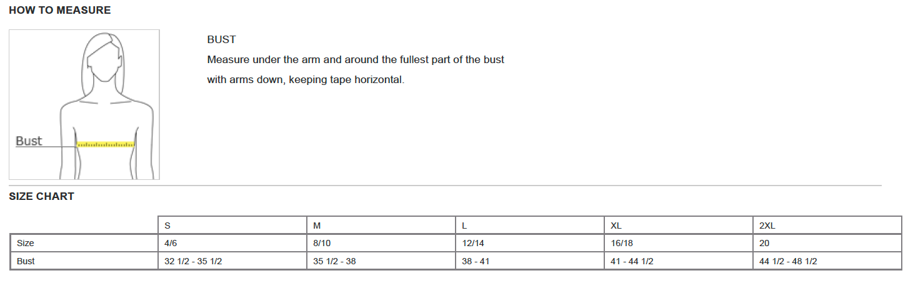
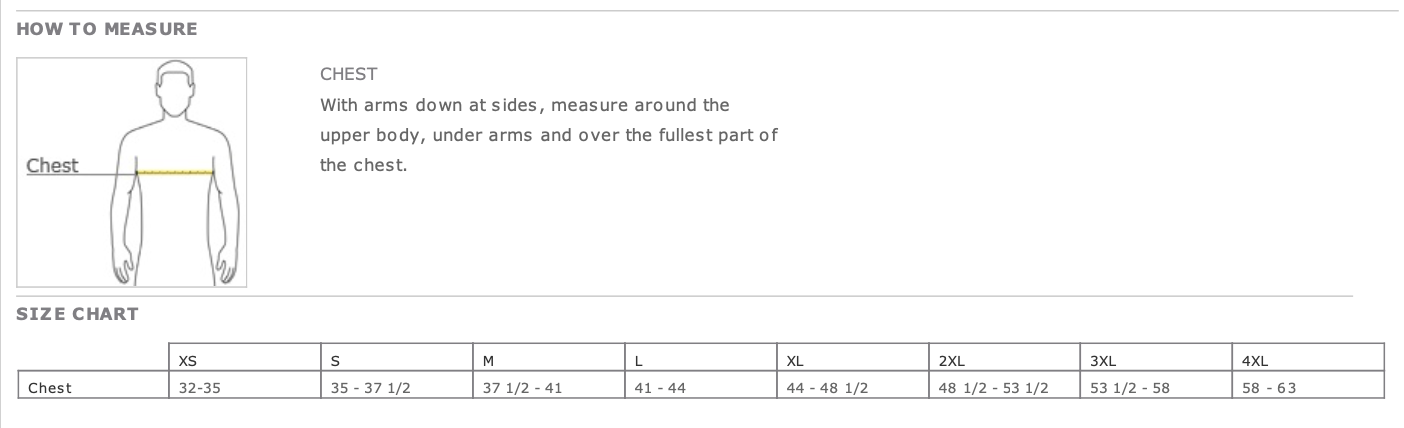
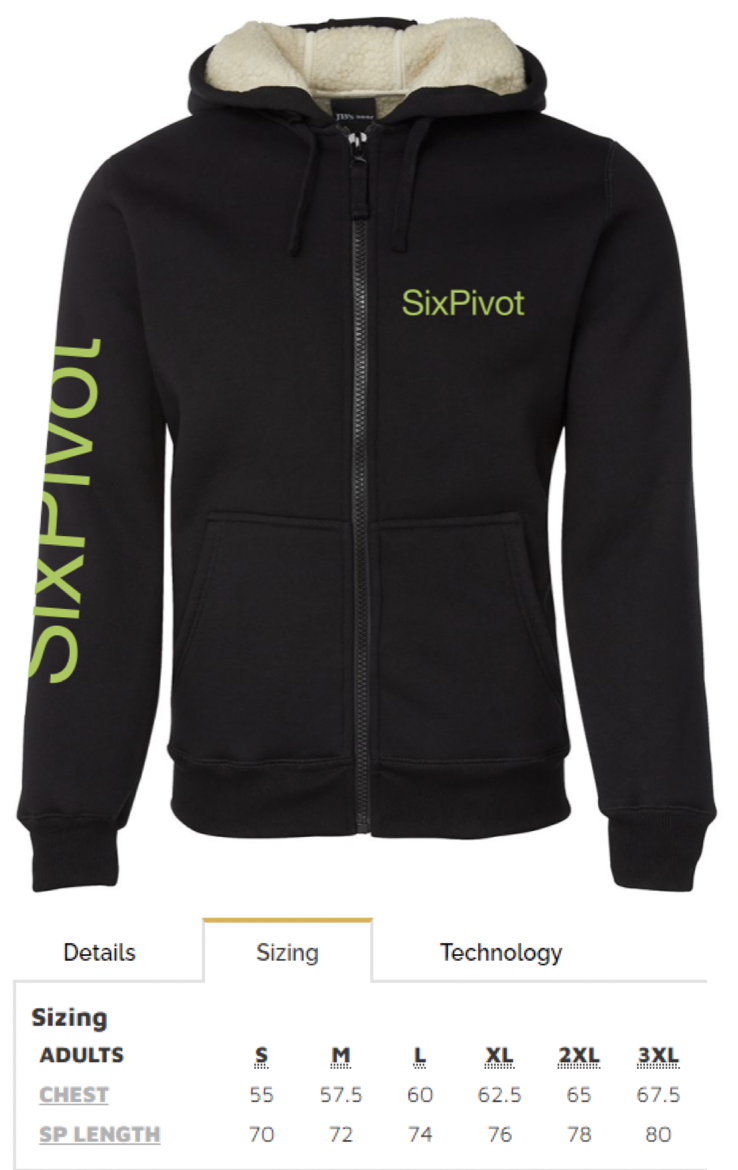
* [ ] Shirt and hoodie size (charts below)

<figure><img src="https://1433628967-files.gitbook.io/~/files/v0/b/gitbook-x-prod.appspot.com/o/spaces%2FazHLjJzFRgpNtF3p9lmK%2Fuploads%2F1MwAtgPHNDyjDQT2OiDs%2Fwomens%20shirt.png?alt=media&amp;token=f08bf0cf-c35e-4cdc-9da5-0b09240e85fb" alt=""><figcaption><p>Women's shirt</p></figcaption></figure>

<figure><img src="https://1433628967-files.gitbook.io/~/files/v0/b/gitbook-x-prod.appspot.com/o/spaces%2FazHLjJzFRgpNtF3p9lmK%2Fuploads%2FuzKf35vgdbwWM1NLwNd3%2Fmens%20shirt.png?alt=media&amp;token=103443ed-f7b6-403d-b95d-4aca4c16d55c" alt=""><figcaption><p>Men's shirt</p></figcaption></figure>

<figure><img src="https://1433628967-files.gitbook.io/~/files/v0/b/gitbook-x-prod.appspot.com/o/spaces%2FazHLjJzFRgpNtF3p9lmK%2Fuploads%2FuVJrADASIdx2vueQ77U0%2Fhoodie%20size.png?alt=media&amp;token=fac6a5b5-d51e-4685-9b26-8ca954f00c3d" alt=""><figcaption><p>Hoodie sizing</p></figcaption></figure>

##


# Your first day

You will be getting a bunch of calendar invites for you to get to know the team better 🤗 To help give you an idea of what your on-boarding will look like, we've planned something along the lines of this:

<figure><img src="https://1433628967-files.gitbook.io/~/files/v0/b/gitbook-x-prod.appspot.com/o/spaces%2FazHLjJzFRgpNtF3p9lmK%2Fuploads%2Fn1veCxLdvAhF6wGZbdcC%2FScreen%20Shot%202022-11-01%20at%202.38.47%20pm.png?alt=media&amp;token=600367b7-dcc9-48d4-a1b0-f6dd23ec9391" alt="A timeline, with &#x27;Warm welcome and schedule&#x27;, &#x27;2 half days on-boarding&#x27;, &#x27;2 weeks soft landing with Cloud Control&#x27;, &#x27;Roll onto first project&#x27;, and &#x27;Retrospective&#x27;"><figcaption></figcaption></figure>

Here's some more insight of what your first two days it will look like:

### Your first day :tada:

<table><thead><tr><th width="178">When</th><th width="171">Which Pivot</th><th width="74">Feels</th><th>Includes:</th></tr></thead><tbody><tr><td>10:00-10:45am</td><td>Faith</td><td><span data-gb-custom-inline data-tag="emoji" data-code="1f44b">👋</span></td><td>Welcome to SixPivot</td></tr><tr><td>11:00-11:30am</td><td>Briony</td><td><span data-gb-custom-inline data-tag="emoji" data-code="1f4bc">💼</span></td><td>What are our projects, who are our clients?</td></tr><tr><td>12:00-12:30pm</td><td>Sammy</td><td><span data-gb-custom-inline data-tag="emoji" data-code="1f483">💃</span></td><td>All things dev experience</td></tr><tr><td>12:30-1:30pm</td><td>Lunch</td><td><span data-gb-custom-inline data-tag="emoji" data-code="1f354">🍔</span></td><td>Nom nom nom</td></tr><tr><td>1:30-2:00pm</td><td>Tony</td><td><span data-gb-custom-inline data-tag="emoji" data-code="1f4a1">💡</span></td><td>Cloud Ctrl what's the go?</td></tr><tr><td>The rest of your afternoon</td><td>The Clouds</td><td><span data-gb-custom-inline data-tag="emoji" data-code="2601">☁️</span></td><td>Getting set up with Cloud Ctrl</td></tr></tbody></table>

### Your second day :sparkles:

<table><thead><tr><th width="175">When</th><th width="172">Which Pivot</th><th width="76">Feels</th><th>Includes:</th></tr></thead><tbody><tr><td>10:00-10:45am</td><td>Shirley</td><td><span data-gb-custom-inline data-tag="emoji" data-code="1f64c">🙌</span></td><td>Our secret sauce</td></tr><tr><td>11:00-11:30am</td><td>Jayne</td><td><span data-gb-custom-inline data-tag="emoji" data-code="1f917">🤗</span></td><td>Ways of working, time sheets, <a href="/perks-and-benefits/employee-assistance-program">EAP</a>, <a href="/perks-and-benefits/benefits">staff benefits</a> and all the good stuff</td></tr><tr><td>11:30-12:00pm</td><td>Newt</td><td><span data-gb-custom-inline data-tag="emoji" data-code="1f60e">😎</span></td><td>Meet your buddy</td></tr><tr><td>12:00-1:00pm</td><td>Lunch</td><td><span data-gb-custom-inline data-tag="emoji" data-code="1f354">🍔</span></td><td>Nom nom nom</td></tr><tr><td>1:00-2:00pm</td><td>Open session for team</td><td><span data-gb-custom-inline data-tag="emoji" data-code="1f64c">🙌</span></td><td>Looking after yourself with <a href="/our-culture/wellbeing-and-mental-health">Mark Bramwell</a></td></tr><tr><td>2:30-3:00pm</td><td>Chris</td><td><span data-gb-custom-inline data-tag="emoji" data-code="1f4bb">💻</span></td><td>Life of a consultant at the Pivots</td></tr><tr><td>The rest of your afternoon</td><td>The Clouds</td><td><span data-gb-custom-inline data-tag="emoji" data-code="26c5">⛅</span></td><td>Getting set up with Cloud Ctrl</td></tr></tbody></table>

### Recommended stuff to do in your first few days

* Login to Slack&#x20;
* Check out our channels and add yourself into opt in ones like #kids-and-animals and #faiths-philosophising
* Login to Workflow Max (you should have received a login activation email)
* Login to Xero (you should have received a login activation email)
* Login to 1Password (you should have received a login activation email)

### Some things to familiarise yourself with

* Watch Faith speak about our [Purpose](https://web.microsoftstream.com/video/e4787e3f-f9bc-480a-a468-3caa52e56f22)
* Watch Faith speak about our partnership with [Microsoft](https://web.microsoftstream.com/video/03097f12-4224-4d41-ad86-a8d7120ef5ba)

### Things to set up when you’re ready

* Put your phone number and [README](https://sixpivot.sharepoint.com/sites/HR/SitePages/Team-READMEs.aspx) (authentication required) into your Slack profile
* Setup your email signature&#x20;
* Zoom/Teams [backgrounds](https://sixpivot.sharepoint.com/:f:/s/HR/Eha7IqAqbwJJn3d6HwFJwAoBQ15FYZM3LYjuG2bDJwK-0Q?e=ya3KJN) (authentication required) are here if you need/want them (but no pressure to use)

<br>


# Your buddy

We see your buddy as a trusted person you can go to for advice and support. Your buddy will set up agreed “informal formal” connections with you for your first three months while you settle in. They will guide and check in with onboarding, answer any questions and help you feel safe that your conversations are between you two. &#x20;

* Tips and tricks&#x20;
* Things they’ve learned&#x20;
* SixPivot inner workings (technology, people, project, domain, operations)&#x20;
* Share things they're/you're struggling with&#x20;


# Access and licenses

How do I access \[x] and who can help me?

We have a bunch of different systems that we use to do our jobs. Some things like Slack, everyone uses all the time so we will make sure you have access to these when you start. Other things, like whether you use JetBrains IDEs, are up to you so we'll only purchase or assign a license to these things on request (there's no "approval" process though, we just don't want to pay for things we don't need).

The common systems we use are listed below, but if you need access to something not listed here, reach out to Jayne or your manager and have a chat about it.

| System        | Point of Contact    | Who has access? |
| ------------- | ------------------- | --------------- |
| Microsoft 365 | Bill (@billchesnut) | Everyone        |
| MSDN          | Bill (@billchesnut) | Everyone        |
| Slack         | Jayne (@jayne)      | Everyone        |
| 1Password     | Jayne (@jayne)      | Everyone        |
| Xero          | Jayne (@jayne)      | Everyone        |
| WorkflowMax   | Jayne (@jayne)      | Everyone        |
| JetBrains     | Jayne (@jayne)      | As requested    |
| Pluralsight   | Jayne (@jayne)      | As requested    |
| LINQPad       | Jayne (@jayne)      | As requested    |
| Miro          | Jayne (@jayne)      | As requested    |
| Balsamiq      | Jayne (@jayne)      | As requested    |

#### AI Tooling

Everyone has a preference when it comes to tooling and we don't want to *enforce* or limit to a particular tool. So we have a range of tools that are pre-approved for use at SixPivot. You can request a license for **one** AI tool of your choice. And if you need additional tools, reach out to Shirley to have a chat about it. Just please be sure to cross check with our [AI Assisted Software Development Policy. ](https://handbook.sixpivot.com.au/~/revisions/xhUBUn4eNuCID5oan4Qk/how-we-work/policies/ai-assisted-software-development-policy)

| Tool                 | Point of Contact   | Who has access? |
| -------------------- | ------------------ | --------------- |
| GitHub Copilot       | Shirley (@shirley) | As requested    |
| JetBrains AI (Junie) | Shirley (@shirley) | As requested    |
| Cursor               | Shirley (@shirley) | As requested    |
| Claude Code          | Shirley (@shirley) | As requested    |
| ChatGPT              | Shirley (@shirley) | As requested    |
| Microsoft 365        | Shirley (@shirley) | As requested    |


# 1Password

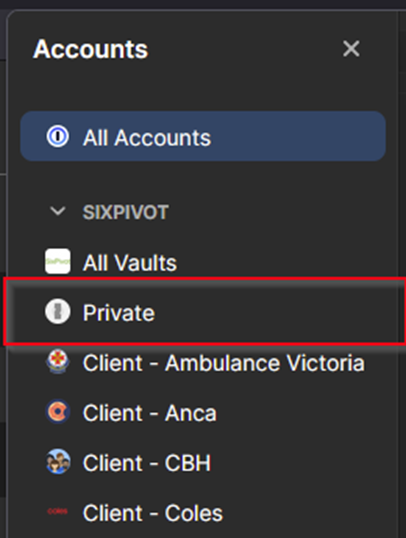
We use [1Password](https://1password.com/) to manage and share credentials securely across the team. It organises passwords into **vaults** - think of them as folders, one per client or purpose - so you only ever have access to what you need.

#### Roles

There are three roles in our 1Password setup:

* **Owner**: Jayne looks after all the billing and oversight.
* **Administrators** - the PCs and Sammy. They manage the overall account, create vaults, and control who has access to what.
* **Team Members** - everyone else. You'll have access to the vaults relevant to your work, and in some cases you may have vault-level admin permissions (for example, Dylan, Thushan and Vic have full access for the \<specific-client> vault).

#### What access looks like

When you're given access to a vault, you'll get full permissions - view, create, edit, and share credentials within that vault. The only things you won't be able to do are **export** or **print** vault contents, which is intentional. If you ever feel like you need to do either of those things, have a chat with a PC first.

#### Requesting access to a client vault

If you need access to a client vault (e.g. you've just been staffed on a new engagement), **reach out to the PC for that client** and they'll get you set up.


# Project structure&#x20;

## Core Delivery Team

When we talk about our core delivery team, we're talking about the people that are on the ground, day to day, building cool stuff. In this team you're supported by a Principal Consultant and an Account Manager, and of course by the entire SixPivot team who are only ever a Huddle away.

A project team can consist of just our people, or a mix of our people and people from the client that we're working with. We don't mind either way - as long as the right people are involved for a project to be successful.&#x20;

### Our People

Different projects need different team compositions, but there's a few things that we try to do consistently.

#### Solo Gigs

We try not to have you working "alone", meaning "without other SixPivot people day to day".&#x20;

What does "alone" mean to us?

If you're augmenting a team of developers at a client (adding our developers to theirs), but you're the only SixPivot person in that team, we still consider you to be working "alone".&#x20;

Even if we have multiple SixPivot people working at the same client, if you're working in different teams or on different projects, you're still considered to be "alone".

There are two key reasons that we don't want you working "alone". Firstly, lots of us join SixPivot because we want to work with other SixPivot people. We're going to try and make that happen as often as we can. Secondly, we always want you to have someone sitting (virtually) next to you that you can bounce ideas off, run PRs[^1] past, etc., to make sure that your work is the best that it can be.&#x20;

#### Support

We try not to have Developers or Senior Developers working without Senior Consultants. We want you to have the support you need to do your best work.

We have different expectations of Developers and Senior Developers than of Senior Consultants, and generally every project benefits from the skills of a Senior Consultant.&#x20;

Sometimes we'll have a Senior Developer doing Senior Consultant things as part of their promotional pathway, but we still want to support them by having a Senior Consultant in the team to mentor them on their way.

### Other People

Depending on the project, there may be zero or many people outside of SixPivot in the core delivery team. These may include, but are not limited to, software developers, QA[^2]s, BAs[^3], PMs[^4], POs, etc.

We're happy to work with anyone that's needed to get the work done, be they clients or other consultancies. The important thing for us is that the right people are in the room to ensure a successful project.

## Roles

Roles at SixPivot are not to be confused with job titles. You may have one job title but be filling a different role, e.g., if you're a Senior Consultant on the pathway to becoming a Principal Consultant, you may fill the Principal Consultant role on a project.

### Team Lead

We're talking here about the team lead from a SixPivot perspective. A project with an augmented team may have a "Team Lead" as a position on the team which may be filled by someone else, but our Team Lead role is the person that's responsible for SixPivot's concerns within that team.&#x20;

As Team Lead, you're responsible for the day-to-day leadership of the team. While there might be multiple people on the team that could do this job, you're the single person identified as the team lead for a project so that we have a single point of contact for all the below.

The Team Lead role is to:

* Understand the scope of work to be performed
* Align with customer contacts
* Ensure a suitable agile process is being followed&#x20;
* Own the project communication, both for the client and for our internal teams\
  e.g., Weekly reports with customers and weekly check-ins with our SixPivot project team
* Set up regular communication within our team that is separate to the client project meetings&#x20;
* Own the Pull Request process\
  i.e., you don't have to PR every piece of work, but you need to make sure that PRs are being done by suitable people - we always want SixPivot people reviewing SixPivot work in addition to any client reviews
* Ensure the backlog is correctly managed\
  i.e., manage scope change, prioritisation, etc.&#x20;
* Act as coach and point of escalation for the SixPivot team, keeping an eye on team wellness&#x20;
* Coordinate scope and estimates for additional changes for tabling with PC for review&#x20;
* Table concerns and blockers with client project team in project meetings&#x20;
* Escalate relevant information to the PC in a timely manner

### Principal Consultant

The Principal Consultant role starts before delivery begins, runs through the duration of a project, and continues after delivery is complete.&#x20;

The Principal Consultant role is to:

* Validate the relevancy of an opportunity, define the scope, and estimate during presales
* Work with the Account Manager on the overall vision for the project and the client&#x20;
* Identify and assign the best people for the SixPivot team, and identify any onboarding and/or offboarding as required
* Initiate internal and external kick off meetings, including timings of engagement, setting of expectations, identifying blockers, etc.
* Identify and initiate a suitable agile process and the way we'll work&#x20;
* Create regular project team reviews to ensure we are on track and all blockers understood&#x20;
* Identify opportunities to share IP, technical scenarios, best practices, etc., with the rest of SixPivot
* Provide oversight and guidance for the SixPivot team lead and wider team, mentoring them from good to great&#x20;
* Act as point of escalation for the SixPivot team&#x20;
* Shield the project team where possible from wider client politics&#x20;
* Identify better practices&#x20;
* Capture knowledge&#x20;
* Manage the client relationship&#x20;
* Identify and assist in opportunities for SixPivot team's career pathways to progress
* Understand the wider client strategy and help guide the technical roadmap that helps them achieve their outcomes

### Account Manager

The Account Manager role starts before the delivery begins, runs through the duration of a project, and continues after delivery is complete. The Account Manager qualifies a client and/or project before engaging PC support for pre-sales activities.

The Account Manager role is to:

* Own the commercial relationship with the customer
* Own customer communications from a commercial/non-technical perspective
* Work with the PC to validate the opportunity, coordinate pre-sales activities, and deliver proposals
* Work with the customer and SC/PC on the overall vision for the project and the client
* Work with the PC to put together the correct team composition for the client and SixPivot
* Be a point of escalation for any client/team issues, etc.
* Have regular client and team catch ups for feedback purposes to ensure the project is on track, the team are happy, deal with any concerns, rotations, etc.
* For strategic clients, own the client account plan with input from the PC to ensure client goals are aligned

[^1]: Pull requests

[^2]: Quality Assurance specialist

[^3]: Business Analysts

[^4]: Project Managers


# Consulting Manifesto

These are the delivery principles of SixPivot, presented in the style of the [Agile Manifesto](https://agilemanifesto.org/). While there is value in the items on the right, we value the items on the left more.

## **Quality Code** over Speed of Delivery

We pride ourselves in delivering solutions in a timely manner, but never at the expense of quality. We write the right tests and our code is peer-reviewed. Fast delivery is a short-term win but a long-term loss if the quality is poor.

## **Building the Right Thing** over Building Things Right

While it's important to build things the right way, it's more important to build the right thing. A system with a perfect technical solution that doesn't solve the problem it was meant to solve has no value to anybody.

## **Delivering Value** over Delivering Code

We need to bill clients to be profitable, but it's more important to deliver value to a client than it is to bill them. If we can solve the client needs without writing code, then we should consider that option. We strive to provide great client outcomes, not simply to focus on the billable time.

## **The Right Tool** over The Shiniest Tool

We greatly value knowledge of the cutting edge, but the cutting edge is not always the best place for the client. The cutting edge could be unproven, we might not have the expertise, or the client might not be able/willing to upskill when it comes time to hand it over.

## **Integrity** over Revenue

We can't have a business without selling our people, and while we have a lot of expertise across the company and we can learn anything, we don't expect anybody to know *everything*. We'll never sell you as an expert in something that you're not.

## **A Champion Team** over a Team of Champions

We're all smart, but we value team efforts over individual efforts. We expect team to put their hand up and ask for help, we work better together, and no one should go it alone. We favour team engagements over solo gigs because the whole is greater than the sum of our parts.


# Our approach to engagements

## Initial Contact

Initial contact with a prospective client can come from anywhere: word of mouth, through developers or customers we've worked with before, and opportunities that we've identified that the sales team have chased up. Whichever the channel, we get the sales team involved and the pre-sales activities kick off.

## Pre-Sales

Pre-sales usually consists of an initial meeting between the sales team and the potential client. Depending on the information at hand there might be a PC involved at that point to help qualify whether the work is our kind of work or not, or that might wait until a second meeting.&#x20;

Next there'll be a requirements gathering workshop led by one of our consultants (an SC or PC) where we'll try to get as much information as we can in order to put together a proposal. That same consultant will then put together the proposal, which will generally include our understanding of the problem, our proposed solution, proposed architecture, team composition, estimated build and running costs, and the usual information about our company, the way we work, T\&C's, etc.

Once a client has signed off on the proposal, sales will work with a PC to schedule the project. We look at technical requirements, experience, PD plans, personalities, etc., to make sure the right people are on it.

## Project Kick-Off

Before day one the PC will be in touch with the client to attempt to get as much of the onboarding done ahead of time as possible. Sometimes this goes well, and we can hit the ground running on day one but sometimes it doesn't. Our goal is to make sure that time is being used as efficiently as possible from the start.

When we reach day one, we have a session with everyone involved to do introductions and set the roles and responsibilities. It's important to have a shared, clear understanding from inception. The first few days will usually be spent setting up user story backlogs, repositories, build and deployment pipelines, etc.

## Running a Project

SixPivot follows an agile software development process for all projects. This is an iterative process that focuses on ongoing communication throughout the entire project to ensure that each piece of functionality is fit for purpose and meets the user’s needs. Despite best efforts the requirements at the start of a project often change as our understanding of the system evolves over time and we receive early feedback from stakeholders and users. The agile software development process allows us to capture this evolving understanding and make any necessary adjustments to future work.

The aim of an agile software development project is to continually deliver incremental pieces of the system to obtain feedback and deliver a return on investment as early as possible. The process starts with the creation of a Product Backlog. From there, we commence continuous feedback cycles called Sprints, which start with a Sprint Planning session, include daily Standups, and concludes with a Sprint Review session and a Sprint Retrospective session.

### Iterative Approach

Agile software development promotes short feedback cycles.

![Circular flow diagram, with Requirements, Plan, Develop, Test, Release, Monitor, and back to Requirements again](https://1433628967-files.gitbook.io/~/files/v0/b/gitbook-x-prod.appspot.com/o/spaces%2FazHLjJzFRgpNtF3p9lmK%2Fuploads%2F3tIUAmaZPgPdWbP13Kw8%2Fimage.png?alt=media\&token=428c1bd5-42a9-46b3-9506-bfeeb51dae2c)

This ensures that any adjustments can be identified and made as early as possible. These adjustments could include:

1. Changes to functionality that was built as per the initial requirements but upon review have been found to be incorrect
2. Changes to functionality that was built as per the initial requirements but upon review a better way to meet the requirements has been discovered
3. Adding functionality that wasn't part of the initial requirements, but have become apparent once a feature has been built and reviewed
4. Removing functionality that was built as per the initial requirements but has since been deemed unnecessary or no longer fit for purpose
5. Fixing functionality that is not performing correctly or fit for purpose

Changes like these are quickest (and therefore cheapest) to make when captured as early as possible, which is why the short iterations of agile software development is important.

### Continuous Improvement

Continuous improvement applies equally to the project and the process. After each iteration, the Delivery Team meets to briefly discuss retrospectively what is working well in the project, what is not, and what they can change to improve things. This continuous improvement endures throughout the entirety of the project.

### Transparency

The nature of agile software development promotes transparency from within the Delivery Team to those outside. By discussing issues each morning at stand-up, reviewing progress at each iteration in a sprint review, and reporting progress after each iteration, the state of the project is always available for anyone to see.

### Our Process

Every project is different. Every project has different people and different challenges, so naturally the process will evolve to suit. Some projects develop more process to address specific needs, while others evolve into a lighter touch process. We do have a fairly standard process that we generally start with. We take a lot of inspiration and terminology from Scrum, but we're not strict Scrum practitioners.&#x20;

> *Rules are made to be broken; Guidelines are made to be followed*\
> *- Quinten, 2022*

As a starting point the ceremonies below generally serve well, but many of the specifics such as attendees, durations, etc., are dependent on the project. The important thing is that we know what value we need out of each session; from there we can find whatever way works to achieve that value.

#### Sprints

**Duration**: One or two weeks

The project is broken down into sprints, which are usually one or two-week periods of time (usually two) during which the team commits to the next piece of work, implements the new features, and reviews those features. At the end of each sprint, we aim to deliver the new functionality to the users (or at least an internal test environment) where feedback can be collected, and adjustments can be made if necessary. From the end of the very first sprint, we aim to have working software available for use.

#### Backlog Refinement

**Duration**: 30-60 minutes\
**Attendees**: Product Owner, Delivery Team

Backlog refinement takes place at some point during the sprint to look ahead and plan work for the next 2-3 iterations. For the next sprint's work, the team looks at the stories planned and confirms that they are the right stories, that they have enough information, that they are estimated and the estimations are still valid, and that they are the right size. For work 2-3 iterations out, the team confirms that the work is in the right order and that the analysis work is progressing accordingly. Any stories that can be estimated should be for the sake of projections and shared understanding.

#### Sprint Planning

**Duration**: 30 minutes\
**Attendees**: Delivery Team, Product Owner

Sprint planning will take place at the start of each sprint. Based on the last few sprints worth of work the team will know how much work they should commit to (based on their velocity – an average of the amount of work completed over the last few sprints). The top of the Backlog is reviewed to ensure that the prioritisation is still accurate, and the correct number of stories are committed to. These stories are moved from the Backlog to a Sprint Board, where their status will be visible for the duration of the sprint as they move through To Do, Doing, and Done columns.

#### Daily Standup

**Duration**: 5-15 minutes\
**Attendees**: Delivery Team, Product Owner

A standup is a short meeting at the start of each day where the team gets together to briefly discuss the work in progress. The aim of this meeting is for members of the team to stay aware of what each other is working on, identify opportunities to help complete stories, and identify and resolve any blockers that people might be having. The Product Owner is invited to observe so that they can keep up to date with the project and help the team resolve any impediments that they might be facing. We usually like to "walk the board" to keep the conversation focussed on the right things.

#### Sprint Review

**Duration**: 30 minutes\
**Attendees**: Delivery Team, Product Owner

Sprint Review will take place at the end of each sprint. The team meets to review the User Stories that were committed to at the start. For each story, the team will review the Acceptance Criteria, review the implementation, and ensure that everyone is happy with what has been delivered. If the User Story has a visual component, it is demonstrated by the Delivery Team to the Product Owner. If it is found that the Acceptance Criteria has not been met, the User Story is carried over into the next sprint where it is completed. If it has been completed, the User Story is considered done and is closed.

During a Sprint Review, it is common for new ideas to surface, or for missing requirements to be identified. These will be added as new stories to the Backlog and prioritised accordingly. Any incomplete stories are briefly discussed.

#### Sprint Retrospective

**Duration**: 30 minutes\
**Attendees**: Delivery Team

At the end of a sprint the Delivery Team will have a short meeting to discuss how the project went during that sprint. The aim is to continually review the processes that the team are using and to discuss ideas about how to improve in the future.

#### Weekly Reports

At the end of each week, we like to send out a short email to the key stakeholders from the client and our own PC's and AM's. We want to share what we're working on, how it's progressing, and call out any impediments and/or risks. The latter is key; we want to communicate risks and problems early so that everyone's aware and resolving while they're small, before they get a chance to build up.

### Artefacts

#### Backlog <a href="#toc50379140" id="toc50379140"></a>

At the start of a new project, the requirements (as best understood at that point in time) are gathered and written up as User Stories (defined below). This collection of User Stories is then prioritised with the Product Owner. The aim with prioritisation is to ensure that high value stories are delivered first. Targeting high value stories ensures that we get feedback on these areas as early as possible, whilst targeting high risk stories ensures that we address any technical risk early on that could impact the way that we build parts of the system.

This prioritised list of User Stories forms the Backlog. The Backlog is a living document that is continually reviewed and refined throughout the project.

#### User Stories <a href="#toc50379141" id="toc50379141"></a>

A User Story is a way of capturing a desired piece of functionality in a specifically formatted sentence: *“As a \<type of user> I want \<piece of functionality> so that \<business value delivered>”*. Writing requirements in this way directs focus to the three most important pieces of information about a software requirement; the type of user performing the action, the functionality itself, and the business value that we’re delivering by implementing this function. A User Story is complemented by Acceptance Criteria, which is a simple bullet point list of things that must work before we can consider the User Story complete. Optionally, a User Story may also contain rough designs of what a screen might look like, and anything else that provides context to the Delivery Team.

### Continuous Integration & Delivery <a href="#toc50379142" id="toc50379142"></a>

#### Continuous Automated Software Builds <a href="#toc50379143" id="toc50379143"></a>

All code written on developers’ machines is continually pushed to a main cloud-based repository where it is automatically compiled. Automated tests are then run against the compiled code to ensure that the changes have not introduced any undesired behaviour.

#### Continuous Automated Software Deployments <a href="#toc50379144" id="toc50379144"></a>

Once code has been automatically compiled, and assuming the automated test suite has passed, the compiled code is automatically deployed to a Development environment in the cloud. This ensures that any changes to the code have not introduced any problems that we might not see on our local machines and provides a very tight feedback loop for the developers to be able to test their changes in the cloud, and if happy, they can then promote this build to a Test environment to make the changes available to explore, test, and provide feedback on.

#### Testing <a href="#toc50379145" id="toc50379145"></a>

Code written as a part of our projects is tested in a variety of ways to ensure it performs correctly, performantly, and to safeguard against accidental changes in behaviour being introduced later. This is done with a combination of unit tests, integration tests, convention tests, performance tests, and manual tests where appropriate.

### Consultant Changes

When we have a project that runs for a while, we like to rotate our people in and out. We do this for a few reasons and genuinely believe that it's win-win. From our side it keeps things interesting for our people, many of whom consult because they like a new challenge on a regular basis. From the client's side they get new eyes and new ideas coming into the project, and a fresh perspective is always a good thing. For both us and the client there's a huge risk mitigation, as there's more than just the team on the ground that know the project, understand the domain, and understand the solution. We've found that these benefits completely outweigh the impact of bringing someone new onto the project and upskilling them.

#### Preparation

Because these rotations are a standard practice for us, we know what needs to be done to make this as seamless as possible. We document the right things, we automate as much of the local environment setup as we can, and we maintain a clean codebase that's easy to bring new people into.&#x20;

Ahead of rolling on to a project the PC will be in touch to give you an overview of what you're walking in to. We'll make some time for PD days to upskill on anything that might be a current gap (maybe this is a Vue gig and you're more Reacty?) so that you can hit the ground running.&#x20;

#### Rolling On

When it's time to roll on to a project we'll organise a day or two (depending on the project) of handover time. During this time, you'll work with one of the existing consultants to get your machine set up, check your access to everything, and get the solution running. You'll probably pair on your first piece of work to help you find your way around the solution. We don't charge the client for the new consultant's time for these days.&#x20;

If we find gaps in the onboarding process, documentation, etc., then we'll update it as we go so that onboarding is that little bit better for the next person.

#### Rolling Off

When we finish up on an engagement we'll spend a bit of time updating any documentation that might need it (ideally we've done this during the gig but this is a good time to double-check it), wrap up any work that we're currently working on, and if there's a new person replacing us, we'll plan for our handover to them. We also make sure that nothing breaks as a result of the change, for example, are there any alert emails that only come to us that need to be updated to someone else?

A week or two after you've finished the PC will be in touch to do an engagement retrospective, where the two of you will look at what went well, what didn't, and what we could improve for the next person.

## Project Shutdown

How we shut down a project is similar to how we roll off. The main thing is to make sure  documentation is up to date; known issues are documented, onboarding guides are up to date, any technical debt is in the backlog and has a plan to be addressed, future stories have as much information as we can give them, etc. We'll also make sure nothing relies on our accounts or presence so that nothing falls over when we're gone.

We know that there's a very good chance that "the next people" could be us in the future, so it's in our best interest to leave things in as good a state as possible.

Although we're not a managed services company and don't offer support contracts to most of our clients, there are one or two where we'll put something in place. These clients are those that came to us with zero IT capabilities and have relied on us end-to-end to deliver a product. We accept ownership of that product going forward and will get a support contract in place so that any future issues can be dealt with.


# How we do timesheets

We work with high flexibility and want you to work when suits you best. We’re also a consultancy and bill our clients on a time basis. There’s a delicate balance on how you manage these both without compromising the other. Here’s how we do it:&#x20;

* We bill clients on a daily rate rather than hourly basis
* We assume 8 hours is a standard working day&#x20;
* We recognize value is more related to outcome, and so do our clients&#x20;

Now of course there are nuances, so let’s unpack:&#x20;

**Daily rate**: We bill on a daily rate, so it doesn’t feel like we’re tracking your every hour. If there’s a (rare) need for a client to be billed in hourly or in half day increments, we’ll discuss it and find the best way.&#x20;

**8 hours**: We trust you to deliver what you think is a day's work, we don’t want to track your time like that. But it is a concern of ours if you overwork. There is real risk of team burning out working remote, and we need to look out for each other.

**Value is more related to outcome**: There will be days when you put in extraordinary “value” to a client and days where you feel it was a bit “meh”. Given the motivations of the people we employ (we usually over-deliver), no-one will mind your “meh” days. So, don’t worry about your “meh” days; we know you hold the same values in delivery.&#x20;

## **Timesheet logistics:**

* Enter the hours you’ve actually worked

It won’t matter if you’ve worked 6 hours one day and 10 hours the next, please log the time you actually worked. This is for our side of things to avoid team over working and the potential for burn out.&#x20;

* Your time will be manually averaged to 8 hours each day and invoiced to clients

Clients accept our daily rate (viewing it as 8 hours a day) and they know from proposal we work remote, flexibly, and are outcomes driven. Unless exception or otherwise agreed, we will assume 8hrs/day/5days. We don’t normally have any difficulties here but if you’ve communicated differently to a client, please let us know.&#x20;

## **Q\&A:**&#x20;

**What counts as your working day?**&#x20;

* Things we count in your working day are the same behaviours you might have in an office at a product company with reasonable discretion. We generally see it as, if it’s taken you away from work for more than two hours, this should be communicated. In terms of timesheets, we trust you to be pragmatic.&#x20;
* Sometimes it's harder to see the boundaries between work and non-work activities because we're working remotely. So, don't forget that all of these things are still considered part of your working day:
  * checking emails, SixPivot or client accounts
  * internal meetings
  * helping another SixPivot person with their project
  * working on internal SixPivot projects and initiatives&#x20;

**Should my total weekly hours add up to 40 hours?**&#x20;

* Yes, the goal should be. It could be Monday or Tuesday with 6 hours and Thursday or Friday 10 hours respectively, whichever combination works for you.&#x20;

**How often should I log my time?**&#x20;

* Ideally at the end of each day.&#x20;
* Definitely by the end of each week.&#x20;
* There are various internal and external processes which rely on timesheets being completed (such as payroll, invoicing, etc) and so if you can keep them up to date it means that other team members can do their regular tasks without having to chase a heap consultants for their timesheets.

## **Exceptions:**&#x20;

**What if my time does not reach 40 hours for a week?**&#x20;

* Half a day or more, perhaps we’re missing a leave form? Notify your manager and make sure you have appropriate communications with your client. It’s probably ok, just make sure we’re aware of it.

**What should I do if I take off half a day due to sickness or personal time?**&#x20;

* We trust that you're going to do the right thing. If you're not feeling well and need to take half the day off, just submit a leave request for 1/2 a day.&#x20;
* If you're just not feeling motivated one afternoon and think you'll probably make it up over the rest of the week, then there's no need to submit a leave request. We expect people to be professional and reasonable in this respect.

**What if I worked more than 40 hours during the week?**&#x20;

* We’ll check in with you that you’re ok. We shouldn’t be putting you in positions where you need to work beyond 40 hours. Occasionally if something major has cropped up, we will need to have overtime pre-approved so we can invoice for it. But it’s important to us that your wellbeing is being looked after and you don’t burn out. Maybe you need help? Maybe you are overworked?&#x20;

**What if I notice a team member is working more than 40 hours during the week?**&#x20;

* Encourage them to log their timesheets correctly and share with a trusted team member. It’s important we avoid burn out.

**Technically can’t I just enter 8 hours over the five days, and no one will notice?**&#x20;

* Yes, technically you can but this means you manage the exceptions. We trust you to be pragmatic.

**What about things like SixPivot internal meetings and tech interviews?**&#x20;

* Not all billable time will be client facing! Customer code reviews, quality assurance, internal meetings related to client work are all critical to the success of the clients project.&#x20;
* We account for and include some internal meetings as billable work. We trust you to be pragmatic with it.&#x20;
* As a general guideline, if you have more than 2 hours of internal meetings in a day, you can put it down separately as non-billable.&#x20;
* We have specific timesheet codes for certain internal activities such as professional development (PD) and internal projects. If you don't have access to these timesheet codes, reach out to Jayne.

**What if I need to do client-specific timesheets?**&#x20;

* We try to follow the above guidelines when tracking timesheets, however, we do sometimes have clients that require additional information for their internal budgeting or cost allocation.
* In these circumstances we try to track high-level hours in the SixPivot timesheet system, and then specifics within the client system. The client system should reflect actual hours worked, unless you are directed otherwise.


# Communication

How we communicate at SixPivot

### Asynchronous Communications

At SixPivot, we embrace **asynchronous communications**.  Simply put, **asynchronous communication is when you send a message without expecting an immediate response**. For example, you send an email. I open and respond to the email several hours later.

**Asynchronous** communications provide the following benefits

* Control over the workday leads to happier and more productive employees
* Incentivizes higher-quality communication over knee-jerk responses
* Better planning leads to less stress
* Deep work becomes the default
* Documentation and greater transparency become automatic
* Collaboration across time zones is seamless
* Puts in-office and remote employees on the same footing

**Synchronous** (or real-time) communications (especially in a remote environment) introduces the following problems:

* Leads to constant Interruptions
* Prioritizes being connected over being productive
* Creates unnecessary stress
* Leads to lower quality discussions and sub-optimal solutions

### The different communications tools we use

#### Slack

Slack is our default company communications platform.  It supports asynchronous comms very well.

Everyone is expected to be contactable over Slack when working. We expect replies within the day to any messages. If you're not at your computer, update your status🍴🗓🤒

We have a #movements channel for sharing our status and whereabouts, this can be used to share if you're working in the office or interstate. Updates on this channel should be for exceptions, not micro-updates, we don't need you to tell us if you're going for lunch or to a doctor's appointment.&#x20;

#### Teams / Zoom

We generally use Teams for our internal company-wide meetings and scheduled meetings because it syncs well with Outlook and calendars.  Many of our clients use Teams as well.&#x20;

Teams and Zoom also support closed captioning and that's important to us for people with accessibility needs.&#x20;

#### Video

We generally use all three (Zoom, Slack, Teams), everybody has their own preferences. Some prefer the camera on, some prefer the camera off - we don't *enforce*, we know video fatigue is a thing. However, we encourage the use of video since it promotes higher-fidelity communications and encourages participants to be present during the meeting.

#### Email

For stuff that doesn't need urgent attention and is good for documenting.&#x20;

#### Phone

Pick up the phone for anything urgent or if you want a chin wag everybody's phone numbers are in their Slack profiles.&#x20;

### Examples of our comms culture:

**1.  Non-sensitive questions go in a public channel by default**

So the answer is visible to everyone and we all learn from it. Only reach for a DM when something is genuinely sensitive.

**2.  No written reply is expected for a non-urgent message**

Not one of us voted for “a quick reply is expected,” so that much is settled. Exactly where and when a reaction emoji is the right way to say “seen,” especially in a public channel versus a DM, is something still open.

**3.  To flag something genuinely urgent, @mention with a deadline**

Say who you need and by when, in the channel. That is the signal that means “this one is different.”

**4.  Messages sent after 6pm are fine to send**

Send when it suits you. Reading them can wait until working hours. Sending is not the same as expecting an answer that night.

**5.  Keeping your Slack status current is a nice-to-have, not an expectation**

Update it if it helps you, but nobody is checking, and nobody should feel they have to.

{% embed url="<https://async.twist.com/asynchronous-communication/>" %}
Async Comms
{% endembed %}

{% embed url="<https://about.gitlab.com/company/culture/all-remote/asynchronous/>" %}
Asynchronous communications at GitLab
{% endembed %}


# Slack channels

How our Slack channels work high level.

### **Default channels:**&#x20;

The ones you're automatically added to when you onboard. And where you can expect to find most team in.

<table><thead><tr><th width="252">Slack channel</th><th>Intent</th></tr></thead><tbody><tr><td>#announcements</td><td>Team-wide communication and announcements. All Pivots are in this channel.</td></tr><tr><td>#donut-be-strangers</td><td>You may not get to cross pollinate with the wider team in your daily tasks. This channel is to create connections and build rapport with introductions. Feel free to leave and join this channel as you like.</td></tr><tr><td>#health-and-well-being</td><td>This channel is to encourage looking after yourself. Will include discussions around health benefits to make you happy little vegemites.</td></tr><tr><td>#movements</td><td>Going somewhere (office/event) / on leave / unwell / good mornings are welcome in this channel. We work flexibly and don't expect micro movements, just keep your Slack status updated.</td></tr><tr><td>#project-updates</td><td>Client related updates. You can scroll here to get an idea of what's happening on projects.</td></tr><tr><td>#open-door</td><td>You can post <a href="/our-culture/feedback/open-door-slack-channel">anonymously</a> here to ask questions, raise concerns and discuss issues openly.</td></tr><tr><td>#pd</td><td>Sharing articles, events and other stuff for learning. You can also ask where you can do PD. </td></tr><tr><td>#random</td><td>A place for non-work-related flimflam, faffing, hodge-podge or jibber-jabber you'd prefer to keep out of more focused work-related channels.</td></tr><tr><td>#sixers</td><td>Chatter area related to our monthly whole team Sixers meeting. Go wild in here during meetings, we dig it. </td></tr><tr><td>#positive</td><td>Shout outs and good vibes welcome in this space. Work related recognition and team encouragement is the energy. </td></tr><tr><td>#consulting</td><td>The art, the practice, the science. Place for discussing upcoming consulting work. Sharing tips, learns and all the things. </td></tr><tr><td>#programming-news</td><td>Place for updates and news related to software development.</td></tr><tr><td>#help-with-front-end</td><td>Q&#x26;A and discussion on anything related to front-end development. Prefix your post to clarify what technology you're referring to eg [react], [vue], [css], [JavaScript].</td></tr><tr><td>#help-with-dotnet</td><td>Q&#x26;A and discussion on anything related to .NET.</td></tr><tr><td>#help-with-other</td><td>Q&#x26;A and discussion for general technical questions.</td></tr><tr><td>#help-with-azure</td><td>Q&#x26;A and discussion on Azure.</td></tr></tbody></table>

### **Noteworthy opt-in channels:**&#x20;

These channels you can join (or leave) when you like.&#x20;

<table><thead><tr><th width="254">Slack channel</th><th>Intent</th></tr></thead><tbody><tr><td>#handbook</td><td>Jump in here to make updates and edits. Everybody in the team welcome, the more input, the better. </td></tr><tr><td>#website</td><td>See a typo, jump in here and tell us. Want to add or change something, let us know. </td></tr><tr><td>#leads</td><td>Have an idea for a project, pop in here and let us know.</td></tr><tr><td>#recruitment</td><td>All the happenings with reruitment, what we're planning, what we're trying etc.</td></tr><tr><td>#faiths-philosophising</td><td>Join here for the inside of Faith's head, her musings, her projects and what's coming next.</td></tr><tr><td>#ai</td><td>All things AI and ML news and happenings</td></tr><tr><td>#pd-books</td><td>Join for bookclub, find out what we're reading, when the next session is. </td></tr><tr><td>#kids-and-animals</td><td>Share your pics, stories and funnies with us</td></tr><tr><td>#gardening</td><td>Tips, pics and updates for gardening here</td></tr><tr><td>#making</td><td>A place to discuss and show off feats of creativity in the physical realm since we spend so much time in the virtual</td></tr><tr><td>#mh-and-nd</td><td>A public space where we can discuss Mental Health and Neurodiversity topics and share resources.</td></tr><tr><td>#mh-and-nd (private)</td><td>Private peer support group for Mental Health and Neurodiveristy. Contact Rebecca to be added.</td></tr><tr><td>#ladies (private)</td><td>Peer support group for women. A place to let your hair down. </td></tr><tr><td>#ideas-register</td><td>Keep up to date with the monthly meetings here. Join conversations related to the <a href="/how-we-work/internal-innovation">ideas register</a> and innovation. </td></tr><tr><td>#blogs</td><td>Place to share your writing. Get feedback and encouragement from others. </td></tr><tr><td>#hardware</td><td>Place to discuss laptops, PC's, phones consoles etc.</td></tr><tr><td>#help-with-mobile</td><td>Q&#x26;A and discussion on mobile technologies.</td></tr></tbody></table>


# Professional Development (PD)

### Intention:

We want to empower everyone in our team to take PD. To do this we’ve removed a set number of days per year, as well as any specific individual's budget - we don’t want you to feel limitations when it comes to your learning and growth. We want to (and need to) invest in you.

### What’s the catch?

There’s no catch, we hired you because you’re talented and we want you to maintain, as well as grow your talents. What we’re trying to do is put your professional development in your hands. Our ideal outcome is you taking the initiative to request PD; and/or asking for guidance in designing your PD plan.

### Some things to know:

* PD days are fully funded by us, they don’t come out of your annual leave.
* Any conference, course, exams fees etc will be funded by us.&#x20;
* PD can be blocks of time example; a 2 day course, or 1 day prepping for a gig, or could be regularly scheduled such as 1 every month or could be a few hours to join a webinar etc.&#x20;
* For Australian conferences we’ll fund travel, accommodation, and the conference costs.
* International conference costs can be built into your overall salary package, or agreed as a one-off basis; there may be options to split travel or accommodation, each can be discussed on merit.&#x20;
* University degrees, advanced diplomas, master's etc. aren’t monetarily funded; however, we can work with you to schedule time.&#x20;
* PD doesn’t have to be solely for career progression or technical based; our PD includes holistic personal growth such a mindfulness, learning about different communication styles, understanding more about personal well-being etc.&#x20;
* Check out our [Travel and expenses policy](/how-we-work/policies/travel-and-expenses) to see what's covered in more details in terms of travel, meals etc

<details>

<summary>Don’t be awkward, we’re not:</summary>

How we see it, if you don’t make time for PD it can limit our capabilities and growth. Likely causing us to turn down opportunities. Your investment into PD helps us, and your team be better.

We’ve enabled unlimited PD by allowing for it in the budget (monetarily, as well as in billable time). We have a ‘placeholder budget’ based off previous years PD. As team use more PD year on year, we expect to increase the placeholder PD budgets. Your PD won’t be putting us out, we have budgeted and planned for it.

For consultants, while no different to any of our team with PD, we get the pressure of being billable and you may sometimes feel reluctant to request PD. This is where planning comes into play. Trust we will work with you around our scheduling and customers to ensure it is seamless for everyone.

</details>

<details>

<summary>Areas included in our PD:</summary>

* Personal well being&#x20;
* Soft skills
* Industry alignment/understanding – e.g. learning more about the FinTech sector&#x20;
* The future of work
* Becoming a thought leader/community leader/speaker
* Career progression
* Consulting skills
* Technical skills
* Exams and certification

</details>

<details>

<summary>Some inspiration for PD:</summary>

* Courses/webinars/1-on-1 coaching that improve your mental well being or help you focus, reduce anxiety etc
* Learning from others - as a group/1on1/book time with any of the team who you feel you have a bunch of questions for or some expertise that you want to learn from
* Shadowing someone you admire in the team
* Pair programming&#x20;
* Specifically requesting code reviews
* Working on your own project or product; it’s aligned to us because it’s solving technical problems, learning new tech and creating something challenging; *\*your IP is still yours, even when it’s developed on SixPivot PD time*
* Asking if you can shadow or have insight into a particular project because its tech stack is interesting, or the person doing the work you highly respect, and want to see how they are approaching it
* Hackathons

</details>

### PD Plans

Our PD plans are holistic and include three pillars of development and goals:

<table data-column-title-hidden data-view="cards"><thead><tr><th></th><th data-hidden></th><th data-hidden></th></tr></thead><tbody><tr><td>👨‍💻Technical</td><td></td><td></td></tr><tr><td>🙌Interpersonal </td><td></td><td></td></tr><tr><td>🌱Life </td><td></td><td></td></tr></tbody></table>

{% hint style="info" %}
For example, you may have life goals to buy a home, or interpersonal skills you'd like to develop to influence stakeholders.
{% endhint %}

Our PD Plan is to help you think through and set up a high-level goals. Please complete with as much detail as you can. But it's also ok if you do not have any specific goals in a particular area. This is your plan - your career, your life 😊&#x20;

* Find link to PD Plan Template [here](https://sixpivot.sharepoint.com/:w:/r/sites/HR/_layouts/15/Doc.aspx?sourcedoc=%7B3DA2B350-0E8A-412E-8BAF-5D3CABA5B0CB%7D\&file=Professional-development-plan-template.docx\&action=default\&mobileredirect=true\&cid=36faafe1-11d8-445b-af08-6f0a6e85ae24)
* PD Plans are kept by individuals (some content is confidential e.g., life goals, some interpersonal skill goals etc.)
* You and your manager will discuss your plan in your 1-on-1s

### How to request PD

1. Pop in a request to Xero
2. Discuss with your manager for approval, we'll work out timing together
3. Chat with your account manager to make scheduling seamless for everyone i.e., your client
4. It gets booked in and the dates will be entered into our [tracking sheet](https://sixpivot.sharepoint.com/:x:/s/Sales/ERnj-kxKbR1Nv71qE73rOFMBZKA9n7tCgZ6RuHVsMUhExQ?e=1IBede)

### **Nice to knows**&#x20;

* The more notice the better for planning
* Unlimited PD doesn't mean unplanned, from a commercial point of view we need to plan for the impact to cashflow
* Want to go to a conference in the following 12 months? Include it in your PD plan please
* PD can be booked for study time as well as exam time 📕
* PD can be on the job, prior to a commencing an engagement, specifically booked days, or regular short sharp drops like 2 hours a fortnight etc
* PD is a discussion point in your 1-on-1s - use it to revisit what you have in your plan and see if you need to book time out&#x20;
* Not sure what type of PD you can do? Let's discuss and investigate in your 1on1 &#x20;
* You can also get PD ideas via feedback or observations given by the team too

Tracking PD at the Pivots is somewhat difficult. We find many team members do PD in their own time (self-driven learning, curiosity-based projects etc.) and that's ok! But we do love to track it where possible (to see how we're going, where we need to improve, budget for better etc.). So please when it comes to identified/desired PD know you are supported in time and budget and please chat with your manager to arrange it.&#x20;


# Leave

### Types of leave

<details>

<summary><strong>🌴 Annual and additional leave</strong></summary>

Get out of here, visit your loved ones, take a holiday, and unplug. Note many of our team uninstall work apps and go off-grid, we fully endorse this practice!

* 4 weeks of annual leave
* Preferably keep your accrued annual leave to less than 20 days (>160 hours). Exceptions to this may be needed from time to time, especially where leave is being accrued for significant life events.
* As part of your package negotiation, you can have up to an additional 2 weeks of leave, for a total of 6 weeks leave per annum
* When booking leave, annual leave needs to be used first with any remainder being taken from your additional leave balance.
* Additional leave is added each work anniversary and can accrue up to 24 months. Our preference is utilising it within the 12 month period. But if not, it rolls over for a further 12 month period. Note if it still unused by the next work anniversary it will expire.&#x20;

</details>

<details>

<summary><strong>🤒 Personal and carer's leave</strong> </summary>

Also known as sick days, mental health days, caring for family and loved ones or 'meh' days (those days where nothing goes right and you just need to write them off). No medical certificate required, no questions asked.

* 10 days of personal and carer's leave

</details>

<details>

<summary><strong>🤓 Professional development</strong> </summary>

Check out our guideline and intentions [here](/how-we-work/professional-development-pd)

* Unlimited PD

</details>

<details>

<summary><strong>🦘 Switcharoos</strong></summary>

Switch a public holiday to your preferred date. Find more info [here](/how-we-work/leave/switcharoos).&#x20;

</details>

<details>

<summary>🎗 Special or <strong>Domestic Violence leave</strong></summary>

For people impacted by domestic violence as well as people concerned about their own behaviour. Please see our offering and guidelines [here](/how-we-work/leave/domestic-violence-support).  &#x20;

* Unlimited paid domestic violence leave

</details>

<details>

<summary><strong>🍼 Parental leave</strong></summary>

Congratulations! Check out our offering and guidelines[ ](/how-we-work/leave/parental-leave)[here](/how-we-work/leave/parental-leave).&#x20;

* 12 weeks full pay for primary carers
* 3 weeks full pay for secondary carers

</details>

<details>

<summary><strong>🧘 Unpaid Me Time</strong></summary>

Take a break from work with job security. See more info [here](/how-we-work/leave/unpaid-me-time).&#x20;

* Up to 12 months (or negotiated)

</details>

<details>

<summary><strong>🐾 Pawrental leave</strong></summary>

So small and cute 🥺 this is for you to settle in your new dog or cat

* 1 day per year

</details>

### **How to request leave \***

* Fill in a leave form in Xero. (See below for examples using the web or mobile app)
  * For a full day enter 7.6 hours (07:36 on the mobile app)
  * For a half day enter 3.8 hours (03:48 on the mobile app)
* Inform the relevant people (manager, your team, client)
* Reschedule/handover anything important
* Update your Slack status

*\*note that* [*Switcharoos*](#switcharoos) *are handled differently: please ping Jayne for your Switcharoo. Xero muddles it up and we prefer to update Switcharoos directly in our tracking sheet.*&#x20;

### Example leave requests using web interface

Note the default for a single day is 7.6 hours. For a half day you would enter 3.8 hours.

<figure><img src="https://1433628967-files.gitbook.io/~/files/v0/b/gitbook-x-prod.appspot.com/o/spaces%2FazHLjJzFRgpNtF3p9lmK%2Fuploads%2FJTpqwcYKc0ywBa1fL1tm%2Fleave%20request%20single%20day.png?alt=media&amp;token=8672991e-b796-45be-b64b-8635743d42bd" alt="Screenshot of Xero web form for entering a leave request. A single day is selected and the hours field is visible with the value 7.6000" width="455"><figcaption><p>New leave request - single day</p></figcaption></figure>

For multiple days leave, you only need to enter the date range

<figure><img src="https://1433628967-files.gitbook.io/~/files/v0/b/gitbook-x-prod.appspot.com/o/spaces%2FazHLjJzFRgpNtF3p9lmK%2Fuploads%2FShtKCFowpd70l1qv4Fad%2Fleave%20request%20multi%20day.png?alt=media&amp;token=dd06bce8-6b01-4e00-aac3-9955d386d8a4" alt="Screenshot of Xero web form for entering a leave request. A date range is selected, so no hours need to be entered single day is selected" width="450"><figcaption><p>New leave request - multi day</p></figcaption></figure>

### Example leave requests using mobile app

You can use the Xero Me mobile app ([iOS](https://apps.apple.com/au/app/xero-me/id991901494) or [Android](https://play.google.com/store/apps/details?id=com.xero.payday\&pli=1)) to enter leave requests&#x20;

In contrast to the web interface, the mobile apps require you to enter time in HH:MM format (rather than decimal). A full day will be 07:36 (and yes you need the leading zero!). For a half day you would enter 03:48.

Note also that in the mobile app, the hours field defaults to 00:00, and it will require you to change that to a valid value before you can submit a request for a partial or single day's leave.

<figure><img src="https://1433628967-files.gitbook.io/~/files/v0/b/gitbook-x-prod.appspot.com/o/spaces%2FazHLjJzFRgpNtF3p9lmK%2Fuploads%2Fm0aYBqPEPt5XWEcDPnUT%2Fmobile%20leave%20request%20single%20day.png?alt=media&amp;token=dc4da66c-b130-43fd-ad05-09cbe904a60a" alt="Screenshot of Xero Me mobile app form for entering a leave request. A single day is selected and the hours field is visible with the value 07:36" width="375"><figcaption><p>Mobile app - Leave request single day</p></figcaption></figure>

Like the web interface, the mobile app doesn't need hours when you select multiple days.

<figure><img src="https://1433628967-files.gitbook.io/~/files/v0/b/gitbook-x-prod.appspot.com/o/spaces%2FazHLjJzFRgpNtF3p9lmK%2Fuploads%2F3FMmV4Kqszpo4s4QNjuR%2Fmobile%20leave%20request%20multiple%20day.png?alt=media&amp;token=1c82aa83-9723-45b6-ab90-d42015783616" alt="Screenshot of Xero Me mobile app form for entering a leave request. A date range is selected, so no hours need to be entered single day is selected" width="375"><figcaption><p>Mobile app - Leave request multiple days</p></figcaption></figure>


# Switcharoos

You can switch a public holiday to your preferred date.

Sometimes our friends or family work in an industry where they have to work through the public holiday and we'd prefer to take time when they do. Or maybe there's a cultural or religious significant date we'd prefer time for. Or sometimes we just want to mix it up and take a long weekend.&#x20;

Here's our approach with switching public holidays:

* You can switch to a date within 2 weeks, or other cultural/religious significant date
* If you're part time, the public holiday has to fall on your agreed working days
* Everybody defaults to the public holiday to their place of residence e.g. if you move to NZ/Toowoomba/Yeppoon the public holiday date for that region applies

#### How to request a Switcharoo:

Ping Jayne and she will sort you out. Unlike other leave types, Xero can't jive with Switcharoos so we do these ones manually.&#x20;


# Parental Leave

Congratulations! We're excited for you and hope this information can be helpful in your planning.

### Minimum tenure:

No minimum tenure, parental leave is available to all employees from the day you start working with us.&#x20;

### **Inclusive of:**

Our policies are designed to support all parents. This includes same-sex couples, adoptive and foster parents, kinship and surrogacy arrangements.

### Notice:

At least 10 weeks prior to commencing parental leave, you will need to notify your manager.

### Primary Carers:

Primary Carers leave is to give birth mothers the time to take off work for their newborn child and recover following birth. It also supports adoptive parents to take time off for a recently adopted child. The primary carer is the person who most meets the child’s needs including feeding, dressing, bathing and supervising.&#x20;

* Primary carers are entitled to take either 12 weeks of full pay parental leave or 24 weeks of half pay parental leave

### **Secondary Carers:**

If you are not the primary caregiver and your partner has a child, or you adopt a child together, you can take Secondary Carer's leave.&#x20;

* Secondary Carers are entitled to take either 3 weeks of full pay parental leave or 6 weeks of half pay parental leave

### Stillbirth

In the tragic circumstances of stillbirth, the death of a baby before or during birth from the 20th week of pregnancy onwards, you remain entitled to paid and unpaid parental leave. Employees are not required to resubmit a new leave form, the original will remain in force. The employee may (at their full discretion) return to work when they are ready by notifying their manager.

### Extending:

You are entitled to 12 months unpaid parental leave and have the option to extend for a further 12 months of unpaid parental leave.

You also have the option to use some or all annual leave entitlements during the 12 months of parental leave. This can also be taken at either full or half pay.

### Inclusions:

Superannuation payments will continue to be paid on paid parental leave, although not on the period of unpaid parental leave.

While on parental leave, you will be included in salary reviews and are eligible to apply for internal promotions and other job opportunities.

### Returning:

At least 4 weeks before the expiration of your parental leave, you should confirm your intention to return to work or variance. You are guaranteed to return to work immediately after paid or unpaid parental leave to your pre- parental leave position or equivalent.

### Useful Links & Resources

<details>

<summary><strong>Government Paid Parental Leave</strong></summary>

In addition, employees may be eligible for government paid parental leave and related entitlements. The Australian Government Paid Parental Leave Scheme may provide government- funded Parental Leave Pay at the national minimum wage to employees who meet the eligibility criteria. For more information you can visit the Department of Human Services website [here](https://www.servicesaustralia.gov.au).

</details>

<details>

<summary><strong>Fair Work Fact sheet</strong></summary>

Link to Fair Work Fact sheet on parental leave and related entitlements [here.](https://www.fairwork.gov.au/tools-and-resources/fact-sheets/minimum-workplace-entitlements/parental-leave-and-related-entitlements)

</details>

<details>

<summary><strong>Employee Assistance Program (EAP)</strong></summary>

Becoming a parent is an important time in your life, if you need support and would like to book a counselling session, please contact our EAP with these [details](https://sixpivot.sharepoint.com/sites/HR/SitePages/Employee-Benefits.aspx#our-eap-assist-\(our-workplace-counselling-service\)). This service is completely confidential.

</details>

<figure><img src="https://1433628967-files.gitbook.io/~/files/v0/b/gitbook-x-prod.appspot.com/o/spaces%2FazHLjJzFRgpNtF3p9lmK%2Fuploads%2F1FaGIexgd1VQDgfHl0so%2Fprior%20parental.png?alt=media&amp;token=ad223733-05c9-4949-9084-fa01b69244dc" alt=""><figcaption></figcaption></figure>

<figure><img src="https://1433628967-files.gitbook.io/~/files/v0/b/gitbook-x-prod.appspot.com/o/spaces%2FazHLjJzFRgpNtF3p9lmK%2Fuploads%2FTyUZ0RB0rTnMlnlnyBw5%2Fduring%20parental.png?alt=media&amp;token=4f45afd3-7633-4977-a8ca-b2dac4efca70" alt=""><figcaption></figcaption></figure>

<figure><img src="https://1433628967-files.gitbook.io/~/files/v0/b/gitbook-x-prod.appspot.com/o/spaces%2FazHLjJzFRgpNtF3p9lmK%2Fuploads%2FgWgnvCMN1cwho0Sn0UmA%2Freturn%20parental.png?alt=media&amp;token=d53194d8-b62e-4fbb-b41f-36f52e9a8176" alt=""><figcaption></figcaption></figure>


# Domestic Violence Support

Family, domestic and sexual violence is a major national health and welfare issue that can have lifelong impacts. The Australian Bureau of Statistic 2016 estimated that two in five Australian adults have experienced violence, and that one in six women and one in seventeen men have experienced partner violence.

UNLIMITED paid domestic violence leave is available and designed to support everyone at SixPivot. It can be taken as a block of time or as individual days. We do not require evidence or supporting documentation with a domestic violence leave application when you are the person in danger or experiencing domestic violence.

We encourage team to seek assistance for domestic violence related concerns and are committed to supporting you. This policy applies to you if you are being directly affected and/or impacted by domestic violence.

{% tabs %}
{% tab title="Support from SixPivot can include:" %}

* Reduced responsibility and performance KPI's
* Changing or redirecting work emails and calls
* Individual and family counselling for an agreed period
* Flexible work arrangements in addition to those currently offered as standard
* Access to an alternate phone if needed
* Provision of pay advance to be recovered over an agreed period of time
* Cash support up to $5,000 for legal fees, medical and other
* Paid Emergency Accommodation for up to a two week period
* Safety Planning
  {% endtab %}

{% tab title="We commit to:" %}

* Working with you and provide information about the support services available, but you remain in control of the process
* Responding with care, sensitivity and a non-judgmental approach, and will avoid intrusive enquiries
* &#x20;Believing what you are telling us
* Taking the time to listen and support you and that confidentiality is respected
  {% endtab %}
  {% endtabs %}

### Inclusive of:

Our policy applies equally to people of all genders. Domestic violence and abuse can occur between opposite or same-sex intimate partners of any age, who may or may not be married or living together. It can also occur between family members, between carers and those they live with or care for in the home. Domestic violence and abuse can continue after a relationship has ended.

### Confidentiality:

We understand information relating to a team member’s situation regarding family and domestic violence is extremely sensitive and is confidential. Information will only be disclosed with your consent and disclosure of your situation is kept to a minimum and on a ‘needs to know’ basis.

### Domestic Violence and Abuse Definition:

Sometimes defined as intimate partner violence, family/carer violence or domestic violence, it is an incident or pattern of physical, verbal, sexual, emotional or psychological abuse. It can involve financial/economic abuse and control, and/or stalking and harassment that is perpetrated by one intimate partner over another. Domestic violence and abuse frequently involves control, coercion, threatening behaviour and abuse. It frequently takes place overtime, often starting with small acts of abuse such as:

<details>

<summary>Examples</summary>

* Cyber harassment: many of the forms of control, threats and stalking are carried out virtually through email, text messages, telephone messages etc.
* Stalking: workplace stalking often results in the perpetrator following a victim to and from their place of work or hanging around the workplace entrance.
* Emotional/psychological control and threats: can affect confidence and self-esteem and may also include control over social interactions and autonomy.
* Financial/economic abuse: control of finances, often used to prevent a victim from having the money to pay for transport to get to work, or to buy suitable clothing for work. Without financial independence, it can be very difficult to leave a violent or abusive relationship.
* Coercive control: a systematic pattern of behaviour with the purpose of undermining a victim and creating fear through threats, humiliation and intimidation and depriving an individual of support and independence. It is a psychological or emotional form of abuse that is used to control and limit the freedom of an intimate partner.
* Sexual abuse: unwanted sexual attention, including rape.
* Physical violence: involving hitting, kicking, burning, pulling hair, stabbing and shooting, leading to injury and in the worst cases death.

</details>

### Are you worried about your own behaviour?

If you are concerned about your behaviour impacting your intimate partner or family/carer, you are encouraged to take domestic violence leave. It takes a lot of courage to acknowledge your behaviour is causing harm. Ask yourself:

<details>

<summary>Ask yourself:</summary>

* Have I ever shouted or screamed at a family member?
* Have I ever called a family member insulting or belittling names and constantly criticised them?
* Have I ever prevented my partner spending money for their personal use
* Have I ever slapped, hit, pushed or shoved a family member – or threatened to?
* Have I ever scared my partner or children?
* Have I ever thrown something in my partner’s or child’s presence, such as a glass, a chair or tv remote?
* Have I ever pressured my partner into doing something sexual that they didn’t want to?
* Have I ever tried to stop my partner doing something that they wanted to do? (for example, going out with friends, having a job, doing some study

</details>

There is a difference between a healthy level of disagreement and using violence and control. We are committed to supporting you when you’re concerned about your own behaviour. With confirmation you are seeking appropriate advice and treatment from a medical doctor or psychologist we encourage you to take domestic violence leave and other support benefits.

### Links & Resources

*If you are in immediate danger or that of a family member call 000*

<details>

<summary><strong>Fair Work Policy Australian Government</strong></summary>

* Link to Fair Work Policy on Domestic & Family Violence leave and related entitlements [here](https://www.fairwork.gov.au/leave/family-and-domestic-violence-leave).

</details>

<details>

<summary><strong>Employee Assistance Program (EAP)</strong></summary>

* If you need support and would like to book a counselling session, [contact our](https://sixpivot.sharepoint.com/sites/HR/SitePages/Employee-Benefits.aspx#our-eap-assist-\(our-workplace-counselling-service\)) EAP. This service is completely confidential.

</details>

<details>

<summary><strong>Domestic &#x26; Family Violence Toolkit</strong></summary>

* A self-help resource to help people living with domestic violence [here](https://www.lifeline.org.au/media/ssdfbwzi/web__ll-4pp-tool-kit_domestic-family-violence-dfv.pdf).

</details>

<details>

<summary><strong>1800RESPECT</strong></summary>

* This is a 24-hour national sexual assault, family and domestic violence line (phone: 1800 737 732) visit website [here](https://www.1800respect.org.au).

</details>

<details>

<summary><strong>Mensline Australia</strong></summary>

* Supports men and boys who are dealing with family and relationship difficulties. 24/7 telephone and online support and information service (phone: 1300 789 978) visit website [here](https://mensline.org.au).

</details>

<details>

<summary><strong>Men’s Referral Service</strong></summary>

* This service from No to Violence offers assistance, information and counselling to help men who use family violence (phone: 1300 766 491) visit website [here](https://ntv.org.au/get-help/).

</details>

<details>

<summary><strong>Lifeline</strong></summary>

* Anyone across Australia experiencing a personal crisis or thinking about suicide can call 13 11 14, or text 0477 131 114 at night (6pm-midnight AEDT). Someone will help put you in contact with a crisis service in your state or territory. Visit website [here](https://www.lifeline.org.au).

</details>

<figure><img src="https://1433628967-files.gitbook.io/~/files/v0/b/gitbook-x-prod.appspot.com/o/spaces%2FazHLjJzFRgpNtF3p9lmK%2Fuploads%2FMaw7m02RlRao566Q5T92%2FDV%20leave.png?alt=media&amp;token=f16bd933-8505-4323-ac94-7c41bea63d01" alt="Table outlining processes prior, during and returning from leave"><figcaption></figcaption></figure>


# Unpaid Me Time

Life is a lot, and sometimes you need a break.

If you want to have a break from work we will support you. Me Time is where you can take an extended amount of unpaid time, up to 12 months (or negotiated) - and your job will be guaranteed and waiting for you.

You don't need a reason, you can simply want to take time to do things like:

🧘 Have a mental health break

🎨 Write your magnum opus

✈️ Go travelling

💆 Take a career break

&#x20;🍃 Caravan Australia&#x20;

Whatever your reasoning is, if you need time, you will have job security. Hopefully it can make decisions around how you structure your life easier.&#x20;

**How to request Me Time:**

Talk with your manager about Me Time. They can guide and work with you around scheduling, customers and timelines.&#x20;

Note: leave benefits don't accrue while you're taking unpaid leave. This includes annual and personal leave as well as the time before you are eligible for long service leave.


# Shutdown period

(Christmas/New Years)

{% hint style="info" %}
All team have 2 bonus days leave for this period, so you don't dip into your annual leave too much.
{% endhint %}

During this time, we shut down for 2 weeks. With the public holidays and the 2 bonus days of leave, you will use 38 hours of annual leave (these are automatically applied for you, no need to request). Uninstall and unplug during this period, nobody is on Slack or working 🎊\
\
Note: You can request to work over this period if you are planning leave elsewhere in the year, or some other reason. But we strongly recommend you take the time over this period.


# Long Service Leave

We have team who are reaching the time when they can acces their long service leave entitlements. Each state slightly differs please see below for details:&#x20;

<details>

<summary>Long Service Leave Entitlements in Queensland</summary>

Full details of your long service leave entitlements in QLD can be found [HERE](https://www.business.qld.gov.au/running-business/employing/legal-obligations/long-service-leave/entitlements), however we have summarized the main points below for quick reference:

**What is Long Service Leave?**

Long service leave is a period of paid leave granted to an employee in recognition of a long period of service with an employer.  *(Noting your 10-year anniversary date will be increased by any period of unpaid leave)*

**How much Long Service Leave will I receive at my 10-year work anniversary?**

8.6667 weeks

**When can I access Long Service Leave?**

At your 10-year work anniversary.

**Does Long Service Leave continue to accrue past the 10 years?**

Yes. After a further 5 years (15 years continuous service) a further 4.3333 weeks will be available. More than 15 years, long service leave can be accessed as it accrues at a rate of .86667 of a week per year.

**Can my employer force me to take my long service leave?**

Yes, once you reach your 10-year anniversary. With written notice of at least 3 months an employer can ask you to take at least 4 weeks long service leave to decrease your leave balance. At SixPivot we prefer to have a discussion around your commitments so that we can be fair to the employer and to the employee.

**Is an employee able to take up other paid work whilst on long service leave?**

Yes. However, this cannot be seen as a conflict of interest to SixPivot and should be discussed with your manager.

**If I leave the employ of SixPivot is my long service leave paid out?**

Yes, after 10 years. (Between 7 and 10 years only if the employee leaves due to illness, death, or incapacity, or if the employer dismisses the employee for a reason other than the employee’s conduct, capacity, or performance).

**Can I apply for a payment of my long service leave in lieu of taking time off?**

Yes but only by completing an application (form 13) found [HERE](https://www.qirc.qld.gov.au/forms) to the Queensland Industrial Relations Commission for an order. These applications may only be made for compassionate reasons or on the grounds of financial hardship.

**Where can I see my long service leave balance?**

You will be able to see and apply for long service leave as normal through Xero.

**Do my normal leave entitlements continue to accrue whilst on long service leave?**

Yes.

</details>

<details>

<summary>Long Service Leave Entitlements in South Australia</summary>

Full details of your long service leave entitlements in SA can be found [HERE](https://www.safework.sa.gov.au/workers/wages-and-conditions/long-service-leave), however we have summarized the main points below for quick reference:

**What is Long Service Leave?**

Long service leave is a period of paid leave granted to an employee in recognition of a long period of service with an employer.  *(Noting the 10 year anniversary date will be increased by any period of unpaid leave)*

**How much Long Service Leave will I receive at my 10-year work anniversary?**

13 weeks

**When can I access Long Service Leave?**

Once you reach your 7-year work anniversary you may have access to your 7-year pro-rata entitlement of 9.1 weeks by way of mutual agreement with your manager, noting SixPivot are under no obligation to grant long service leave prior to 10 years, but this is an option.

**Does Long Service Leave continue to accrue past the 10 years or past 7 years if you access it early?**

Yes, long service leave will continue to accrue at a rate of 1.3 weeks per year or 49.4hrs per year.

&#x20;**Can my employer force me to take my long service leave?**

Yes, once you reach your 10-year anniversary. With written notice of 60 days an employer can ask you to take all or part of your long service leave to decrease your leave balance. At SixPivot we prefer to have a discussion around your commitments so that we can be fair to the employer and to the employee.

**Is an employee able to take up other paid work whilst on long service leave?**

No, however you can take up unpaid work (e.g. voluntary work) whilst on long service leave.

**If I leave the employ of SixPivot is my long service leave paid out?**

Yes, after 7 years (pro-rata) your long service leave will be paid out when you leave SixPivot unless your employ is terminated for misconduct.

**Can I apply for a payment of my long service leave in lieu of taking time off?**

Yes, please discuss with your manager if this is something you want to consider.

**Where can I see my long service leave balance?**

You will be able to see and apply for long service leave as normal through Xero.

**Do my normal leave entitlements continue to accrue whilst on long service leave?**

Yes.

</details>

<details>

<summary>Long Service Leave Entitlements in Victoria</summary>

Full details of your long service leave entitlements in VIC can be found [HERE](https://business.vic.gov.au/business-information/staff-and-hr/long-service-leave-victoria/long-service-leave-an-overview), however we have summarized the main points below for quick reference:

**What is Long Service Leave?**

Long service leave is a period of paid leave granted to an employee in recognition of a long period of service with an employer.

**How much Long Service Leave will I receive at my 10-year work anniversary?**

8.66 weeks

**When can I access Long Service Leave?**

Once you reach your 7-year work anniversary you have access to your 7-year pro-rata entitlement of 6.1 weeks.

**Does Long Service Leave continue to accrue past the 10 years or past 7 years if you access it early?**

Yes, long service leave will continue to accrue at a rate of .866 of a week per year.

**Can my employer force me to take my long service leave?**

Yes. At 7 years, with written notice of 12 weeks an employer can ask you to take all or part of your long service leave to decrease your leave balance. At SixPivot we prefer to have a discussion around your commitments so that we can be fair to the employer and to the employee.

**Is an employee able to take up other paid work whilst on long service leave?**

No, however you can take up unpaid work (e.g. voluntary work) whilst on long service leave.

**If I leave the employ of SixPivot is my long service leave paid out?**

Yes, after 7 years (pro-rata) your long service leave will be paid out when you leave SixPivot unless your employ is terminated for misconduct.

**Can I apply for a payment of my long service leave in lieu of taking time off?**

No, it is an offence to give or receive payment for long service leave instead of the employee taking the break from work. Both an employee and an employer can be liable for this offence.&#x20;

**Where can I see my long service leave balance?**

You will be able to see and apply for long service leave as normal through Xero.

**Do my normal leave entitlements continue to accrue whilst on long service leave?**

Yes.

</details>

<details>

<summary>Long Service Leave Entitlements in Western Australia</summary>

Full details of your long service leave entitlements in QLD can be found [HERE](https://www.commerce.wa.gov.au/labour-relations/long-service-leave-0), however we have summarized the main points below for quick reference:

**What is Long Service Leave?**

Long service leave is a period of paid leave granted to an employee in recognition of a long period of service with an employer.  *(Noting your 10-year anniversary date will be increased by any period of unpaid leave)*

**How much Long Service Leave will I receive at my 10-year work anniversary?**

8.6667 weeks

**When can I access Long Service Leave?**

At your 10-year work anniversary.

**Does Long Service Leave continue to accrue past the 10 years?**

Yes. After a further 5 years (15 years continuous service) a further 4.3333 weeks will be available. More than 15 years, long service leave can be accessed as it accrues at a rate of .86667 of a week per year.

**Can my employer force me to take my long service leave?**

No, however the long service leave must be granted and taken as soon as reasonably practicable after it becomes due, unless agreement is made between employee and employer.

**Is an employee able to take up other paid work whilst on long service leave?**

No.

**If I leave the employ of SixPivot is my long service leave paid out?**

Yes at 10 years, (between 7 and 10 years it is not paid out if dismissed due to serious misconduct).

**Can I apply for a payment of my long service leave in lieu of taking time off?**

Yes, this must be made in writing to the employer.

**Where can I see my long service leave balance?**

You will be able to see and apply for long service leave as normal through Xero.

**Do my normal leave entitlements continue to accrue whilst on long service leave?**

Yes.

</details>

<details>

<summary>Long Service Leave Entitlements in New South Wales</summary>

Full details of your long service leave entitlements in NSW can be found [HERE](https://staticontent.dpc.nsw.gov.au/ir/long-service-leave-elearning-module/story_html5.html), however we have summarized the main points below for quick reference:

**What is Long Service Leave?**

Long service leave is a period of paid leave granted to an employee in recognition of a long period of service with the same employer.  *(Noting your 10-year anniversary date will be increased by any period of unpaid leave).*&#x20;

**How much Long Service Leave will I receive at my 10-year work anniversary?**

8.6667 weeks

**When can I access Long Service Leave?**

At your 10-year work anniversary.

**Does Long Service Leave continue to accrue past the 10 years?**

Yes, *additional entitlement to Long Service Leave is earned after each additional five years of continuous service with the same employer.*&#x20;

**Can my employer force me to take my long service leave?**

Yes, once you reach your 10-year anniversary. With written notice of at least 1 month an employer can ask you to take at least 4 weeks long service leave to decrease your leave balance. At SixPivot we prefer to have a discussion around your requirements.

**Is an employee able to take up other paid work whilst on long service leave?**

Yes. However, this cannot be seen as a conflict of interest to SixPivot and should be discussed with your manager.

**If I leave the employ of SixPivot is my long service leave paid out?**

Yes, after 5 years but only if the employee leaves due to illness, death, or incapacity, or if the employer dismisses the employee for a reason other than the employee’s conduct, capacity, or performance.

**Can I apply for a payment of my long service leave in lieu of taking time off?**

No, this is not allowed under the Long Service Leave Act 1955 in NSW.

**Where can I see my long service leave balance?**

You will be able to see and apply for long service leave as normal through Xero.

**Do my normal leave entitlements continue to accrue whilst on long service leave?**

Yes.

</details>


# Salary

How do we review salaries and how often is a question that comes up from time to time.&#x20;

The below outlines our considerations and the process we go through to make sure we are competitive in market and that each of you is looked after when it comes to salary.&#x20;

**Our current salary bands are a guide for when we recruit new people and are a fair indication of where most people sit, however tenure and the unique value you bring to SixPivot over time can see people in a particular job role exceed their salary band:**&#x20;

Salary bands are *base salary only* - superannuation and benefits are in addition (note: many organisations represent 'packages' to make base salary appear higher).

* Senior Developers: $130- $150K &#x20;
* Senior Consultants: $150 - $170K &#x20;
* Principal Consultants: $170 - $180K &#x20;
* Directors: $180K+&#x20;

**Each February and July we undertake a salary review process:**&#x20;

* We evaluate the market
* We use a cross section of salary reports from recruitment agencies
* We look at parity across the team&#x20;
* We look at tenure and contribution&#x20;
* This is done for all team members both development/ consulting team and operational/ sales team&#x20;
* We do allocate salary increases into the budget each year  &#x20;

**How are salaries increased?**&#x20;

* We will assess each person based on the above factors&#x20;
* We try to proactively come to you with increases&#x20;
* Team parity and fair market salaries are of prime consideration in assessing salaries&#x20;
* When salary increases occur is based on a number of factors so we don't have a specific rule for when team members can expect a salary increase. We don't always give an increase every year, but generally you would expect at least one salary increase within a 2 year period.
* This is also somewhat determined by your starting salary&#x20;

&#x20; **Other factors that affect your salary:**&#x20;

* Additional leave negotiations&#x20;
* If you work part-time&#x20;
* Other benefits packaged at your request&#x20;
* Promotions - any associated increase will take place at the time of promotion

&#x20; **Other cash benefits:**&#x20;

* Shop points (tax free)&#x20;
* Anniversary points (tax free)&#x20;
* Profit share&#x20;

**Can I and how do I ask for a salary review?**&#x20;

* You can ask for a salary review at any time.&#x20;
* Your salary will be reviewed against the above criteria&#x20;
* If asking for an increase, please provide a genuine professional rationale&#x20;

**Our intent with salaries:**&#x20;

* We will never be the highest paying nor lowest paying&#x20;
* We try to ensure that our salaries are slightly above average while balancing the return/ value within the consulting dynamic&#x20;
* We try to ensure that salaries are set to create and support a sustainable and profitable business&#x20;
* We want to pay you so that you are never tempted to leave for salary and that salary becomes a non-decision point&#x20;
* We try to balance salary and benefits and to align them to individual priorities that also map to parity within the team&#x20;

**When comparing salaries to other opportunities or looking for an increase:**&#x20;

* Are you comparing apples to apples?&#x20;
* If wanting a higher salary, what are you expecting will change to warrant the higher salary?&#x20;
* Why do you feel that your current salary requires review?&#x20;
* If you want more money this may be possible but are there other benefits you would be happy to forsake/ trade for salary?&#x20;
* Likewise, if you would like other benefits/perks, are there salary or other trades you would consider?&#x20;
* Ultimately, we want you to feel valued and that you are paid in alignment with your role and contribution and that both your salary and other benefits meet your personal needs. Our salary bands are a guide and a rough overall expectation. They are based on role to help you and us ensure fairness and transparency, and to act as a guide for us all.
* Profit share is a genuine attempt to reward everyone equally as the company prospers&#x20;

### Got more questions?

We've likely answered them in our Ask Me Anything session on salaries, check it out [here](https://web.microsoftstream.com/video/ea3601dc-8e97-4e78-8295-ac27cc62d105) (authentication required).&#x20;


# Tracking sheet

Where am I working? Where is everyone else working?

We have a lot of people and quite a few different clients and it can be hard to know where everyone is working at any particular time. The [Pivot's Tracking Sheet](https://sixpivot.sharepoint.com/:x:/s/Sales/EWJsveYG4UdNpV0mFN6xhkoBMmbp2uzq1y58NebeeeoWzg) (authentication required) allows us to see all that information in one place.

Jayne and the leadership team ensure that this is always up to date to the best of our ability. The leadership team also gets together at least once a week to review all of our current and upcoming engagements.


# Internal innovation

We often have great ideas for how to improve the way we work at SixPivot, this could be a process improvement, or a project template, or even a full-scale product idea. To enable us to capture, prioritise, and execute on these ideas we have an ideas register located [here](https://sixpivot.sharepoint.com/sites/allstaff/Lists/Ideas%20Register/AllItems.aspx).

### Process for Ideas & Initiatives

1. Add ideas to the [Ideas Register](https://sixpivot.sharepoint.com/sites/allstaff/Lists/Ideas%20Register/AllItems.aspx)
2. Ideas will be reviewed and prioritised by leadership team
   1. Currently selected ideas will complete a "lean canvas" or "pitch on a page"
   2. An idea "champion" will be assigned to help make sure that the idea keeps momentum
3. Idea progress will be tracked in the [Ideas Register](https://sixpivot.sharepoint.com/sites/allstaff/Lists/Ideas%20Register/AllItems.aspx)
   1. Execution of the ideas can be managed in whichever way makes more sense
4. Sixers will have a short segment to review progress on active initiatives

### Defining Ideas

As ideas proceed through the process, we will need to defined the initiative in more detail, taking into consideration the benefits, risks, and commercial impacts of adopting the idea.

A **Lean Canvas** is a 1-page business plan template created by Ash Maurya that helps you deconstruct your idea into its key assumptions. It replaces elaborate business plans with a single page business model.

![Screenshot of page from leancanvas.com](https://1433628967-files.gitbook.io/~/files/v0/b/gitbook-x-prod.appspot.com/o/spaces%2FazHLjJzFRgpNtF3p9lmK%2Fuploads%2FqYZrry21s46d6meTJDtH%2Fimage.png?alt=media\&token=e09fb032-5497-4f10-94a3-33ee6fc3da81)

### Executing Ideas

[**Design Sprints**](https://www.interaction-design.org/literature/topics/design-sprints) are an intense 5-day process where user-centered teams tackle design problems. Working with expert insights, teams ideate, prototype and test solutions on selected users. Google’s design sprint is the framework to map out challenges, explore solutions, pick the best ones, create a prototype and test it.

![Graphic showing 5 phases of a design sprint: Understand, Sketch, Decide, Prototype and Validate](https://1433628967-files.gitbook.io/~/files/v0/b/gitbook-x-prod.appspot.com/o/spaces%2FazHLjJzFRgpNtF3p9lmK%2Fuploads%2FagTPBKPKQQxKtXiRhGU1%2Fimage.png?alt=media\&token=4fca7da7-35a8-4ee2-9cd4-38eb2feba974)


# Office details

Want a desk and get outta the house? Got you covered

### The Hub

We use [Hub Australia](https://www.hubaustralia.com/) when we need a temporary office space in Adelaide, Brisbane, Melbourne, Perth or Sydney.

At the reception desk just ask for a day pass and mention you work for SixPivot. You may want to check with Jayne beforehand to make sure they have your details if you've never done this before.

**Wi-Fi Password:** scan the QR code on the back of the day pass

**Meeting Space:** ask Jayne to book on your behalf if required

Anything else you want to know or see facilities check out the Hub Space [Induction Booklet](https://sixpivot.sharepoint.com/sites/HR/Shared%20Documents/Forms/AllItems.aspx?id=%2Fsites%2FHR%2FShared%20Documents%2FBrisbane%20Office%20Space%2Fhub%2Danzac%2Dsquare%2Dinduction%2Dbooklet%2Epdf\&parent=%2Fsites%2FHR%2FShared%20Documents%2FBrisbane%20Office%20Space\&p=true\&ga=1).

### Other locations

If you're in a location that doesn't have a Hub but does have another co-working office space then reach out to Jayne to check if it is suitable. We do aim to [be flexible](/our-culture/flexibility) after all!


# Submitting expenses

How to submit expense claims for reimbursement

To submit expense claims, you can use the Xero Me mobile app ([iOS](https://apps.apple.com/au/app/xero-me/id991901494) or [Android](https://play.google.com/store/apps/details?id=com.xero.payday\&pli=1)), or via the Xero website. See [Travel and expenses](/how-we-work/policies/travel-and-expenses) for details of what kinds of expenses can be claimed.

You should attach a copy of the receipt to the expense claim.

{% hint style="warning" %}
PDF receipts can be uploaded via the mobile app. Trying to upload them via the website doesn't seem to work.
{% endhint %}

### Expense claim fields

| Field              | Usage                                     |
| ------------------ | ----------------------------------------- |
| Amount             | Amount of expense                         |
| Description        | Name of event/conference/trip/thing       |
| Spent at           | Name of vendor/business purchase was made |
| Spent on           | Date of purchase                          |
| Account            | See below                                 |
| Tax                | Will usually update automatically         |
| Consultant         | Your name                                 |
| Company            | Pick appropriate one from the list        |
| Assign to customer | Only use this if you've been asked to     |
| Label              | Leave blank                               |

The **Consultant** and **Company** field are in the **Optional fields** section (which is collapsed by default on the mobile app).

### Account suggestions

Jayne can fix this up if you pick the wrong one, but these are commonly used values for the **Account** field:

| Example expense                                    | Account                      |
| -------------------------------------------------- | ---------------------------- |
| Exam/certification                                 | Staff training & development |
| Laptops                                            | Computer Equipment           |
| Personal software license bought using shop points | IT expenses                  |
| Local or interstate conference registration fee    | Staff Training & Development |
| Local or interstate conference meals               | Travel - National            |
| Interstate conference travel                       | Travel - National            |
| Overseas conference registration                   | Staff Training & Development |
| Overseas conference meals, travel                  | Travel - International       |

### Example

<figure><img src="https://1433628967-files.gitbook.io/~/files/v0/b/gitbook-x-prod.appspot.com/o/spaces%2FazHLjJzFRgpNtF3p9lmK%2Fuploads%2FuIC64cbuvbB1qHkq0NC3%2Fexpense%20screenshot.jpg?alt=media&amp;token=1fe2b4dd-eb4d-42e5-97e4-ccc810661e63" alt="Screenshot of Xero Me app showing expense claim with fields filled in" width="295"><figcaption><p>Mobile App expense</p></figcaption></figure>


# Policies


# Device Security and Client Devices

How we manage our devices securely and utilise client devices effectively and securely in our networks.

## Purpose

As consultants, our devices regularly have access to SixPivot systems, client environments, source code and other sensitive information.

Most of the time we work from our own laptop under the [SixPivot laptop scheme](https://handbook.sixpivot.com.au/perks-and-benefits/laptop-allowance). Sometimes a client requires us to use a device they provide and manage instead.

These are two different trust boundaries.

> **Your SixPivot work device is your responsibility to keep secure. A client device belongs inside the client's environment and should be treated as separate from ours.**

This policy describes how we work across those boundaries.

It should be read alongside our [Cybersecurity Policy](https://handbook.sixpivot.com.au/how-we-work/policies/cybersecurity-policy) and any security requirements imposed by the client.

## Your SixPivot work device

Under our [laptop scheme](https://handbook.sixpivot.com.au/perks-and-benefits/laptop-allowance), Pivots choose and ultimately own their laptops. While you're using one for SixPivot work, we expect it to be maintained as a secure work device.

Whether you use Windows, macOS or Linux, it should:

* run a supported operating system and receive security updates;
* use full-disk encryption;
* have appropriate anti-malware or endpoint protection running;
* have its firewall enabled;
* require authentication and automatically lock when unattended;
* use MFA for SixPivot and client accounts where available; and
* not be shared with other people while it contains or provides access to SixPivot or client information.

Our [Cybersecurity Policy](https://handbook.sixpivot.com.au/how-we-work/policies/cybersecurity-policy) contains the broader security requirements and guidance for protecting your device.

We don't prescribe a particular operating system or security stack. We do expect everyone to maintain a reasonable security posture appropriate to the device they're using.

### Isolating Your Accounts

There are times when we use our own SixPivot devices to sign in to a customer environment, whether that's GitHub, Azure DevOps, Microsoft 365, Azure or another customer-managed service.

For these situations, we encourage you to use a **separate browser profile for each customer**, rather than using your personal or SixPivot browser profile.

A browser profile creates a useful boundary between environments. It keeps authentication sessions, cookies, browser history, extensions and saved credentials separate and reduces the risk of accidentally accessing a customer service using the wrong account.

For example, you might have - on your SixPivot device:

* **Personal** - personal accounts and services
* **SixPivot** - SixPivot Microsoft 365, GitHub and our internal services
* **Customer A** - accounts and services associated with that customer
* **Customer B** - accounts and services associated with another customer

Where possible, avoid signing customer accounts into your SixPivot or personal browser profile, even temporarily. Likewise, don't sign personal or unrelated SixPivot accounts into a customer profile.

#### **Keep the Boundary Clean**

A separate profile is most useful when it remains isolated.

Avoid sharing saved passwords, browser sessions or customer-specific extensions between profiles. Be particularly careful when browsers offer to synchronise profiles or credentials using a personal or SixPivot account.

Downloads from customer systems should also be treated as customer data. Store them only where appropriate for that engagement and remove local copies when they're no longer required.

If an engagement requires stronger isolation, a browser profile may not be sufficient. A dedicated customer device or isolated virtual machine provides a stronger boundary and should be used where required by the customer or where the sensitivity of the work warrants it.

The general principle is simple: **keep personal, SixPivot and customer identities separated and avoid allowing authentication or data to unintentionally cross those boundaries.**

When an engagement ends, it's also easier to remove the browser profile and data associated with it.

## Engagement Lifecycle

### Before an Engagement

Before starting with a client, take a moment to understand how they expect you to work and what access you'll be given.

This doesn't need to be complicated, but you should know:

* whether you'll use your SixPivot work device, a client-provided device or both;
* the client's relevant security and acceptable-use policies;
* how you'll access client systems, such as VPN, VDI or a client-managed device;
* which accounts and identities you'll be expected to use;
* where source code, documents and other client information should be stored;
* whether there are restrictions on local development, downloading data or using external services;
* whether there are specific requirements around AI or development tools, source code assistants or sharing information with third-party services; and
* who to contact if you need access or aren't sure whether something is permitted.

If you're using your SixPivot work device, make sure it continues to meet the requirements in our [Cybersecurity Policy](https://handbook.sixpivot.com.au/how-we-work/policies/cybersecurity-policy) before connecting it to client systems.

If the client provides a device, understand how they expect it to be used before you start moving work onto it. Keep it separate from your SixPivot and personal environments from the beginning rather than trying to untangle them later.

When something isn't clear, ask your PC or team mates. It's much easier to establish the right boundaries at the start of an engagement than fix them afterwards.

### During an engagement

Client information should only be kept locally where there's a reason for it to be there and prior approval by the client.

Where practical, keep source code, documents and other project artefacts in the systems provided for the engagement rather than accumulating permanent local copies.

Credentials should be kept in an appropriate credential manager (our standard being [1Password](https://1password.com/)) and production or sensitive client data should not be copied locally unless the engagement requires it.

Client security requirements may be stronger than ours. When working in their environment, find out their policies and follow those requirements.

### When an engagement ends

When you finish working with a client, clean up after the engagement.

That generally means removing things you no longer need, including:

* local source repositories;
* downloaded documents, exports and client data;
* temporary files and database backups;
* client credentials, certificates and SSH keys;
* disconnect Github or other provider accounts, remove PATS or tokens;
* VPN profiles and client-specific software where no longer required;
* Chrome/Browser Profiles or custom software installed for client use, licenses associated and
* virtual machines, containers or development environments containing client information.

Have a quick look through places like Downloads, Desktop and temporary working directories too. It's surprisingly easy for client information to end up there during an engagement.

There may be legitimate reasons for SixPivot to retain information for ongoing support or other agreed purposes. Those cases should follow the relevant project arrangements and our [Cybersecurity Policy](https://handbook.sixpivot.com.au/how-we-work/policies/cybersecurity-policy).

The goal isn't to forget everything you learnt. Reusable knowledge and patterns are valuable. Client confidential information, credentials, data and intellectual property we aren't entitled to retain are not.

## When a client gives you a device

Some clients require us to work from a laptop, virtual desktop or other device that they provide and manage.

Treat that device as part of **their environment**, not ours.

The client may manage or monitor the device using endpoint security, device management, network controls or other tools. That's normal for a client-managed device and one reason we keep the environments separate.

Use the device for the engagement it was provided for.

Unless there's a specific business requirement, don't sign into unrelated SixPivot or personal services from it.

This includes things like:

* SixPivot Slack or Teams;
* personal email or Microsoft/Google accounts;
* personal GitHub accounts;
* personal password managers or cloud storage;
* personal banking, financial or other personal accounts;
* other clients' systems, cloud services or other third-party providers; and
* unrelated SixPivot systems.

Where the client provides their own Microsoft 365, Teams, GitHub or other services, use the identity and environment they've provided.

This avoids unnecessarily creating connections between the client, SixPivot and your personal accounts.

## Client Device Isolation

<figure><img src="https://1433628967-files.gitbook.io/~/files/v0/b/gitbook-x-prod.appspot.com/o/spaces%2FazHLjJzFRgpNtF3p9lmK%2Fuploads%2FFRMrHbLdZ9Jz8HGByIW2%2Fimage.png?alt=media&amp;token=fe25aeb3-c33e-4891-861d-90c9650acb96" alt=""><figcaption><p><strong>One Internet connection, two trust zones.</strong> Client-provided devices should have direct Internet access without access to devices on your trusted network.</p></figcaption></figure>

### Keep client devices off your trusted network

A client-provided device should be treated as untrusted from the perspective of your home or SixPivot network.

Where possible, connect it through an isolated network such as:

* guest Wi-Fi; or
* a dedicated VLAN with appropriate firewall rules.

The device should be able to reach the Internet but should **not be able to initiate connections to trusted devices on your local network**.

This isn't about bypassing the client's security controls. Client VPNs, proxies, endpoint protection, DNS policies and other controls should continue to work normally.

We're simply keeping their environment separate from ours.

If you can't provide network isolation or aren't sure how to configure it safely, ask for help.

### Don't bridge the environments

Avoid moving information directly between a client device and your SixPivot work device.

Don't use USB drives, personal cloud storage, Slack/Teams, personal email or similar tools as an informal bridge between them. Eg. Sending a message from customer Teams to your SixPivot Teams account.

If information legitimately needs to move between a client environment and SixPivot, use an approved repository, document store, collaboration platform or another mechanism agreed for the engagement.

Likewise, don't disable or work around security controls on a client device. If something prevents you from doing your job, raise it with the client or project team rather than circumventing it.

## Returning a client device

When the device is no longer required, follow the client's return process.

Remove SixPivot information or sessions where appropriate, but don't factory-reset, uninstall client security software or otherwise attempt to clean the device on the client's behalf unless they've asked you to.

The device belongs to their environment and should be returned in the state they expect.

## If something goes wrong

If a device is lost, stolen, compromised or you suspect something isn't right, follow our [Cybersecurity Policy](https://handbook.sixpivot.com.au/how-we-work/policies/cybersecurity-policy) and the client's incident process where applicable.

The same applies if you accidentally cross one of these boundaries, for example by copying client information somewhere it shouldn't be or signing into an account from the wrong device.

Raise it early so we can work out whether there's actually a risk and deal with it appropriately.

## In short

**Your SixPivot work device**

Keep it secure, encrypted, patched and protected. Look after client information while you're working with it and clean up when the engagement ends.

**A client-provided device**

Treat it as part of the client's environment. Don't use it as a personal or general SixPivot device and keep it isolated from trusted networks.

**Between the two**

Keep the environments separate and only move information between them through mechanisms appropriate for the engagement.


# Responsible Use of AI

How we use AI responsibly at SixPivot.

## Why this exists

AI is part of how we work at SixPivot.

We encourage Pivots to explore and use AI where it helps us work more effectively, whether that's building software, researching a problem, analysing information, creating content or automating parts of our work.

With that capability comes responsibility.

Using AI can mean sharing information with another service, giving a tool access to a codebase or allowing an agent to take actions on our behalf. We need to understand those boundaries and make sensible decisions about what we give AI access to.

The principle is simple:

> **Know what information you're giving AI, where that information is going and what the AI is allowed to do.**

AI can help produce the work. It doesn't change who is responsible for it.

## Our approach to AI

We don't want Pivots to avoid AI because there is a policy around it. Quite the opposite.

We expect Pivots to understand and make appropriate use of the technology available to them. Experimentation and learning are an important part of keeping our skills current and understanding where AI genuinely helps.

At the same time, using AI doesn't lower our expectations around quality, security, privacy or professional judgement.

When using AI for SixPivot or client work:

* understand the tools and services you're using;
* consider what information you're providing them;
* respect client policies and confidentiality;
* use an appropriate account and environment for the work;
* consider the cost and effectiveness of how you're using AI;
* review and take responsibility for AI-assisted work; and
* ask when you're unsure.

Our [Cybersecurity Policy](/how-we-work/policies/cybersecurity-policy) continues to apply when using AI.

For more practical guidance on choosing models, providers and tools, see [AI Tools and Services](/how-we-work/policies/responsible-use-of-ai/ai-tools-and-services).

For engineering-specific guidance, see [AI-Assisted Software Development](/how-we-work/policies/responsible-use-of-ai/ai-assisted-software-development).

## Think beyond the AI tool

It's easy to think about AI in terms of the application in front of you: ChatGPT, Claude, Cursor, Junie, Copilot or whatever comes next.

The actual path your information takes can be more complicated.

When evaluating AI use, think about three parts:

<figure><img src="https://1433628967-files.gitbook.io/~/files/v0/b/gitbook-x-prod.appspot.com/o/spaces%2FazHLjJzFRgpNtF3p9lmK%2Fuploads%2F4JTMORz6ulZmnYHLU8E1%2Fimage.png?alt=media&amp;token=75848982-1bfe-4290-9c1e-c208fd8d891a" alt=""><figcaption><p><strong>Model, Provider &#x26; Tool Example:</strong> Using Opus 5 with Claude Code with different providers may yield different outcomes.</p></figcaption></figure>

### Model

**What is actually processing the request?**

The model might be proprietary, open-weight, hosted remotely or running locally. Consider whether the model is appropriate for the work you're asking it to do.

### Provider

**Who is actually processing the information and where?**

The organisation that created a model isn't necessarily the organisation providing it to you.

The same model can be available through different providers, regions and hosting arrangements with very different privacy, security and data sovereignty implications.

Eg. Opus on Anthropic (US) vs Opus via Azure Foundry (AU)

### Tool

**What sits between you and the model and what can it see or do?**

A tool might send additional context, index a repository, access files, execute commands or connect to other systems.

Don't assume that choosing an appropriate model automatically makes the tool or provider appropriate.

{% hint style="info" %}
An approved *model* doesn't make every provider appropriate.&#x20;

An approved *provider* doesn't make every tool or integration appropriate.&#x20;

An approved *tool* doesn't mean every type of data can be put into it.
{% endhint %}

Our [AI Tools and Services](/how-we-work/policies/responsible-use-of-ai/ai-tools-and-services) guidance covers these considerations in more detail.

## Use the right model for the work <a href="#use-the-right-model-for-the-work" id="use-the-right-model-for-the-work"></a>

Bigger or more capable models aren't automatically the right choice for every task.

Consider the capability required, the amount of context being processed, how often the task will run and the cost of using the model.

Routine tasks may be better suited to smaller or faster models, while complex reasoning or particularly difficult engineering work may justify a more capable model.

This becomes especially important when building automated or agentic workflows where a decision made once can result in thousands of model calls.

We don't expect Pivots to optimise every prompt for cost. We do expect people to make sensible choices and avoid unnecessarily expensive use where a cheaper model or approach produces an equivalent outcome.

Eg. Using Fable to change the colour of a border is in-efficient, using Sonnet would work optimally.

## Think about the data

Across the Model, Provider and Tool, consider the information you're working with.

Be particularly careful with:

* client confidential information;
* source code and intellectual property;
* personal or sensitive information;
* production data;
* credentials, secrets and API keys;
* commercially sensitive SixPivot information; and
* information subject to regulatory or data sovereignty requirements.

Only provide AI systems with the information reasonably required for the task.

If you wouldn't be comfortable sharing the information with the provider under the applicable client and SixPivot arrangements, don't put it into the tool. When in doubt, as on our #ai Slack Channel or reach out to the PLT.

## Before using AI

For everyday use, we're created a helpful [AI Checklist](/how-we-work/policies/responsible-use-of-ai/ai-checklist) to help.

## Client engagements

Our clients have different approaches to AI.

Some actively encourage its use. Others restrict particular models, providers, tools or types of information. Some may have specific data sovereignty, security, governance, residency or regulatory requirements.

When working with a client, their requirements for their systems and information take precedence.

Don't assume that because something is appropriate for SixPivot work it's automatically appropriate for client work.

It's important to review their AI Guidelines, AI Policies or AI Governance documents, if they don't have one, reach out and find out what they are.

We also have to appreciate and understand [Device Policy](https://handbook.sixpivot.com.au/~/revisions/Srsqj7Icjx72OqJmSZiY/how-we-work/policies/device-security-and-client-devices) and [Client Devices](https://handbook.sixpivot.com.au/~/revisions/Srsqj7Icjx72OqJmSZiY/how-we-work/policies/device-security-and-client-devices#when-a-client-gives-you-a-device) and their operating environments too.

### Before an engagement

Understand the client's expectations around AI before using it with their information.

Know:

* whether the client has an AI or acceptable-use or governance policy;
* which tools and services are permitted;
* whether particular providers or models are restricted;
* understand team or personal budgets, cost constraints or policies;
* what information can be processed by AI; and
* whether there are specific privacy, security or data sovereignty requirements.

Where the client provides their own AI environment, understand when you're expected to use it rather than a SixPivot service.

If the requirements aren't clear, ask or reach out to your PLT.

### During an engagement

Stay within the boundaries established for the engagement.

Use the appropriate accounts, tools and providers for the work.

If the way you're using AI materially changes, such as introducing a new provider, connecting another system or giving an agent additional capabilities, reconsider whether the new arrangement is still appropriate.

### When an engagement ends

Clean up client-specific AI resources that are no longer required.

Depending on how you've worked, this might include projects, uploaded files, persistent context, local data stores, credentials, connectors or client-specific configurations.

There may be legitimate reasons to retain information for ongoing support or other agreed purposes. Follow the arrangements for the engagement where this applies.

## You are responsible for the outcome

AI-assisted work is still our work.

Whether AI helped write code, analyse information, research a problem, create content or make a recommendation, you're responsible for deciding whether the result is appropriate to use.

Apply judgement according to the consequence of getting it wrong.

AI output can be incorrect, incomplete or misleading while appearing convincing. The more important the outcome, the more care we should take validating it.

For software development, see [AI-Assisted Software Development](/how-we-work/policies/responsible-use-of-ai/ai-assisted-software-development).

## AI with access and agency

There is a difference between an AI that answers a question and one that can interact with your environment.

Agents, MCP servers, skills, agents, plugins and connectors can give AI access to files, source repositories, shells, databases, browsers, cloud environments and other systems.

As capability increases, agentic workflows increase, so does the importance of understanding what the AI can access and what it can do.

Our **Agents and Connected AI** guidance covers this in more detail.

## If something goes wrong

We're human, mistakes happen.

If you accidentally provide information to an inappropriate AI service, expose credentials, discover that information has been processed somewhere unexpected or believe an AI tool may have caused a security or privacy issue, raise it promptly.

Follow our [Cybersecurity Policy](/how-we-work/policies/cybersecurity-policy) and any applicable client incident process.

Early reporting gives SixPivot and the client the best opportunity to understand what happened and manage any risk.

## In short

**Understand the path**

Think about the Model, Provider and Tool, not just the application in front of you.

**Protect the data**

Know what you're sharing and respect SixPivot and client requirements.

**Understand the capability**

Know what the AI can access and what it can do on your behalf.

**Use it effectively**

Choose models and approaches appropriate to the work and be conscious of unnecessary cost.

**Own the outcome**

AI can assist with our work, but responsibility for the result remains with us.

**When in doubt, ask**

If you're unsure whether a particular model, provider, tool or use of information is appropriate, find out before using it.


# AI Writing Policy

Writing is how we communicate our thoughts and ideas to another person. We appreciate the productivity that AI has allowed us in other spaces, however the humanity behind writing warrants protection. \
\
We’re not going to tell you, you have to write every first draft from scratch (although it's a nice idea). But we will draw a line at AI slop being thrown over the fence and creating more work for others (client and internally). This isn’t an acceptable standard of work. \
\
We've come up with a few principles:<br>

1. **Own every idea and sentence** - if it goes out with your name on it, it represents your thinking and you’re accountable to it and you own the writing. You’ve checked the sources cited are correct.&#x20;
2. **Do the thinking yourself** - writing is how you actually understand a thing. Use AI to sharpen, workshop or pressure test.
3. **Spend more time on the doc than the reader will reading it** - don’t disrespect others and create more work for them.
4. **Longer is not better** - concise and easy to read is where expertise is.<br>

As AI tools inevitably improve, the humanity of these principles will still stand.&#x20;


# AI Checklist

Quick way to think about whether an AI service is appropriate for the work you're doing, particularly when client or sensitive information is involved.

You shouldn't need an approval process every time you use AI.

This checklist is a quick way to think about whether an AI service is appropriate for the work you're doing, particularly when client or sensitive information is involved.

It considers the whole path your information takes, from the **Tool** you're using, through the **Provider**, to the **Model**, as well as the **Data** you're sharing, the **Security** implications and whether the approach is **Cost Effective**.

If you can't confidently answer something that matters for the work you're doing, find out before providing sensitive or client information. Your PLT is there to help you.

## Checklist

### **Data & Privacy**

* [ ] Am I allowed to provide this information to this AI service?
* [ ] Does it contain client confidential, personal, sensitive or otherwise restricted information?
* [ ] Does the client have specific requirements for AI use?
* [ ] Am I sharing only what is reasonably needed for the task?

### **Cost & Effectiveness**

* [ ] Am I using an appropriate model for the complexity of the task?
* [ ] Am I providing more context or making more model calls than reasonably needed?
* [ ] If this is automated or agentic, are loops, retries and parallel work appropriately bounded?
* [ ] Is the expected cost reasonable for the value of the task?

### **Security**

* [ ] Do I understand what the AI can access and what actions it can take?
* [ ] Are its permissions, integrations and connectors appropriate for this task?
* [ ] Could it access credentials, secrets or systems that it doesn't need?
* [ ] Are sensitive, consequential or destructive actions appropriately restricted?
* [ ] Am I using MCPs, Skills or Agents that may transmit or call services that may have unknown or restricted behaviours?

Use the checklist when something **does** change, such as starting a new client engagement, trying a new AI tool or provider, connecting a new service, working with different data or giving an agent additional capabilities.


# AI Tools and Services

The use of AI tools and Services within SixPivot.

**Last Updated:** August, 2026

AI tools and models change quickly. This page provides practical guidance on the tools and services we use at SixPivot and how to decide whether they're appropriate for the work you're doing.

Being able to access a tool doesn't automatically make every use of it appropriate.

Our [Responsible Use of AI](https://chatgpt.com/) policy describes the principles that apply whenever we use AI. This page focuses on choosing and configuring the services we use.

## Think about the whole service

When we talk about an AI tool, there may be several services involved in processing the request.

For example, a coding tool might use one provider for one model and another provider for a different model.

Think about the complete path:

> **Tool → Provider → Model**

The model you select doesn't necessarily tell you who is processing your information or where that processing happens.

Similarly, using an approved tool doesn't mean every provider, model, plugin or integration available through it is automatically appropriate.

## SixPivot and client use are different

A tool that is suitable for SixPivot work isn't automatically suitable for client work.

Before using AI with client information, understand any requirements the client has around:

* approved AI tools and providers;
* data residency or sovereignty;
* source code and intellectual property;
* personal or sensitive information;
* model training and data retention; and
* external integrations or services.

Where a client provides their own AI environment, such as Microsoft 365 Copilot, GitHub Copilot or another managed service, prefer that environment where appropriate.

If a client restricts AI use, their requirements take precedence for their information and systems.

### Use the right account

The account you use can materially change the privacy and security characteristics of an AI service.

Consumer, individual, business and enterprise versions of the same product may have different terms covering data retention, model training, administration, governance and security.

For SixPivot work, use your SixPivot account or an approved SixPivot service where one is available.

For client work, use the account or environment agreed for the engagement.

Avoid using personal AI accounts with SixPivot or client confidential information.

## Privacy and training

Understand what happens to information you provide to an AI service.

In particular, consider whether:

* prompts and responses are retained;
* uploaded files are retained;
* information may be used to train or improve models;
* conversation history or memory is enabled;
* codebases are indexed or uploaded;
* administrators can control retention and access; and
* privacy or zero-data-retention options are available.

Don't assume that selecting a different model inside the same application leaves these characteristics unchanged.

## Data sovereignty

Where information is processed can matter just as much as who processes it.

A model developed in one country might be hosted by a provider in another or run entirely on your own machine.

Conversely, selecting a familiar model through a third-party provider may result in information being processed somewhere you didn't expect.

For work with residency or sovereignty requirements, confirm where processing occurs rather than inferring it from the model or tool.

If you can't establish where client information will be processed, don't send client information to that service until you have clarified whether its use is appropriate.

## Choosing a model

Use a model appropriate for the work rather than automatically choosing the most capable model available.

Smaller and faster models are often suitable for straightforward tasks such as:

* simple transformations;
* summarisation;
* classification;
* routine code changes;
* generating boilerplate; and
* high-volume automated work.

More capable models may be appropriate for complex reasoning, difficult engineering problems, architecture or tasks where getting a high-quality result quickly is more valuable than minimising the cost of an individual request.

The cheapest model isn't always the cheapest way to solve a problem. Repeated retries, poor output or additional engineering time can easily outweigh the difference in model cost.

> **Use the model that gets the job done effectively, not simply the cheapest or most capable model available.**

## Context has a cost

Model selection isn't the only thing that determines cost.

Large prompts, long conversations, repository-wide context, uploaded documents. skills, plugins and agents and agentic workflows can result in significantly more information being processed than expected.

Be conscious of tools that repeatedly send large amounts of context with every request.

This matters particularly when building automated systems. A small inefficiency repeated thousands of times can become expensive.

Where appropriate:

* provide only the context needed for the task;
* avoid repeatedly processing information that hasn't changed;
* use smaller models for simpler stages of a workflow;
* complete smaller tasks in a session, or&#x20;
* use an orchestrator session to create specs and a seperate clean session to do the work;
* cache or reuse results where appropriate; and
* put sensible limits around automated model usage.

Cost optimisation shouldn't come at the expense of producing a reliable result.

## Local models

Running a model locally can be useful where privacy, experimentation, latency, offline operation or cost makes it appropriate.

A genuinely local model can also provide a strong data boundary because prompts and responses don't need to leave the device.

However, don't assume that a tool described as "local" keeps everything local or that Client's automatically approve the use of local models.

The surrounding application may still use external services for things such as:

* authentication;
* telemetry;
* embeddings or indexing;
* web search;
* model routing; or
* other connected features.

Apply the same **Tool → Provider → Model** thinking to local AI as you would to a hosted service.

Local models also remain subject to client requirements. Keeping data on your laptop doesn't automatically make its use permitted.

## Supported tools

SixPivot supports a range of AI tools and we expect this list to change over time.

Rather than treating a product name as blanket approval, consider the account, provider, model and information involved.

Always review the service Terms of Service, Privacy Policy and any data-retention/security policies.

### ChatGPT

**Privacy:** [Training Optout](https://help.openai.com/en/articles/8983130-what-if-i-want-to-keep-my-history-on-but-disable-model-training) (last checked: August, 2026)

> With ChatGPT Business, ChatGPT Enterprise, ChatGPT Edu and our API Platform offerings, by default, we don’t use provided inputs and outputs to train our models. Please see our[ Enterprise Privacy page](https://openai.com/enterprise-privacy) for information on how we handle business data.\
> \
> If you are on a ChatGPT Plus, ChatGPT Pro or ChatGPT Free plan on a personal workspace, data sharing is enabled for you by default, however, you can opt out of using the data for training. To do so, please navigate to *Your Profile > Settings > Data Controls > Improve the model for everyone > Switch off the toggle.* Once you opt out,\* new \*conversations will not be used to train our models. As a separate control, this can also be applied to Voice mode.

Suitable for general AI-assisted work when used through an appropriate SixPivot account and in accordance with the requirements of the engagement.

Be conscious of the information being provided, enabled integrations and any persistent features such as projects or memory.

### Claude

**Privacy:** [Data Usage Policy](https://code.claude.com/docs/en/data-usage) (last checked: August, 2026)

> **Consumer users (Free, Pro, and Max plans)**: We give you the choice to allow your data to be used to improve future Claude models. We will train new models using data from Free, Pro, and Max accounts when this setting is on (including when you use Claude Code from these accounts).
>
> **Commercial users**: (Team and Enterprise plans, API, 3rd-party platforms, and Claude Gov) maintain existing policies: Anthropic does not train generative models using code or prompts sent to Claude Code under commercial terms, unless the customer has chosen to provide their data to us for model improvement (for example, the [Developer Partner Program](https://support.claude.com/en/articles/11174108-about-the-development-partner-program)).

Suitable for general AI-assisted work and more complex reasoning when used through an appropriate account.

[Claude Code](https://code.claude.com/docs/en/overview) is also commonly used for software development. Because it can interact directly with a development environment, the additional guidance in **AI-Assisted Software Development** and **Agents and Connected AI** applies.

### GitHub Copilot

**Privacy:** [Data Usage & Training Policy](https://docs.github.com/en/copilot/how-tos/manage-your-account/manage-policies#model-training-and-improvements) (last checked: August, 2026)

> Starting on April 24, 2026, if you have a **Copilot Free**, **Copilot Pro**, **Copilot Pro+**, or **Copilot Max** plan, GitHub may use your interactions with GitHub features and services—including inputs, outputs, code snippets, and associated context—to train and improve AI models. This change allows us to build more intelligent, context-aware coding assistance based on real-world development patterns. You can opt-out from allowing your data to be used for training in your personal settings for GitHub Copilot. For information about how we use and share data, see our [Privacy Statement](https://docs.github.com/en/site-policy/privacy-policies/github-general-privacy-statement).

Suitable for AI-assisted software development where its use is permitted for the project.

For client repositories, ensure the account and configuration being used are appropriate for that client.

### Cursor

**Privacy:** [Data Use Policy](https://cursor.com/data-use) (last checked: August, 2026)

> * If you enable “[Privacy Mode](https://cursor.com/help/security-and-privacy/privacy#how-do-i-enable-privacy-mode)” in Cursor’s settings: Customer Data will not be used for training by Cursor. Cursor maintains zero data retention (ZDR) agreements with all providers, and AI model providers will not store or train on your data. However, please note that subject to their policies, model providers (including Cursor) may run risk classifiers to detect violations of terms and usage policies, and if your prompts or conversations trigger abuse detectors your data may be stored for investigation and deleted in accordance with their retention policies. Non-ZDR models will be designated as such or require an admin to opt-in to enable the model for your workspace. See documentation from [SpaceXAI](https://x.ai/legal/faq-enterprise), [OpenAI](https://developers.openai.com/api/docs/guides/your-data#default-usage-policies-by-endpoint) and [Anthropic](https://privacy.claude.com/en/articles/7996866-how-long-do-you-store-my-organization-s-data) for more details about their retention policies.
> * If you choose to turn off “Privacy Mode”: we may use and store codebase data, prompts, editor actions, code snippets, and other code data and actions to improve our AI features and train our models. Some of our inference providers may temporarily access and store model inputs and outputs to improve our inference performance; this data is deleted after use.

Suitable for AI-assisted software development where its use is permitted for the project.

Cursor can work with different models and providers and may process repository context as part of providing its features. Selecting an appropriate provider and privacy configuration is therefore as important as selecting the model itself.

### JetBrains Junie

**Privacy:** [Data Collection Policy](https://www.jetbrains.com/help/ai-assistant/settings-reference-data-sharing.html) (last checked: August, 2026)

> When you use AI features, AI Assistant needs to send your requests and pieces of your code to the LLM ([Large Language Model](https://en.wikipedia.org/wiki/Large_language_model)) provider. Besides the prompts you type, it may send additional details, such as file types, frameworks used, and any other information that may be necessary for providing context to the LLM.
>
> ...
>
> The option that controls detailed data collection can be found in the IDE Settings under Settings | Appearance & Behavior | System Settings | Data Sharing | Send detailed code-related data and is disabled by default.

Suitable for AI-assisted software development when its use is permitted for the project.

Junie operates as an agent within JetBrains development environments and can inspect project context, modify files, run commands and execute tests as part of completing a task.

As with other agentic development tools, consider the environment and information Junie has access to, not just the prompt you provide. Ensure the models and providers configured for use are appropriate for SixPivot or the client engagement.

### Microsoft 365 Copilot

**Privacy:** [Data, Privacy & Security Policy](https://learn.microsoft.com/en-us/microsoft-365/copilot/microsoft-365-copilot-privacy) (last checked: August, 2026)

> When you enter prompts using Microsoft 365 Copilot, the information contained within your prompts, the data they retrieve, and the generated responses are processed and stored in alignment with contractual commitments with your organization's other content in Microsoft 365.
>
> ....
>
> Microsoft 365 Copilot is upholding data residency commitments as outlined in the Microsoft Product Terms and Data Protection Addendum. Microsoft 365 Copilot was added as a covered workload in the data residency commitments in Microsoft Product Terms on March 1, 2024.

Suitable for working with information already within an appropriately managed Microsoft 365 environment.

When provided by a client, use it within the boundaries and permissions of their environment.

## Other tools and models

We're technologists. We expect people to experiment with new models, providers and tools rather than limiting themselves to a static list.

Before using a new service with SixPivot or client information, apply the principles in our [Responsible Use of AI](/how-we-work/policies/responsible-use-of-ai) policy.

In particular, understand:

1. **what the tool can access;**
2. **who is providing the model;**
3. **where the information is processed;**
4. **what happens to the information afterwards;** and
5. **whether the information you're providing is appropriate for that service.**

Experimenting with public, synthetic or otherwise non-sensitive information is very different from giving a new service access to a client repository.

When you're unsure, ask before introducing sensitive information. The PLT is always  there to help.

## Keep configurations intentional

AI tools increasingly accumulate capabilities over time.

You might start with a coding assistant and later add filesystem access, MCP servers, GitHub integration, browser access or another model provider.

Periodically review what you've enabled and remove integrations, credentials and providers you no longer use.

This is particularly important when moving between client engagements.

## In short

**Don't judge an AI service by its product name alone.**

Understand the tool, provider, model involved & the data/security/residency policies.

**Use the right environment.**

Use SixPivot accounts for SixPivot work and the agreed environment for client work.

**Know where the data goes.**

Privacy, retention and data sovereignty can differ between providers and account types.

**Choose models deliberately.**

Use capability and cost appropriate to the task rather than defaulting to the largest model.

**Experiment safely.**

We're encouraged to explore new AI technology. Start with non-sensitive information and understand the service before trusting it with SixPivot or client data.


# AI-Assisted Software Development

How we use AI assisted tools to enhance our development experiencce.

AI has become part of how we build software at SixPivot.

It can help us explore unfamiliar code, investigate problems, implement features, refactor systems, write tests and review our work. Modern coding agents can often take on substantial pieces of development work.

That's useful, but producing code faster isn't the goal.

Our Consulting Manifesto talks about **Quality Code over Speed of Delivery**. AI should help us reach good solutions faster, not simply help us produce more software.

> **AI-generated code is still our code.**

If we ship it, we're responsible for understanding, supporting and maintaining it.

This guidance assumes you've already considered the appropriate use of AI under our [Responsible Use of AI](/how-we-work/policies/responsible-use-of-ai) policy.

## Understand what you're shipping

You don't need to have personally typed every line of code, but you should understand the solution you're delivering, the change it brings and the effect it would have on the software.

Before accepting significant AI-generated changes, make sure you understand:

* the approach being taken;
* the assumptions being made;
* how it fits into the existing system; and
* why it's an appropriate solution to the problem.

AI can produce convincing implementations that are subtly wrong, unnecessarily complicated or simply don't fit the architecture around them.

Use the same engineering judgement you would apply to code written by anyone else.

## Review according to risk

Not every generated change needs the same level of scrutiny.

A small mapping change is very different from a database migration, authentication change or production infrastructure update. But that small mapping change can have a significant effect.

Apply greater scrutiny where mistakes have greater consequences, particularly around:

* security and authentication;
* data access and persistence;
* database migrations;
* infrastructure and deployment;
* concurrency and distributed systems; and
* destructive or difficult-to-reverse operations.

AI can also be useful as an additional reviewer, but having another AI review AI-generated code isn't necessarily independent verification. It can over-engineer, over-estimate and not grasp the wider picture.

Normal project and  code review practices still apply.

## Test the requirement, not the implementation

AI is very good at generating both an implementation and the tests for it.

This creates an easy trap: if the AI misunderstands the requirement, it can encode the same misunderstanding into both.

Everything passes, but the software is still wrong.

Tests should validate the expected behaviour and requirements of the system, not simply confirm that the generated implementation behaves as written.

Use AI to help find edge cases and generate tests, but apply independent thought to what actually needs to be proven.

Ensure that tests generated are high-value and not testing irrelevant or unncessary things.

## Be deliberate about dependencies and architecture

AI can introduce libraries, abstractions and architectural patterns very quickly.

That doesn't mean we need them, keep a tight control on dependencies.

Before accepting a new dependency or significant architectural change, consider whether:

* the project already has an established way of solving the problem;
* the additional abstraction is actually useful;
* the dependency is necessary and appropriate;
* the library, API or version being suggested actually exists; and
* the change makes the system easier or harder to maintain.

Don't let an agent redesign the application simply because it found a different way to solve the task.

## Keep changes reviewable

Coding agents can produce a lot of code very quickly.

Large generated changes can be difficult to understand, review and recover from, particularly when they combine implementation, refactoring, dependencies and unrelated cleanup into one change.

Prefer coherent changes with a clear purpose. A simpler, smaller PR is easier to review than a huge one.

If an agent starts changing substantially more than expected, understand why before accepting the work.

A large diff isn't necessarily a sign of progress.

## Build software humans can maintain

The AI conversation that produced a solution won't always be available to the next person maintaining it.

The code needs to stand on its own.

Prefer straightforward implementations that fit the existing codebase over clever solutions that only make sense with the context that generated them.

Documentation and comments should explain things that genuinely need explanation, not attempt to preserve an AI conversation inside the codebase.

The same maintainability standards apply whether the code was written by a Pivot, generated by an AI or produced collaboratively between the two.

Ensure comments written are concise and relevant.

## Keep engineering

AI is particularly valuable for exploring options, challenging assumptions, understanding unfamiliar systems and working through difficult problems.

Use it for those things.

Don't let every engineering problem become a prompt followed by accepting the first plausible answer.

For important decisions, understand the problem, challenge the proposed solution and consider alternatives.

AI should increase what we can accomplish while preserving the engineering judgement that makes the result good.

## In short

**AI-generated code is our code.**

Understand and own what we ship.

**Quality over quantity.**

Generating more code faster isn't the objective.

**Review according to risk.**

Apply more scrutiny where mistakes have greater consequences.

**Test what should happen.**

Don't let the same incorrect assumption define both the implementation and its tests.

**Keep changes understandable.**

Build software that the rest of the team can review, support and maintain.


# Cybersecurity Policy

Our Cyber Security Policy for keeping our devices, services & data secure.

## Purpose

The purpose of this cybersecurity policy is to protect our customer’s data as well as the data we use to do business within SixPivot. We all play a part in protecting the sensitive information we deal with. This policy contains guidelines for securely managing credentials, customer data, and your laptop.

This policy applies to everyone at SixPivot, as we all interact with systems that process and store sensitive information.

This policy does not contain development guidelines. For that we have the dev wiki, our professional development days, and the combined experience of the team. This guide also compliments our other policies around [Device Security & Client Devices](/how-we-work/policies/device-security-and-client-devices).

## Guidelines

### Laptops and Desktops

These guidelines apply to any computer you use for work, such as a laptop or desktop.&#x20;

Follow the client guidelines and policies for client issued laptops - as described in [Device Security & Client Devices](/how-we-work/policies/device-security-and-client-devices).

1. Turn on device encryption. On Windows use [BitLocker](https://support.microsoft.com/en-us/windows/turn-on-device-encryption-0c453637-bc88-5f74-5105-741561aae838), on Mac use the [Disk Utility](https://support.apple.com/en-au/guide/disk-utility/dskutl35612/mac), and on Linux use [cryptsetup](https://gitlab.com/cryptsetup/cryptsetup) with Linux Unified Key Setup (LUKS) and enable FileSystem Encryption for the partition.
2. Install security software that actively monitors your device for threats - update it frequently.
3. Set a lock screen with a password, PIN, or biometrics. Do not share your password/PIN with anyone, or let anyone use your login.
4. Recommend disabling content in notifications (e.g., show Slack notifications without the message content). This will ensure that no confidential or private information is accidentally shared during a screen sharing session.
5. When you no longer use your laptop for work, e.g., passing it on to a family member, selling, using as a paper weight, you need to perform a full disk format (the option where data is completely erased, not marked as deleted) or use a secure wipe such as DBAN (HDD) [ShredOS](https://shredos.org/) (SSD or NVME) or a Secure Wipe on the  SSD/NVME firmware.

<details>

<summary>Procedure: Enabling device encryption on Windows</summary>

📝 You need Windows 10 or 11 Pro edition to enable BitLocker.

You can enable BitLocker yourself following [the Microsoft instructions](https://support.microsoft.com/en-us/windows/turn-on-device-encryption-0c453637-bc88-5f74-5105-741561aae838), or follow these steps. Just remember to store your BitLocker recovery key in your SixPivot OneDrive personal files.

#### Step-by-step instructions

1. Search “BitLocker” or select Start > Control Panel > System and Security > BitLocker Drive Encryption<br>

   <figure><img src="https://1433628967-files.gitbook.io/~/files/v0/b/gitbook-x-prod.appspot.com/o/spaces%2FazHLjJzFRgpNtF3p9lmK%2Fuploads%2Fyo1f9foTeHKnEBtz17Pr%2Fimage.png?alt=media&amp;token=3eba4ab8-6e1c-4d47-a612-6f5873099e8e" alt=""><figcaption></figcaption></figure>
2. Choose ‘Turn on BitLocker’
3. If you get an error that says “This device can’t use a Trusted Platform Module” then read the steps below “BitLocker Without Trusted Platform Module”<br>

   <figure><img src="https://1433628967-files.gitbook.io/~/files/v0/b/gitbook-x-prod.appspot.com/o/spaces%2FazHLjJzFRgpNtF3p9lmK%2Fuploads%2FHR43nr0d25AlMTHsncuv%2Fimage.png?alt=media&amp;token=5233d6c7-4cbc-47b8-b987-e94a090b6f62" alt=""><figcaption></figcaption></figure>
4. Click Next through each step, accepting the default settings. Windows will suggest you back up your data before proceeding.
5. When it asks you to back up your recovery key, choose ‘Print the recovery key,’ and in the print dialog choose “Microsoft Print to PDF” and click Print. Enter “BitLockerRecoveryKeys.pdf” as the file name.
6. **You must upload the recovery keys to your personal SixPivot OneDrive files.**

   📝 Every now and then Windows might ask you to enter your recovery key if it detects a change to the system (BIOS changes, partitioning the drive). By storing your keys in OneDrive, you can access them from your mobile.
7. Click next on the remaining steps. The last screen will have an option ‘Run BitLocker system check.’ Check this, then click Continue. BitLocker will show a pop up asking you to restart, once you restart BitLocker will be enabled.
8. The BitLocker settings page should tell you if encryption is enabled.<br>

   <figure><img src="https://1433628967-files.gitbook.io/~/files/v0/b/gitbook-x-prod.appspot.com/o/spaces%2FazHLjJzFRgpNtF3p9lmK%2Fuploads%2FzZ9Uj0ecmmBIm99hTQmx%2Fimage.png?alt=media&amp;token=80c37958-bd6b-4fac-97cc-5d2800925513" alt=""><figcaption></figcaption></figure>

#### BitLocker Without Trusted Platform Module

A Trusted Platform Module (TPM) is a piece of hardware that comes with modern laptops. It simplifies the BitLocker set up but is not mandatory. These steps will turn on BitLocker without a TPM.

1. Search “Local Group Policy Editor” and open “Edit group policy”:<br>

   <figure><img src="https://1433628967-files.gitbook.io/~/files/v0/b/gitbook-x-prod.appspot.com/o/spaces%2FazHLjJzFRgpNtF3p9lmK%2Fuploads%2F6KWck46rwAsKWmiVdock%2Fimage.png?alt=media&amp;token=fa54c732-76bb-43eb-a295-44c5f5d9392b" alt=""><figcaption></figcaption></figure>
2. Open Computer Configuration > Administrative Templates > Windows Components > BitLocker Drive Encryption > Operating System Drives then open the setting ‘Require additional authentication at startup’.<br>

   <figure><img src="https://1433628967-files.gitbook.io/~/files/v0/b/gitbook-x-prod.appspot.com/o/spaces%2FazHLjJzFRgpNtF3p9lmK%2Fuploads%2FzBfV6gJl9ZCge1UFywxy%2Fimage.png?alt=media&amp;token=1116ee91-20de-4a7b-80a1-05de5b2ebce6" alt=""><figcaption></figcaption></figure>
3. Select ‘Enabled’ then select OK to close the settings<br>

   <figure><img src="https://1433628967-files.gitbook.io/~/files/v0/b/gitbook-x-prod.appspot.com/o/spaces%2FazHLjJzFRgpNtF3p9lmK%2Fuploads%2FXTTMYdtWhMsvvm49Mbes%2Fimage.png?alt=media&amp;token=22480623-c537-44bd-b003-106331594e81" alt=""><figcaption></figcaption></figure>
4. Now follow the steps to enable BitLocker. You will see an extra step in the process that will ask you to choose how to unlock your drive at startup. Choose ‘Enter Password’<br>

   <figure><img src="https://1433628967-files.gitbook.io/~/files/v0/b/gitbook-x-prod.appspot.com/o/spaces%2FazHLjJzFRgpNtF3p9lmK%2Fuploads%2FDiNFRpYdrIhASE9v0NGY%2Fimage.png?alt=media&amp;token=1c12618e-9522-4f5a-b132-8158ea9bb1bb" alt=""><figcaption></figcaption></figure>
5. Windows will ask you for this password every time you start your device:<br>

   <figure><img src="https://1433628967-files.gitbook.io/~/files/v0/b/gitbook-x-prod.appspot.com/o/spaces%2FazHLjJzFRgpNtF3p9lmK%2Fuploads%2FHfMD71q8t8V9bpNxGfVI%2Fimage.png?alt=media&amp;token=9f2e734d-dabe-4122-86ba-65b95731832c" alt=""><figcaption></figcaption></figure>
6. This password decrypts your drive each time you start your computer. You will still be asked to log in to Windows like usual after this.

</details>

<details>

<summary>Procedure: Removing data from Windows</summary>

When you dispose of your laptop, such as selling it or giving it to a friend or family member, make sure to delete your user profile.

The procedure is listed in the steps below, but the approach is as follows:

* Create a new local administrator account
* Log in with that new account and delete your profile
* Delete work related data that is not stored in your user profile directory

#### Step-by-step instructions

1. Search “Add user” > “Add, edit, or remove other users” > Add someone else to this PC or Control Panel > User Accounts > User Accounts > Manage Another Account > Add a new user in PC settings > Add someone else to this PC
2. Choose “I don’t have this person’s sign-in information”<br>

   <figure><img src="https://1433628967-files.gitbook.io/~/files/v0/b/gitbook-x-prod.appspot.com/o/spaces%2FazHLjJzFRgpNtF3p9lmK%2Fuploads%2Fz4jxCOtLenolAHcq7MlM%2Fimage.png?alt=media&amp;token=77a5a9ba-4b0a-47c7-ae84-5fa0c2821d07" alt=""><figcaption></figcaption></figure>
3. Choose “Add a user without a Microsoft account”
4. Enter a new username, if you are passing on this laptop enter the new owner's name, or if you are just deleting your old profile enter something like “New Administrator"
5. Enter a password and fill out the security questions. Then create the new user.
6. Click the new user you just create and select Change account type<br>

   <figure><img src="https://1433628967-files.gitbook.io/~/files/v0/b/gitbook-x-prod.appspot.com/o/spaces%2FazHLjJzFRgpNtF3p9lmK%2Fuploads%2FI9u1qSqZi4i0StAfX5nm%2Fimage.png?alt=media&amp;token=999e1138-bf51-4b6f-8279-cedc7699a8d0" alt=""><figcaption></figcaption></figure>
7. Choose Administrator<br>

   <figure><img src="https://1433628967-files.gitbook.io/~/files/v0/b/gitbook-x-prod.appspot.com/o/spaces%2FazHLjJzFRgpNtF3p9lmK%2Fuploads%2FvindYnNXONcRkidN0hOn%2Fimage.png?alt=media&amp;token=02690c7c-9517-4941-8b99-6896c109d560" alt=""><figcaption></figcaption></figure>
8. Log In to the new account. Go Start > Click your username > Sign out<br>

   <figure><img src="https://1433628967-files.gitbook.io/~/files/v0/b/gitbook-x-prod.appspot.com/o/spaces%2FazHLjJzFRgpNtF3p9lmK%2Fuploads%2Fp76vdhJgr1LZWCx3gPTt%2Fimage.png?alt=media&amp;token=527f622a-3d7c-4820-9522-aa8256d5d80f" alt=""><figcaption></figcaption></figure>
9. Log in to the new account (bottom left will display your old profile and the new one you just created)<br>

   <figure><img src="https://1433628967-files.gitbook.io/~/files/v0/b/gitbook-x-prod.appspot.com/o/spaces%2FazHLjJzFRgpNtF3p9lmK%2Fuploads%2FQyUbcziW4umy2ofCaqZY%2Fimage.png?alt=media&amp;token=f3a95f63-a70d-4045-9ee0-0d6c7d4ca73b" alt=""><figcaption></figcaption></figure>
10. Repeat step 1 to open the user management screen.
11. Select your old profile and click Remove.<br>

    <figure><img src="https://1433628967-files.gitbook.io/~/files/v0/b/gitbook-x-prod.appspot.com/o/spaces%2FazHLjJzFRgpNtF3p9lmK%2Fuploads%2FYbvHOpaua5nZlR7AJva1%2Fimage.png?alt=media&amp;token=c9b93101-d0d9-45de-b125-04388b412e5b" alt=""><figcaption></figcaption></figure>
12. As the warning says, this will delete all the data associated with that account. If you have any personal data you want to back up do this first, then click “Delete account and data”<br>

    <figure><img src="https://1433628967-files.gitbook.io/~/files/v0/b/gitbook-x-prod.appspot.com/o/spaces%2FazHLjJzFRgpNtF3p9lmK%2Fuploads%2Fd4GeQBkHLeD708d0iwiR%2Fimage.png?alt=media&amp;token=f54345ea-ad11-4a12-8d6b-1a8da0727a7d" alt=""><figcaption></figcaption></figure>
13. Make sure you manually delete any work-related data that you were storing outside of your user profile, such as directories under C:\ drive, or another hard drive.

</details>

<details>

<summary>Procedure: Enabling disk encryption on Mac</summary>

Follow the steps outlined [here](https://geekgirltech.com/how-to-enable-disk-encryption-on-mac-and-windows-o-s/).

</details>

<details>

<summary>Procedure: Enabling disk encryption on Linux</summary>

An overview of the procedure:

* For existing installations, back up your home (\~) directory somewhere (USB / another partition)
* Create a small (1.8G) ext4 partition that will be mounted at /boot when we install Linux
* Create a new ext4 partition that will store your encrypted swap and root partitions
  * Encrypt this ext4 partition with LUKS
  * Within this partition create a logical volume group with two volumes:
    * A swap volume
    * A root volume (to store OS and data)
* Install Linux on the root volume, specify the swap volume as swap and mount the 1.8G partition at /boot
* Configure your new installation to prompt for the encryption passphrase
* For existing installations overwrite your home directory from the backup.

The above procedure has been confirmed on Ubuntu (22.04) only, and basically followed the steps in [this guide](https://www.mikekasberg.com/blog/2020/04/08/dual-boot-ubuntu-and-windows-with-encryption.html) (skipping straight to Phase 3 about partitioning the drive).

It is possible to encrypt an existing disk without reinstalling, but this has not been proven and may lose to a broken install; [here be dragons](https://access.redhat.com/documentation/en-us/red_hat_enterprise_linux/8/html/security_hardening/encrypting-block-devices-using-luks_security-hardening#encrypting-existing-data-on-a-block-device-using-luks2_encrypting-block-devices-using-luks).

Here is a screen shot of the partition table that contains a Windows 11 installation alongside an Ubuntu installation. Both OSs have disk encryption turned on.

![](https://1433628967-files.gitbook.io/~/files/v0/b/gitbook-x-prod.appspot.com/o/spaces%2FazHLjJzFRgpNtF3p9lmK%2Fuploads%2FZIRAG2BJs6HaDiiksq6s%2Fimage.png?alt=media\&token=5e4f1931-541d-44fa-84e0-779e4d56880d)

</details>

### Passwords

1. Store client account as well as SixPivot account credentials in the SixPivot credential manager linked to your private vault in [1Password](/new-starters/access-and-licenses/1password).
2. Enable MFA on client email and client accounts.
3. Change default passwords. If the client IT can only set your password, share a one-time-link to the password in your credential manager for them to set as your password.
4. Store client collateral in the SixPivot client folder on SharePoint.
5. Store shared credentials in the SixPivot credential manager linked to the client vault. Shared credentials are those required by the project team to onboard and access the application(s) they are working on (database credentials, application log ins, etc.).
6. Discourage the use of generic accounts. If clients provide us with a “sixpivot” shared account, we should strongly encourage them to create individual accounts for each of our team members. The use of generic accounts is bad practice as it limits the ability to audit user actions reliably.
7. Clients will often provide us with global admin (Azure) or root account (AWS) access to their cloud platforms. We should only use these credentials to set up delegated access to cloud platforms. For example, we will create specific “named” Azure AD or IAM users for each of our team who needs to access the platform.
8. Regular user access reviews will be undertaken every three months to ensure that SixPivot team members who no longer require access to customer data have been removed. This is mostly applicable to customers where we have a long-term support agreement (see 3.2).

<details>

<summary>Procedure: 1Password Private vs Client vaults</summary>

In 1Password you will see your private vault and many different vaults, one for each client.

* Store your account credentials in your “Private” vault. Account credentials are the log ins that require your SixPivot email or client email to log in to email, Teams, Miro etc. Your private vault is accessible only to you.<br>

  <figure><img src="https://1433628967-files.gitbook.io/~/files/v0/b/gitbook-x-prod.appspot.com/o/spaces%2FazHLjJzFRgpNtF3p9lmK%2Fuploads%2Fd8NIFg6JC10F2TaK0Nbh%2Fimage.png?alt=media&amp;token=ef42d561-e97f-4b5c-b4b5-dfb5fb200990" alt=""><figcaption></figcaption></figure>
* Shared client secrets are stored in the client vault. These can be accessed by anyone at SixPivot. A shared client secret is anything except your account credentials. Examples are log ins for the application you are building, database credentials for each environment, Seq logins, build server tokens, etc.

</details>

<details>

<summary>Procedure: Securely sharing credentials</summary>

When you need to share credentials from 1Password, do not copy the credentials and paste them into email or chat, use the [1Password secure share](https://support.1password.com/share-items/) feature.

#### Recommended settings:

**Only some people**

Enter their email address(es). You then share the link with the audience, and they will need to enter their email address. If their email matches, they will receive a verification code via email.

![](https://1433628967-files.gitbook.io/~/files/v0/b/gitbook-x-prod.appspot.com/o/spaces%2FazHLjJzFRgpNtF3p9lmK%2Fuploads%2FIV6OptfW1DFFiMj5h3CT%2Fimage.png?alt=media\&token=ad0a4d70-9236-4515-8ee5-bcb07a78b943)

![](https://1433628967-files.gitbook.io/~/files/v0/b/gitbook-x-prod.appspot.com/o/spaces%2FazHLjJzFRgpNtF3p9lmK%2Fuploads%2FDOOGrlegV97KOYDI0VbF%2Fimage.png?alt=media\&token=bba2d48a-1d7d-46a5-a2a2-6a212d5d5b19)

**Can be viewed only 1 time**

Mission Impossible self-destruct feature invalidates the link once it has been viewed.

![](https://1433628967-files.gitbook.io/~/files/v0/b/gitbook-x-prod.appspot.com/o/spaces%2FazHLjJzFRgpNtF3p9lmK%2Fuploads%2FRCjgEfuZWpqCNISu20wS%2Fimage.png?alt=media\&token=b0941eb4-8e71-48b5-abbf-2a16159bb40c)

&#x20;

</details>

### Data

1. Delete source code from your device and delete credentials from your personal account when the engagement ends.\
   The end of the engagement should be after you have completed the handover, onboarding and training and you are no longer expected to provide support to the customer (see 3.2).
2. When we have an agreement (formal or informal) with the client to provide support, do not delete the credentials or source code. This ensures we can respond quickly to urgent support requests. When the agreement ends then delete the source code and credentials (see 3.1).
3. It’s encouraged to keep code snippets for your personal knowledge base or to share with the team. Do not keep the entire source code, unless that is something we agreed to with the customer, such as to save time on boarding in the future, or when we host the customer's source code in the SixPivot repository. What we normally want to keep is useful patterns we applied for that job, not the whole code base itself.
4. To avoid accidental sharing of customer-identifying text from the code snippets, remove these when collecting code snippets.

### Incidents

1. Notify the principal leadership team (PLT) about suspected or confirmed breach of customer data on your device. This includes accidental loss or theft of laptop.
2. Change your account credentials in case of a breach. This includes your SixPivot account, as well as the client accounts.
3. Security incidents that occur within the customer environment, such as DOS, threat intrusion or any other cyber incident can be reported directly to the relevant client contact(s). Keep the SixPivot project team in the loop as a second priority to managing the incident with the client.


# Travel and expenses

Our policy

With our clients and team members spread across Australia, there are occasions when Pivots may need to travel to attend work-related meetings, events, or training. This policy details all the requirements, roles, and responsibilities for managing work-related travel and expenses.

**Local staff:** those living within 100kms of the location are effectively considered to be local and SixPivot will not generally pay travel expenses.  Those living outside of 100kms radius are treated as Interstate attendees.

### **When it comes to travel and expenses, our goal is to balance:**

* Fairness to you: when your travel is for business/PD reasons your personal budget should not be impacted
* When travel for SixPivot is optional or associated with social events we may co-contribute for certain events.
* Fairness to your colleagues: travel costs money, which could be used for other initiatives, so we ask for a bit of common sense to be applied when making your choices
* Our obligations: at the end of the day, SixPivot needs to be accountable. We need to ensure we have appropriate audit trails and timely payments. This leads to effective management of fringe benefits and other tax liabilities.

### **Reasons you may need/want to travel with SixPivot:**

* PD to attend a conference or speak at a conference
* Attend a training course as part of your PD
* Attend Summit
* Attend our annual retreat/social gatherings
* Attend other SixPivot meetings
* Attend client site

### **What costs are covered by SixPivot during our events?**&#x20;

*Note: all travel costs need to be pre-approved by your manager*

#### &#x20;**🏔 Company meetings (e.g., Summit and PLT):**

* Travel to and from home to the venue (interstate attendees)
* Flights and accommodation including breakfast (interstate attendees)
* All refreshments for the day and evening of Summit/PLT (all attendees)
* Travel to and from home to venue will be subsidised and agreed prior to the event (local Staff).

#### **📓 Conferences and training for PD:**

* Travel between the airport and venue, please use the most cost-effective travel possible e.g., ride share, Uber etc. working on your best judgement (interstate attendees)
* Travel from home to airport will be at your personal expense.
* Flights and accommodation (interstate attendees)
* Reimburse all expenses (food and incidentals) for interstate attendees in line with ATO recommendations, maximum $173.55 per night (all receipts must be entered through Xero Expenses)
* All local staff will travel at their own cost to the venue

#### **🌴 Annual retreat (voluntary attendance):**

* Travel between the airport and venue (interstate attendees) for the Pivot and their partner\*
* Travel from home to airport will be at your personal expense.
* SixPivot will recommend the most time efficient and cost-effective form of travel to the venue.  Should you choose to take an alternative then any additional cost will be at your personal expense.
* Flights and accommodation (incl. breakfast) for the Pivot and their partner\*\*
* All refreshments for the evening dinner (all attendees)
* All local staff will travel at their own cost to the venue

\*All other family members (e.g. children) will need to be paid for personally\
\*\*Team living in New Zealand, we cover accommodation and travel expenses (flights and taxis) up to AU $1,000 per person.

#### **🎉Social Functions (voluntary attendance):**

* All local staff will travel at their own cost to and from the venue
* Where an employee lives outside of 100kms from where a social function is being held, SixPivot may choose to partially subsidise either your travel costs or accommodation for the evening. All other expenses are to be covered by the individual (seek prior approval from your manager).

### **Client Site:**

If you need to travel as part of your client engagement and intend to claim expenses, then pre-approval is required. This should be raised with your Account Manager so that the travel and expenses costs and reimbursement of those costs can be agreed formally with the client. Once this has been agreed you should then proceed to lodge your expenses through the Xero Expenses app.

### **Vehicle Expenses**

If you would like to claim vehicle expenses such as KM’s, depreciation, fuel etc then you should seek advice from your chosen Tax Agent. SixPivot will not reimburse vehicle expenses.

### Travel Insurance

Please note that travel insurance is not covered by SixPivot. If you require travel insurance this is something you need to organise at your own cost.

### Expenses App

iOS: [download Xero Me](https://apps.apple.com/au/app/xero-me/id991901494)

Android: [download Xero Me](https://play.google.com/store/apps/details/Xero_Me?id=com.xero.payday\&hl=en-AU)

See [Submitting expenses](/how-we-work/submitting-expenses)for more information on how to submit expense claims.


# Psychosocial Hazards

Many workplaces have physical hazards, such as dealing with mechanical devices, lifting heavy weights, or sitting too long in one position.&#x20;

Psychosocial hazards are anything at work that may cause psychological or physical harm. This includes bullying, harassment (including sexual harassment), poor workplace relationships, or experiencing traumatic events.&#x20;

Some hazards can have a greater impact in remote working situations, such as social isolation, communication challenges, work/life balance issues and workload management. This policy is to address psychosocial hazards here at SixPivot and step through our commitments to you and support we can provide. &#x20;

### **Different types of psychosocial hazards:**&#x20;

<table data-view="cards"><thead><tr><th></th><th></th><th></th></tr></thead><tbody><tr><td></td><td><a href="https://www.safeworkaustralia.gov.au/safety-topic/managing-health-and-safety/mental-health/psychosocial-hazards/job-demands">Job demands</a></td><td></td></tr><tr><td></td><td><a href="https://www.safeworkaustralia.gov.au/safety-topic/managing-health-and-safety/mental-health/psychosocial-hazards/poor-support">Poor support</a></td><td></td></tr><tr><td></td><td><a href="https://www.safeworkaustralia.gov.au/safety-topic/managing-health-and-safety/mental-health/psychosocial-hazards/poor-organisational-change-management">Poor organisational change management </a></td><td></td></tr><tr><td></td><td><a href="https://www.safeworkaustralia.gov.au/safety-topic/managing-health-and-safety/mental-health/psychosocial-hazards/poor-organisational-justice">Poor organisational justice </a></td><td> </td></tr><tr><td></td><td><a href="https://www.safeworkaustralia.gov.au/safety-topic/managing-health-and-safety/mental-health/psychosocial-hazards/remote-or-isolated-work">Remote or isolated work </a></td><td></td></tr><tr><td></td><td><a href="https://www.safeworkaustralia.gov.au/safety-topic/managing-health-and-safety/mental-health/psychosocial-hazards/traumatic-events-or-materials">Traumatic events or materials</a></td><td></td></tr><tr><td></td><td><a href="https://www.safeworkaustralia.gov.au/safety-topic/hazards/bullying">Bullying</a></td><td></td></tr><tr><td></td><td><a href="https://www.safeworkaustralia.gov.au/safety-topic/managing-health-and-safety/mental-health/psychosocial-hazards/low-job-control">Low job control </a></td><td></td></tr><tr><td></td><td><a href="https://www.safeworkaustralia.gov.au/safety-topic/managing-health-and-safety/mental-health/psychosocial-hazards/lack-role-clarity">Lack of role clarity</a></td><td></td></tr><tr><td></td><td><a href="https://www.safeworkaustralia.gov.au/safety-topic/managing-health-and-safety/mental-health/psychosocial-hazards/inadequate-reward-and-recognition">Inadequate reward and recognition </a></td><td></td></tr><tr><td></td><td><a href="https://www.safeworkaustralia.gov.au/safety-topic/managing-health-and-safety/mental-health/psychosocial-hazards/harmful-behaviours">Poor workplace relationships including interpersonal conflict </a></td><td></td></tr><tr><td></td><td><a href="https://www.safeworkaustralia.gov.au/safety-topic/managing-health-and-safety/mental-health/psychosocial-hazards/poor-physical-environment">Poor physical environment </a></td><td></td></tr><tr><td></td><td><a href="https://www.safeworkaustralia.gov.au/safety-topic/hazards/workplace-violence-and-aggression">Violence and aggression </a></td><td></td></tr><tr><td></td><td><a href="https://www.safeworkaustralia.gov.au/safety-topic/managing-health-and-safety/mental-health/psychosocial-hazards/harmful-behaviours">Harassment</a> including <a href="https://www.safeworkaustralia.gov.au/safety-topic/hazards/workplace-sexual-harassment">sexual harassment </a></td><td></td></tr></tbody></table>

See the [Code of Practice](https://www.worksafe.qld.gov.au/__data/assets/pdf_file/0025/104857/managing-the-risk-of-psychosocial-hazards-at-work-code-of-practice.pdf) for more comprehensive details. &#x20;

Our aim is to recognise and address workplace psychosocial hazards to every extent possible. &#x20;

### **Inclusive of:**&#x20;

This policy applies to everyone at SixPivot. It covers aspects of remote and on-site work as well as external communication with clients (including with client developers, stakeholders, and other external contacts). It also applies to all forms of communications (including texts, email, video conferencing, Zoom, MS Teams and any other tools used for remote collaboration).&#x20;

### **Confidentiality and non-discrimination** &#x20;

We understand information relating to a team member’s psychological wellbeing is sensitive and will be treated with the utmost confidentiality (as well as in compliance with applicable privacy laws). &#x20;

Team members will not be discriminated against or disadvantaged when raising a psychosocial hazard. We’re committed to preventing negative impacts to our team wellbeing.&#x20;

### **Our commitments to you as an individual:**&#x20;

* Acting promptly, ensuring your immediate safety&#x20;
* Treating all matters seriously and maintaining confidentiality &#x20;
* Communicating process and outcomes to you&#x20;
* Responding with care, sensitivity and a non-judgmental approach&#x20;
* Supporting and working with you and providing information about support available&#x20;

### **Our commitments holistically as a company:**&#x20;

* Encouraging open communication&#x20;
* Aiming to prevent and minimize the occurrence of work-related psychosocial hazards &#x20;
* Providing a supportive and inclusive work environment&#x20;
* Giving appropriate support and resources to team members experiencing challenges&#x20;

### **Our wellbeing promotion strategies:**&#x20;

**Work-life balance:** We actively encourage flexible work, subscribing to the world's best in flexible work (see [flexibility](https://handbook.sixpivot.com.au/our-culture/flexibility)). Take regular breaks, naps, work when it works for you. We support you. &#x20;

**Device and app:** every team member is given and encouraged to use the Inner Balance sensor and app (valued at $286) by HeartMath. The Inner Balance sensor helps with tracking coherent breathing and heart coherence. These techniques can help people regulate their emotions, reduce anxiety, and can promote wellbeing. &#x20;

**Slack channels:** team are encouraged to join our public Slack channel #health-and-well-being to discuss and find resources, as well as chat with our Mental Skills Coach. &#x20;

**Education and awareness:** to increase awareness about wellbeing, stress management, and work-life balance. All team have access to: &#x20;

* [Neurodiversity and Mental Health Hub:](https://sixpivot.sharepoint.com/sites/nd-and-mh-hub) resources and how-to guides for team at SixPivot&#x20;
* [Our internal mental health blog (Salty6)](https://sixpivot.sharepoint.com/sites/Salty6/SitePages/Mental-Health.aspx?web=1) for team to share and write blog posts about their experiences or thoughts
* Peer Support Networks: team are encouraged to join our mental health Slack channels where we can talk about mental health issues and experiences without fear of discrimination or of being judged by peers.&#x20;
* Public Slack Channel #mh-and-nd, for everyone in sharing resources, support for mental health and neurodiversity and promote a sense of belonging and community. &#x20;
* Private Slack channel #nd-mh-private for people experiencing mental health challenges to share confidentially and provide support to one another (ask an admin for access).&#x20;

**Team health challenges:** team are encouraged to join our public Slack channel #health-and-well-being to participate in challenges like Steptember and Push Ups to encourage exercise and charity.&#x20;

**Coaching and counselling:** with our Wellbeing Support Team. All team has access to have paid coaching sessions available with an organisational consultant or mental skills coach.&#x20;

**Employee Assistance Program (EAP):** Confidential counselling services are provided through EAP Assist to support members of our team facing mental health challenges. Information about contacting EAP Assist is [here](https://handbook.sixpivot.com.au/perks-and-benefits/employee-assistance-programme).&#x20;

### **Responsibilities:**&#x20;

**Leadership:** Senior Leadership are responsible for identifying psychosocial hazards, assessing the risks, controlling the risk and reviewing the controls. Leadership are also responsible for setting the tone and culture for wellbeing in the workplace - leading by example and actively fostering a supportive culture. &#x20;

**Employees**: Employees are responsible calling out psychosocial hazards they observe as well as, for maintaining their well-being and contributing to a positive work environment. Everyone is encouraged to seek help if they are experiencing psychosocial hazards and to support their team. &#x20;

### Reporting channels:&#x20;

Our reporting channels for team experiencing psychosocial hazards include:&#x20;

* **Direct communication:** with your manager over 1on1s/Slack/email. Your manager can provide support from SixPivot.&#x20;
* **Anonymous sharing:** in #open-door or #mh-and-nd Slack channel for people who may be hesitant to reveal their identity.&#x20;
* **Leadership:** team are encouraged to approach any member of the management team, including executives, to discuss psychosocial hazard concerns.&#x20;
* **Team meetings:** open dialogue is encouraged, and team can share concerns with colleagues and managers. &#x20;
* **Wellness team:** our designated team specifically trained to support wellbeing concerns, please contact your manager to arrange a time.  &#x20;

### Duty of Care &#x20;

We recognise our duty of care towards the wellbeing of our team. &#x20;

* We’re committed to providing a safe and supportive work environment that promotes mental wellbeing and prevents harm to employees' mental health.&#x20;
* Leaders and managers have a responsibility to proactively identify and address any potential risks or concerns related to mental health in the workplace.&#x20;
* Team are encouraged to report any issues or concerns related to wellbeing to their leads, managers and Principal Consultants.&#x20;
* We will take appropriate steps to address reported concerns promptly and implement necessary measures to ensure the well-being and mental health of our employees.&#x20;

### Compliance with Legislation and Regulations &#x20;

We’re committed to complying with all applicable legislation and regulations related to wellbeing in the workplace, including but not limited to: &#x20;

1. Managing the Risk of Psychosocial Hazards at Work Code of Practice&#x20;
2. The Work Health and Safety Act and Regulations&#x20;
3. Anti-discrimination laws and regulations&#x20;
4. Privacy laws and regulations&#x20;

We’ll regularly review and update our policies and practices to ensure compliance with any changes in legislation or regulations. All team are expected to adhere to these laws and regulations and contribute to maintaining a safe and inclusive work environment&#x20;

### Support and resources:&#x20;

*In an emergency call 000 or go to your local hospital emergency department.*&#x20;

* [Mental Health Commission](https://www.qmhc.qld.gov.au/) - information and resources on mental health&#x20;
* Lifeline Australia – 13 11 14&#x20;
* Mental Health access line – 1300 642 255 \
  A confidential mental health telephone triage service that provides the first point of contact to public mental health services. Available 24 hours a day, 7 days a week and links callers to the nearest Public Mental Health service.&#x20;
* 13 YARN – 13 92 76 for Aboriginal and Torres Strait Islander people&#x20;
* Suicide Call Back Service – 1300 659 467&#x20;
* Beyond Blue – 1300 22 46 36&#x20;
* [Beyond Blue](https://www.beyondblue.org.au/mental-health/work) – information and resources on developing healthy workplaces&#x20;
* [Workers’ Psychological Support Service](https://wpss.org.au/) – assists workers who have experienced a work-related psychological injury.&#x20;


# Recruitment process

Involves a few different steps, here is the high level intention:

We're grateful (and excited) you're thinking about working with us! Here's a high-level idea of what our recruitment process might look like for you.&#x20;

### Informational/screening chat:&#x20;

This is a casual conversation to get to know each other better. We'll answer any and all questions about SixPivot as well as see if there is alignment for relevant experience, role expectation and salary.

### Technical component

Technical interview finding your technical and consulting limits.

### Final interview

This is where you meet our GM or CEO who will want to learn about you as well as share our vision and goals.&#x20;

### Offer

Congratulations you've made it 🎉 We think you're amazing!

The nice thing about job offers from SixPivot is once you have a job offer from us, you will always have one. We regularly have people join us when they're ready e.g., after travelling, after their stocks have vested, after baby or purchasing a house. We'll decide together on a rough timeline when works for you 😃

### Feedback

We think it's important to close the loop. Our team take a good amount of time putting together individual feedback. You will be provided feedback directly from the developers who interview you.&#x20;

If unsuccessful at any stage of the interview process, you can reapply again in 12 months. And if our community mentoring program is running we may also invite you to participate.&#x20;


# Position descriptions

There is always room for improvement when describing something as complex as a job role. We approach it openly and will continue to iterate on it so we can sincerely reflect our roles and culture.

### **Developers**

Are smart and friendly developers who write clean code and can communicate with technical and non-technical peers. Software Developers welcome being mentored and know when to ask for help. The main difference between Software Developers and Senior Developers is the level of support. We ensure there is mentoring, support and oversight to set Software Developers up for success and growth. Externally our Software Developers aren’t too different from a Software Developer in a product company, ours may just have more soft skills experience having exposure to clients.

### **Senior Developers**

Are brilliant technologists. Senior Developers write elegant code and can implement a feature end-to-end. With the breadth of experience they’ve had, Senior Developers can approach problems and think of various ways to solve it while understanding the business impacts. Our Senior Developers aren’t too different from a Senior Developer in a product company. The difference being our Senior Developers also interact with clients on projects.&#x20;

### **Senior Consultants**

Work effectively with business stakeholders to deliver a project. Senior Consultants are great at coaching and mentoring team as well as working with business stakeholders. They have an uncanny ability to translate complex business needs into a technology solution and relay that solution back to a non-technical person. There isn’t a technical skill set difference between a Senior Developer and a Senior Consultant. The main being a soft skills piece in people management to driving technical solutions. Externally you might look at a Senior Consultant as a Team Lead in a product company.&#x20;

### **Specialised Technical Roles**

Not everyone wants to become a Senior Consultant or a Principal Consultant. Software development is a craft and how you want to refine your craft we support. We’re open to specialised subject matter expert roles. The titles of these roles – we aren’t sure yet, it will be a tailored thing. But an example is we have Bill Chesnut who is a Cloud Platform API Evangelist, and we couldn’t imagine our team without him.

### **Principal Consultants**

Not only are Principal Consultants technically brilliant with excellent communication and people skills; they’re skilled in engaging with C-level executives and aligning business requirements into technology on high-level strategy. They’re across multiple teams and projects and are responsible for the project's success from proposal to delivery. Externally you might view a Principal Consultant as a CTO in product company.&#x20;

### **Directors**

SixPivot has three specialist Director roles. These roles are in place to allow us to focus on specific areas of the SixPivot business:&#x20;

* What we do for our partners and customers ([Practice Director](broken://pages/IFgUqpkc0xvU6nkTXJQw))&#x20;
* How we do what we do, with an eye on continual improvement ([Consulting Director](/careers-and-development/position-descriptions/consulting-director))&#x20;
* Innovating how and what we do for our partners, customers and ourselves ([Innovation Director](/careers-and-development/position-descriptions/innovation-director))

####


# Developer

Role Expectations

You’re a friendly developer who writes clean code and can communicate with technical and non-technical peers. You’re a team player who asks for help when you need it, and you know when to escalate a potential future issue. You’re enthusiastic about building great relationships welcoming mentoring and feedback. &#x20;

**Technical**&#x20;

You have demonstrated the ability to craft software that delivers value to our clients. You:&#x20;

* Understand the scope of the engagement and follow guidance&#x20;
* Contribute to recommendations encompassing technical and non-technical concerns like:&#x20;
  * infrastructure,
  * identity management,
  * security,
  * scalability,
  * concurrency, and
  * taking maintainability into consideration&#x20;
* Contribute to healthy debate with clients and peers around technical decisions while maintaining composure&#x20;
* Primarily your role is to write elegant code, escalating any blockers to your teammates as required&#x20;
* Seek feedback and learn from your peers through peer review, pull requests etc&#x20;

**Team, Clients and Peers**&#x20;

You’ve demonstrated the ability to establish great relationships with team, managers and clients. You can:&#x20;

* Support the communication of technical concepts to non-technical people&#x20;
* Participate in technical and non-technical conversations&#x20;
* Participate in project and team meetings&#x20;
* Support the SixPivot approach with regard to agile processes, and understand why this approach an effective way to deliver software&#x20;
* Thrive through respectful feedback when giving and receiving constructive or positive comments&#x20;

**Project Delivery**&#x20;

You’ve demonstrated the ability to work as part of a team from proposal to production. You can: &#x20;

* Participate in delivery against a customer vision &#x20;
* Provide input into estimates &#x20;
* Manage your time against your commitments&#x20;
* Actively track your progress of a project and raise concerns if there is an impact to expected delivery time with your teammates&#x20;
* Recognise delivery or personnel issues early and escalate to your teammates&#x20;

**Company and Culture**&#x20;

You have demonstrated our team values while growing the business within the community and clients. You:&#x20;

* Embody company values and vision&#x20;
* Foster and uphold our commitments around mental health and an inclusive culture&#x20;
* Subscribe to the [Ten Principles of the United Nations Global Compact](https://unglobalcompact.org/what-is-gc/mission/principles) that SixPivot is a signatory of&#x20;
* Subscribe to the [SixPivot Consulting Manifesto](/how-we-work/consulting-manifesto) &#x20;
* Foster a culture of feedback&#x20;
* Proactively call out opportunities for SixPivot with clients&#x20;
* Are trusted to take ownership and encourage ownership in the team&#x20;
* Are open minded and have a learner mindset&#x20;


# Senior Developer

Role Expectations

You’re an experienced developer who can see the big picture. You write elegant code and can communicate with technical and non-technical peers to share your ideas. &#x20;

You’re always a team player and know when to ask for help when you need it, and you know when to escalate a potential future issue. &#x20;

You build great relationships and are trusted by your team as well as clients in your technical brilliance.

**Technical**&#x20;

You have demonstrated the ability to craft software that delivers value to our clients. You:&#x20;

* Understand the scope of the engagement and follow guidance&#x20;
* Confidently make recommendations encompassing technical and non-technical concerns, such as:&#x20;
  * infrastructure,
  * identity management,
  * security,
  * scalability,
  * concurrency, and
  * taking maintainability into consideration&#x20;
* Understand operational and support cost, and risks such as business continuity, and disaster recovery
* Can apply a basic cost/benefit analysis on the projects and specific work you're involved in
* Can confidently have a healthy debate with clients and peers around technical decisions while maintaining composure&#x20;
* Primarily your role is to write elegant code, escalating any blockers to this with your Principal Consultant&#x20;

**Team, Clients and Peers**&#x20;

You’ve demonstrated the ability to establish great relationships with team, managers and clients. You can:&#x20;

* Communicate technical concepts to non-technical people&#x20;
* Effectively steer technical and non-technical conversations to positive outcomes over any medium&#x20;
* Confidently contribute to project and team meetings&#x20;
* Confidently position the value of the SixPivot approach using agile processes and why it is an effective way to deliver software&#x20;
* Thrive through respectful feedback when giving and receiving constructive or positive comments&#x20;

**Project Delivery**&#x20;

You’ve demonstrated the ability to work as part of a team from proposal to production. You can: &#x20;

* Confidently deliver against a customer vision &#x20;
* Comfortably provide input into estimates and manage your time against your commitments&#x20;
* Actively track your progress of a project and raise concerns if there is an impact to expected delivery time with your Principal Consultant&#x20;
* Recognise delivery or personnel issues early and escalate to your Principal Consultant&#x20;

**Company and Culture**&#x20;

You have demonstrated our team values while growing the business within the community and clients. You:&#x20;

* Encompass company values and vision&#x20;
* Foster and uphold our commitments around mental health and an inclusive culture&#x20;
* Subscribe to the Ten Principles of the [United Nations Global Compact](https://unglobalcompact.org/what-is-gc/mission/principles) that SixPivot is a signatory of&#x20;
* Subscribe to the [SixPivot Consulting Manifesto](/how-we-work/consulting-manifesto) &#x20;
* Actively participate in the SixPivot recruitment process and embraces a culture of feedback&#x20;
* Proactively call out opportunities for SixPivot with clients &#x20;
* Are trusted to take ownership and encourage ownership in the team&#x20;
* Are open minded and have a learner mindset&#x20;


# Senior Consultant

Role Expectations

You’re an experienced developer, architect, problem solver and leader of people. You can confidently take on complex projects with little upfront information and limited supervision.  &#x20;

When complications arise, you’re able to rely on your skills and experience to right the ship. Always maintaining trust with our clients, you know when and how to escalate a potential issue before it eventuates. &#x20;

You can lead a team of your peers in an organisational and technical capacity, while strengthening our standing with customers and the community.&#x20;

**Project Delivery**&#x20;

You’ve demonstrated the ability to take ownership of the delivery of a project from proposal to production with limited oversight. You can: &#x20;

* Proficiently set up and lead a software project using agile practices&#x20;
* Confidently build a product vision with a customer that will deliver the best value to their business&#x20;
* Comfortably define and manage project scope and provide estimates on the work that needs to be undertaken&#x20;
* Actively track the progress of a project and manage customer expectations of delivery times and costs, identifying and working to remove any possible roadblocks early&#x20;
* Recognise delivery or personnel issues early and define strategies to proactively remedy the issue&#x20;
* Keep the SixPivot account manager and associated Principal Consultant up to date with project delivery&#x20;

**Team, Clients and Peers**&#x20;

You've demonstrated the ability to lead a team and mentor peers. You can: &#x20;

* Effectively steer technical and non-technical conversations to positive outcomes over any medium&#x20;
* Confidently run project and team meetings, keeping participants focused and on topic&#x20;
* Communicate technical concepts to non-technical people&#x20;
* Proactively support team members and peers by explaining new concepts and coaching them when required&#x20;
* Confidently position the value of the SixPivot approach using agile processes and why it is an effective way to deliver software&#x20;
* Thrive through respectful feedback when giving and receiving constructive or positive comments&#x20;

**Technical**&#x20;

You have demonstrated the ability to craft software that delivers value to our clients. You can:&#x20;

* Confidently make architectural recommendations encompassing technical and non-technical concerns like:&#x20;
* infrastructure, identity management, security, scalability, concurrency and maintainability into consideration&#x20;
* Operational cost and support, business continuity, and disaster recovery&#x20;
* Confidently have a healthy debate with clients and peers around technical decisions while maintaining composure&#x20;

**Company and Culture**&#x20;

You have demonstrated the ability to lead our team values while growing the business within the community and clients. You:&#x20;

* Encompass company values and vision&#x20;
* Foster and uphold our commitments around mental health and an inclusive culture&#x20;
* Subscribe to the Ten Principles of the United Nations Global Compact that SixPivot is a signatory of&#x20;
* Subscribe to the SixPivot Consulting Manifesto&#x20;
* Actively participate in the SixPivot recruitment process and foster a culture of feedback&#x20;
* Proactively call out opportunities for SixPivot with clients &#x20;
* Are trusted to take ownership and encourage ownership in the team&#x20;
* Are open minded and have a learner mindset&#x20;


# Principal Consultant

Role Expectations

An experienced technologist, you can leverage your breadth of technical experience to help clients achieve their vision by aligning technology to their business strategy. &#x20;

Leveraging your relationships with the team and industry, you can overcome complex technical and non-technical challenges providing confidence and reassurance to those around you through experience, knowledge and honesty. &#x20;

A natural leader, you quickly build rapport with your team, clients and community creating trust and respect. You confidently take on architectural direction and take ownership of a project from proposal to delivery. &#x20;

You’re an ambassador for SixPivot encompassing team values and are actively involved with the community and company direction. &#x20;

**Team, Clients and Peers** &#x20;

You’ve demonstrated the ability to establish relationships and trust with team, managers and clients. You can:&#x20;

* Naturally create trust and respect from your peers and clients&#x20;
* Be viewed as the go-to person by team and clients not only on assigned projects &#x20;
* Proactively check in with team on projects and see how the project is progressing&#x20;
* Take initiative to set up structured process for formalised checking in on assigned projects (weekly/fortnightly) with team members&#x20;
* Quickly establish rapport with clients&#x20;
* Confidently be viewed as the most experienced Leader in the room&#x20;
* Facilitate technical and non-technical conversations in one-on-one or workshop environments &#x20;
* Effectively communicate technical concepts to non-technical people &#x20;
* Thrive through respectful feedback when giving and receiving constructive or positive comments&#x20;
* Support team members through group check-ins and/or 1:1's

You *don't* have direct reports or HR responsibilities, but you do care about our people.

**Pre-sales**&#x20;

You’ve demonstrated that you can work closely with clients and SixPivot account managers to take a vision or set of requirements and distil that into an actionable outcome. You can: &#x20;

* Confidently present business and technical concepts to clients in an easily understood manner&#x20;
* Work with ambiguity and think on your feet &#x20;
* Effectively communicate to a client the journey from current state to future state&#x20;
* Lead defensive individuals to a favourable outcome&#x20;
* Manage confrontation and competing interests with a level-head and maintain composure &#x20;
* Effectively estimate, prepare scope, prepare sales proposals, identify team options&#x20;
* Plan the best approach to delivery for the required outcome including best technology choice &#x20;
* Evaluate custom development vs off the shelf third party products&#x20;
* Turn around estimates and proposal in a prescribed time frame&#x20;
* Proactively call out opportunities for SixPivot with clients&#x20;
* Work closely with the SixPivot account manager to workshop best solutions for the client&#x20;

You're *not* the only one responsible for pre-sales, but you do work with others to make sure it gets done.

**Project Oversight**

You’ve demonstrated the ability to take ownership and be responsible for the delivery of a project from proposal to production. You can: &#x20;

* Proficiently set up the team composition and lead a software project using agile practices&#x20;
* Identify the right time to hand over day-to-day delivery to Team Leads while still providing ongoing oversight and technical escalation&#x20;
* Confidently build a product vision with a client that will deliver the best value to their business&#x20;
* Help clients build technology roadmaps&#x20;
* Manage project scope and work with both the technical team and the client on ongoing changes to scope and estimations&#x20;
* Actively monitor progress of a project and client expectations of delivery times and costs, identifying and working as an escalation point to remove any possible roadblocks for the team&#x20;
* Take initiative to set up regular reporting to project stakeholders, both SixPivot and client&#x20;
* Recognise delivery or personnel issues early and define strategies to proactively remedy the issue&#x20;
* Work closely with the SixPivot account manager to manage potential risks&#x20;
* Provide oversight to multiple projects at one time, across both multiple clients and domains&#x20;
* Identify holistic solutions to business requirements for multiple projects across a client
* Support team members in having difficult conversations with a client&#x20;
* Own the quality assurance of our project delivery, helping with risk management and root cause analysis of complex issues

You're *not* there to pick up the work that nobody else wants to do, but you do make sure it gets done.

**Technical** &#x20;

You’ve demonstrated that you can confidently take an architectural direction, validation and day to day hands on, to deliver software that provides value to our clients. You can:&#x20;

* Work with the team and client to make appropriate architectural recommendations and ensure the team stays on track with those recommendations&#x20;
* Provide a validation point for architectural decisions&#x20;
* Have a holistic understanding of, and ensure that projects have considered and implemented:&#x20;
  * Infrastructure, identity management, security, scalability and maintainability&#x20;
  * Operational cost and support, business continuity, and disaster recovery &#x20;
  * Confidently have a healthy debate with clients and peers around technical decisions while maintaining composure &#x20;
  * Regulatory and privacy impacts
* Mediate ensuring that each team member has been heard in times of technical debate and work with the team to come up with the right choice for the client &#x20;
* Be pragmatic and evaluate technical choice in line with required outcome and an understanding of holistic business view &#x20;
* Actively keep up to date and understand new technology frameworks even if you may not be the expert in it&#x20;
* Help with code reviews and pairing when required
* Assist with out-of-band technical spikes, PoC's, etc.

You're *not* on the critical path for technical deliverables, but you do work with others to ensure our technical delivery is up to scratch.

From time to time, you may be asked to fill the role of a Senior Consultant on a project instead of Principal, and this still excites you.

**Company and Culture** &#x20;

You have demonstrated the ability to lead our team values while growing the business within the community and clients. You:&#x20;

* Are seen at a CTO level internally and externally&#x20;
* Foster and uphold our commitments around mental health and an inclusive culture&#x20;
* Subscribe to the Ten Principles of the United Nations Global Compact that SixPivot is a signatory of&#x20;
* Subscribe to the SixPivot Consulting Manifesto&#x20;
* Are an ambassador for SixPivot and encompass company values and vision&#x20;
* Are seen as a Senior Leader within SixPivot and provide input into company direction&#x20;
* Have a desire to be involved with the community and are involved with the Community Mentoring Program&#x20;
* Actively participate in the SixPivot recruitment process and foster a culture of feedback&#x20;
* Are trusted to take ownership and encourage ownership in the team&#x20;
* Are open minded and have a learner mindset&#x20;
* Lead & champion change within SixPivot&#x20;
* Act as an advocate and voice for the team&#x20;


# Consulting Director

<figure><img src="https://1433628967-files.gitbook.io/~/files/v0/b/gitbook-x-prod.appspot.com/o/spaces%2FazHLjJzFRgpNtF3p9lmK%2Fuploads%2F15n7IPwH789X05jMf0zx%2FChris%20cartoon%20pic.jpg?alt=media&amp;token=b2866d0d-1d20-4f85-ab0a-190cbe22a2a3" alt=""><figcaption><p>Chris, our Consulting Director</p></figcaption></figure>

The director role indicates that you are a leader within the SixPivot business, working with other stakeholders to help shape and evolve SixPivot’s scalability, sustainability, and profitability.&#x20;

In addition to the role expectations of a Principal Consultant, as Consulting Director you are responsible for ensuring that our consulting offering is consistent, complete, and best practice across all aspects of delivery, as well as driving aspects of our company culture such as role definitions, expectations, and promotional pathways.

## Pre-Sales

* Refine how we estimate, present our proposals, and schedule work for upcoming projects

## Project Delivery

* Guide the team on our preferred ways of working with regards to agile software delivery, DevOps, FinOps, etc.
* Guide the team on how we initiate projects with new and existing clients
* Develop efficient ways of onboarding and offboarding consultants to/from client engagements to ensure a smooth transition for our team and the client
* Guide team leaders on our preferred ways of providing project updates to our clients and internally
* Develop our processes around wrapping up a project and/or a client
* Mentor our team in best practice from a delivery perspective

## Company and Culture

* Assist with the definitions and expectations of our different roles
* Help drive the criteria that we use to recruit new team members
* Provide input into promotional pathway criteria
* Help find and provide opportunities for those on promotional pathways to practice and demonstrate their gaps


# Innovation Director

<figure><img src="https://1433628967-files.gitbook.io/~/files/v0/b/gitbook-x-prod.appspot.com/o/spaces%2FazHLjJzFRgpNtF3p9lmK%2Fuploads%2FBhW9TTkQsfVvwigBlvFL%2FQuinten%20cartoon%20pic.jpg?alt=media&amp;token=a958a4b0-f3c9-401f-937f-f38309616956" alt=""><figcaption><p>Quinten, our Innovation Director</p></figcaption></figure>

## What do I expect of me:

* Be creative
* Open minded
* Have perspective and perspectives
* Have an opinion
* Help SixPivot customers think differently
* Transpose ideas across domains
* Help SixPivot customers achieve their goals / outcomes, through innovation?
* Champion innovation processes internally
* Something, something innovation process at Six P -> not own, or define, rather guide or custodian of

## What do I want to achieve \[in the role]

I like to help customers be successful

I want to help consultants to think alternatively about the problems they face

I want to improve productivity through creativity / innovation

I would like to see SixPivot become more innovative \[in tech ideas] (as it is innovative in lots of other areas already)

I would like to develop or refine an innovation process at SixPivot, output is ideas

I would like to create an offering around innovation, output is a GTM offering

## What does the business need

Alternative thinking

Customer aligned, orientated thinking

Diversity of thought


# Sustained Engineer

You’re an experienced developer in ensuring our solutions remain robust, scalable, and aligned with evolving customer needs. &#x20;

You’ve demonstrated you know how to maintain and enhance existing software systems, ensuring they run efficiently, and align with our client’s business goals. &#x20;

You’re reliable in providing ongoing support and managing system updates, ensuring performance stability while addressing any technical challenges that arise.&#x20;

**Technical**&#x20;

You’ve demonstrated the ability to diagnose, troubleshoot, and resolve software defects, performance issues and system downtime. You’re skilled in:&#x20;

* Library and framework updates: implementing updates to libraries and frameworks while ensuring minimal impact on client operations.&#x20;
* Root cause analysis: performing deep dives into code, logs, and system performance to identify, diagnose, and address the root causes of complex issues, rather than applying band-aid fixes.&#x20;
* Proactive monitoring: implementing and refining monitoring and alerting tools and strategies to detect and address issues before they impact end users.&#x20;
* Automation and efficiency: continuously seek out automation opportunities, improving the efficiency and reliability of product maintenance tasks.&#x20;
* System enhancements: identifying opportunities for system enhancements, optimizing performance, reliability, and scalability.&#x20;
* Release management: ensuring seamless software releases and updates by following best practices in deployment and version control.&#x20;
* Technical debt management: managing technical debt by streamlining legacy systems and preparing for future growth.&#x20;
* Documentation and knowledge sharing: developing detailed documentation of fixes and workarounds, and improving existing product and onboarding documentation, contributing to an internal knowledge base for future team reference and customer support.&#x20;
* Process automation: identifying opportunities for automation in support tasks, helping to streamline processes and reduce manual effort.&#x20;
* Technical expertise: utilising and expanding your expertise in tools and leveraging cloud platforms to manage post-release engineering tasks.&#x20;

**Team, Clients and Peers**&#x20;

You’ve demonstrated you are a trusted technical advisor for clients, managing the ongoing support and maintenance of their systems. You’re skilled in: &#x20;

* Collaboration with internal teams: partnering with engineering, product, and customer success teams to deliver seamless client support, driving product enhancements based on real-world feedback.&#x20;
* Client engagement: working directly with our customer support teams to address escalated issues, often interfacing with clients to provide resolution updates and technical insights.&#x20;
* Knowledge sharing: sharing expertise with team members and peers through documentation and training, fostering a culture of continuous learning and improvement within the engineering team.&#x20;
* Ownership and autonomy: comfort with working on projects (potentially alone) and knowing when to escalate to your PC for support.&#x20;
* Facilitation: confidently run team meetings, keeping participants focused and on topic &#x20;
* Communication: communicate technical concepts to non-technical people &#x20;
* Positioning: confidently position the value of the SixPivot approach using agile processes and why it is an effective way to deliver software &#x20;
* Feedback: thrive through respectful feedback when giving and receiving constructive or positive comments&#x20;

**Product Delivery**&#x20;

You’ve demonstrated the ability to take ownership and be responsible for the delivery of a project with limited oversight. You’re skilled in:&#x20;

* Ambiguity: working with clients on ambiguous requirements to produce the desired outcome.&#x20;
* Changing priorities: comfort with responding to priorities that may change on a regular basis. &#x20;
* Estimate work: comfort in estimating bugs and minor enhancements in a codebase that you may be unfamiliar with. &#x20;
* On-time deliveries: supporting timely delivery of maintenance patches, minor upgrades, and emergency hotfixes in line with estimates, ensuring minimal disruption to client operations.&#x20;
* Release notes: preparing release notes suitable for distribution to users and stakeholders.&#x20;

**Company and Culture**&#x20;

You have demonstrated the ability to lead our team values while growing the business within the community and clients. You: &#x20;

* Encompass company values and vision &#x20;
* Foster and uphold our commitments around mental health and an inclusive culture &#x20;
* Subscribe to the Ten Principles of the United Nations Global Compact that SixPivot is a signatory of &#x20;
* Subscribe to the SixPivot Consulting Manifesto &#x20;
* Actively participate in the SixPivot recruitment process and foster a culture of feedback &#x20;
* Proactively call out opportunities for SixPivot with clients &#x20;
* Are trusted to take ownership and encourage ownership in the team &#x20;
* Are open minded and have a learner mindset&#x20;


# Promotional pathways

Congratulations in wanting to take the next step in your career, know that we are here to support you every step of the way. Here's our approach:

**1. Put your hand up**&#x20;

Hit up your manager and let them know you are interested in pursuing career pathways.&#x20;

&#x20;**2. Chat with your manager**&#x20;

Your manager is there to support you every step of the way and help you take the next step in your career. They will guide you through this process and keep you informed. &#x20;

**3. 360 review process**&#x20;

Using our [evaluation spreadsheets](https://sixpivot.sharepoint.com/sites/HR/Shared%20Documents/Forms/AllItems.aspx?id=%2Fsites%2FHR%2FShared%20Documents%2FCareer%20Pathways\&viewid=32273849%2D421f%2D43cc%2D89fe%2Da29c0440303a), this is where you rate yourself based on 'if' you were already in the role, and your peers, PCs and non-technical team (these are people who have worked with you most recently) will also fill out the same sheet. &#x20;

&#x20;**4. Feedback**&#x20;

There will be a discussion about the areas you do well in, the areas for improvement and areas that are not observed. Together a PD plan will be set out for you. The rest is up to you to ensure you are closing the gaps and setting yourself up for success.&#x20;

&#x20;**5. Next steps** &#x20;

Once you have worked through the PD plan, the timeframe is somewhat determined by what is in it and your own appetite for progress.). When you feel you are at the right level, we re-do the 360-review process with a larger section of peers to provide feedback. At that point we seek agreement that you have covered the areas required and we move forward to promotion 🎉&#x20;

**Some notes:** &#x20;

* You need to be able to demonstrate the areas covered in the spreadsheet and role description&#x20;
* Attitude, professional maturity and ability to influence are key factors&#x20;
* You may not always do these things in your day-to-day job once promoted, however you have demonstrated that you are capable if required to&#x20;
* You may not always see everything that is needed in your current engagement.
* We will provide you with an opportunity to act up in the “next level role” while being guided by an SC/PC working with you on a project and they will assess your overall ability to perform the role solo&#x20;
* Promotions at SixPivot are decided by 360 reviews, your peers, PCs, and CEO
* Part of the process of moving to the next level is your commitment to the process and you putting in the effort to bridge the gaps&#x20;
* We also consider and/or seek feedback from clients and many of our clients are happy to support your journey and collaborate with us to help you succeed on your pathway
* It is OK not to be interested in promotion, as long as we are committed to lifelong learning
* We are committed to setting up our teams and consultants for success

**The leap from SD to SC**&#x20;

* Senior Consultants will not only be able to confidently lead a customer’s team of developers, but you can also confidently lead a SixPivot team&#x20;
* You can fully come up with a solution and execute that solution without assistance&#x20;
* Our SC role is more encompassing than many others you might see in peer organisations

### Promotions/job title and salary

We do not want career pathways to be seen purely as a link to title change and increased salary. It's important to us to find the role/responsibilities/skills you actually want to do day-to-day and will be happy doing. We are open and have candid conversations on your goals, including salary (please see [PD Plans](/how-we-work/professional-development-pd#pd-plans)). Please talk more with your manager on this. You do not need a title change for an increase in salary at SixPivot.&#x20;

### Got more questions?

We've likely answered them in our Ask Me Anything session on pathways, check it out [here](https://web.microsoftstream.com/video/8f2aeb38-4c56-4649-84a2-183686001a37) (authentication required).&#x20;


# Benefits

<details>

<summary>🍼 Parental Leave</summary>

Including same-sex couples, adoptive, foster and parents to stillborn children:

* No minimum tenure - you’re eligible for parental leave from day one
* 12 weeks full pay for primary carers
* 3 weeks full pay for secondary carers
* Superannuation payments continue to be made on paid parental leave&#x20;
* Full policy [here](/how-we-work/leave/parental-leave)

</details>

<details>

<summary>⛺️ Flexibility</summary>

* Work from anywhere (remote/home)
* Flexible working, work hours that suit you
* Hybrid model - work from a co-working space if you want
* 6 weeks additional annual leave options
* 2 bonus leave days over the Christmas/New Year holiday
* 1 day Pawrental leave for your new dog or cat
* Switcharoos - move a public holiday to a day that suits you&#x20;
* Part-time availability
* Volunteering options
* Unpaid Me time - take an extended break with job security&#x20;

</details>

<details>

<summary>🙌 <strong>Wellness and health</strong></summary>

* Unlimited paid domestic violence leave with paid emergency accommodation and cash support up to $5,000 for legal fees, medical and other - full policy [here](/how-we-work/leave/domestic-violence-support)
* Employee Assist Support program&#x20;
* Paid coaching sessions with organisational consultant or mental skills coach
* Heart Math device to support inner health
* Reimbursements for flu shots (submit through [Xero Expenses app](/how-we-work/policies/travel-and-expenses#expenses-app))
* Team health competitions like Steptember, pushup etc

</details>

<details>

<summary>💻 <strong>Equipping and developing you</strong></summary>

* [Laptop allowance](/perks-and-benefits/laptop-allowance) of up to $4,400 inc GST&#x20;
* Unlimited professional development including flights, accommodation, conferences, coaching, certifications, courses, time off, side projects etc - full policy [here](/how-we-work/professional-development-pd)
* Access to all the licenses you need such as ReSharper, LINQPad, Cloud Ctrl, Pluralsight etc
* Professional pathways process and documentation open and accessible to everyone
* Life goals support: learning and supporting your personal goals e.g., buying a house, a year of travelling, financial goals etc

</details>

<details>

<summary>⭐️ Perks</summary>

* Profit sharing: an equal distribution of profit each year for all team members (after you’ve been with us for a year)
* Weekend away including flights and accommodation for you and your partner in our team annual retreat. Note: team living in New Zealand, we cover accommodation and travel expenses (flights and taxis) up to AU $1,000 per person.
* [Good vibes points](/perks-and-benefits/rewards-shop); every team member has $150 (in points) to allocate to other team members each quarter to say great work
* Workversary celebrations with 100 good vibes points x the number of years worked and a bag for your first year
* SixPivot [Rewards Shop](/perks-and-benefits/rewards-shop) to spend points
* Care and celebration packages we share the moments, the good and the bad
* Novated car lease options - we don't have a fleet lease group, but we support staff setting up their own individual sourced lease company (can provide you with referrals)
* Salary sacrifice options - (e.g., one portable electronic device per FBT year or/and extra super contributions) and we'll still pay your super guarantee contributions based on your original ordinary time earnings and not on your reduced salary
* SixPivot merch - hoodies, shirts, masks, socks, flask mugs, stickers, notebooks and pens
* Transparent salary bands
* Always owned by its people - the future of SixPivot is to never sell and for the team to be 100% owners of the business

</details>


# Employee Assistance Program

Our workplace counselling service

SixPivot have engaged Spectrum Life to provide:

* Confidential counselling sessions via video, phone or face to face (where available)
* Digital training pop-ups
* Wellbeing insights

This service is provided for free to you and your immediate families. We do not receive information on who, what, when, or how. It is completely confidential.

More information about the SixPivot EAP can be found in these internal documents - [Welcome guide](https://sixpivot.sharepoint.com/:b:/s/HR/IQDh8K-yYUiyR5Wwg9a_yG0eAZKwMCJAXNDUAg4h_g-PYN8?e=TlOutO) (authentication required).

#### To access the EAP

* Download the ‘Spectrum.Life' app or go to [app.spectrum-life.com.au/login](https://app.spectrum-life.com.au/login)
* Click on ‘New here? Sign up!’ at the bottom of the page. (Refer to [this document](https://sixpivot.sharepoint.com/:b:/s/HR/IQCOdQOTeO_oTosSONY_DaByAQZYraUmrsMIBCxoat-xDNQ?e=uQlBPV) for the company code. Authentication required)

**Trouble shooting**

* When trying to *create* an account, if you get an error message saying 'Your e-mail is invalid or not registered with the company'
* Try the 'Log in' option and press 'Forgot my password' with your email address
* If this doesn't do the trick, contact Jayne, Sammy or Shirley&#x20;

#### To book a session with a counsellor

Use the app, or call using a toll-free number:

* Australia [1800 862 042](tel:1800862042)
* New Zealand [0800 578 294](tel:0800578294)


# Laptop allowance

Your laptop is a key tool of trade and it’s important everyone has one that meets their needs. Our Bring Your Own Device approach gives you the freedom to choose what suits you best. Here’s how we make the process easier with financial support 👇&#x20;

You can purchase the laptop yourself and expense back to us, or we can purchase the laptop on your behalf. This allows you to amortise the cost over a 2-3 year period.&#x20;

### How the laptop scheme works:

**Two options in value/renewal for laptop allowance:**&#x20;

* **$4,500 (inc GST) every 2 years**
* **$6,250 (inc GST) every 3 years**&#x20;

Some other important details:

* You/we purchase a laptop that has warranty coverage for 2-3 years (up to the agreed value from the options above) &#x20;
* We reimburse you for the cost of the laptop (if you purchased it yourself)&#x20;
* Over a 24-month or 36-month period you will receive an allowance above your normal salary equal to the amount dedicated through salary sacrifice for the laptop; meaning there is no change in your net wages&#x20;
* If your laptop is over the allowance value you can use laptop top-up points through the SixPivot shop, or pay the difference through deduction in your next pay&#x20;
* If you exit SixPivot before the 24-month or 36-month period, the remaining balance from the laptop scheme is sourced from your final pay and the laptop is yours to keep&#x20;
* Everybody at SixPivot owns their laptops&#x20;

Our team has put together a list of their recent [laptop recommendations](https://sixpivot.sharepoint.com/sites/HR/SitePages/Laptop-Recommendations.aspx) (authentication required) to help you make a decision if you're not sure.

### Laptop renewals:&#x20;

You’re permitted to purchase a laptop at any time after the two or three year period. It’d be great if you can give us a 4-week heads-up when you are thinking of replacing yours.&#x20;

To spread the impact on cashflow, we may occasionally ask you to wait longer. If you are asked to wait by us but want it straightaway, you can get approval to buy it on your own and we pay you back at an agreed time.&#x20;

Equally if you need a new laptop at any time (even under 2 or 3 years) because there is an issue, and you are unable to do your job it will be approved immediately. &#x20;

### Finer details: &#x20;

Our intention with laptops is that we want to encourage you to have the right tool to do your job. We see laptops as a tool of trade that should be fit for purpose. It’s up to your discretion when you need a new laptop after two or three years – we only ask (like any other policy) that you don’t abuse it. &#x20;

For some context, we pay for your laptops upfront, and it can hit our bottom line significantly (when we have multiple people buying at once). &#x20;

We don’t want to confuse laptops with ‘benefits’ or ‘perks’ per se, as they're not an entitlement. However, there is nuance as the laptop scheme can be seen as beneficial for:&#x20;

* Onboarding team&#x20;
* Getting to choose your own laptop&#x20;
* Owning your laptop


# Rewards shop

Our place to spend Good Vibes points

Check it out here: <https://rewards.sixpivot.com.au/> (authentication required). You'll find things like gift cards, flights, accommodation and donations to charity or open source software/projects to spend your points on.

### How Good Vibes points work

* Every team member has $150 (in points) each quarter between 1 July to 31 May to allocate to other team members to say great work
* When Good Vibes are awarded a notification is shared publicly in #positive
* Good Vibes you *receive* throughout the year can be spent in the store for yourself (more details and rules/exceptions below)

<figure><img src="https://1433628967-files.gitbook.io/~/files/v0/b/gitbook-x-prod.appspot.com/o/spaces%2FazHLjJzFRgpNtF3p9lmK%2Fuploads%2FdmvFpr4GwhKJHkAltyNS%2Fgood%20vibes.png?alt=media&amp;token=72cc6563-2530-4b52-abd4-d6400576a43a" alt="Screenshot of a Slack notification, saying &#x22;Ben just awarded Jayne 50 Good Vibes points, for making sure my ridiculously snuggly SixPivot jumper got here whilst it&#x27;s still cold in Adelaide&#x22;"><figcaption><p>Example of what is broadcasted</p></figcaption></figure>

### How to allocate points

* (The easy way) in Slack you can type `/goodvibes [@someone] [amount] [reason]`, or
* In the Rewards Shop (via Achievements)

### How to check your balance

* In the Rewards Shop, top right hand corner (first number is to spend, second number is points to give), or
* In Slack you can type `/balance`

### Reset dates

To avoid carrying large balances of points year on year, we reset the points you can allocate and spend throughout the year:&#x20;

* Points to allocate are reset to 150 on the first business day following the quarter:
  * Q1: Jul, Aug, Sep    Q2: Oct, Nov, Dec   Q3: Jan, Feb, Mar   Q4: is Apr, May, June
* Please can you use your Q4 points by the end of May.
* Points do not carryover between quarters.
* June is a zero month for allocation points.
* You have until 30 June to spend your points in the Rewards Shop. What doesn't get spent is removed and reset to zero on 1 July.
  * You can "hold" points for future accommodation and laptop allowance top-ups and you can bank them up for the following financial year
  * JB HiFi vouchers cannot exceed $299 in one purchase, and please limit your purchases to a couple a year to help us stay within FBT rulings
  * Note that FBT rules only allow one portable device purchased within the FBT year (1 April to 31 March), so do some maths if you want to, say, get a tablet in the same year you get the laptop update